Colors & Accessibility

color blindness simulatorfor images and single colors

Compare a HEX color or your own image with one simulated view. Adjust the type and strength before exporting.

color blindness simulator

Original color

#FF5733

Simulated color

#B19F2B

Colors and images are processed locally in this browser; no file is sent to a server.

Options

Color / Image

Green-axis deficiency; red and green distinctions can merge.

Machado 2009 matrices in linear sRGB; strength blends toward the model, not a person's measured severity.

Current result is ready.

A red success badge and a green failure badge may look distinct in your mockup yet collapse into similar tones for someone reviewing a chart. The color blindness simulator lets you test that specific design decision with the original beside the simulated result.

Start with a single brand color to simulate color blindness, then move to a real screenshot or graph. Unlike a quick colorblind simulator that only recolors one swatch, this page keeps the image dimensions for PNG export and marks old output as stale whenever you change the input or model.

Why use this color blindness simulator

Review the information that may disappear, while keeping the original in view.

See where a color-coded chart merges

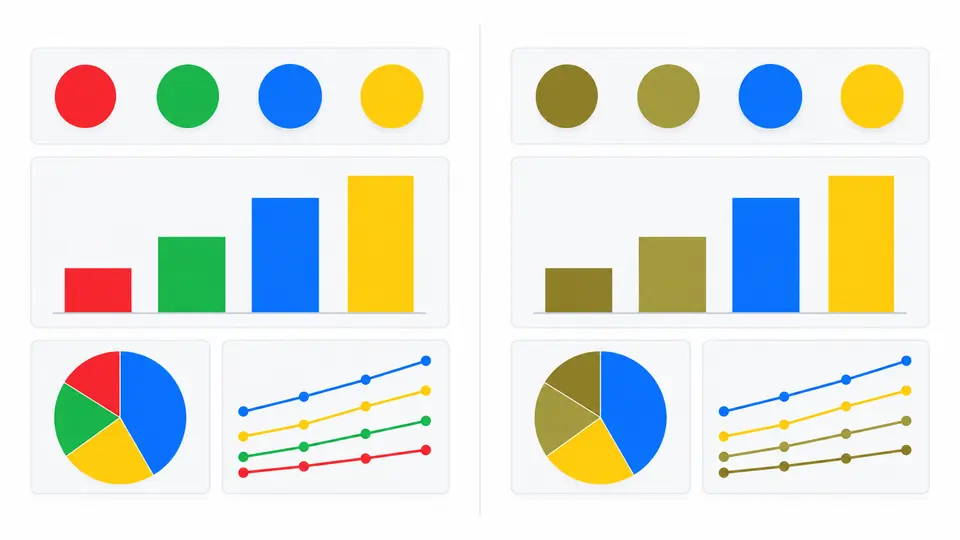
Place the original image next to a Deuteranopia, Protanopia or Tritanopia view. This color blindness simulator helps expose red-green status markers or blue-yellow series that merge; it does not claim to reproduce one person’s exact sight.

A four-color chart shown beside its deuteranopia simulation, where red and green marks become harder to distinguish.

Test strength without losing the input

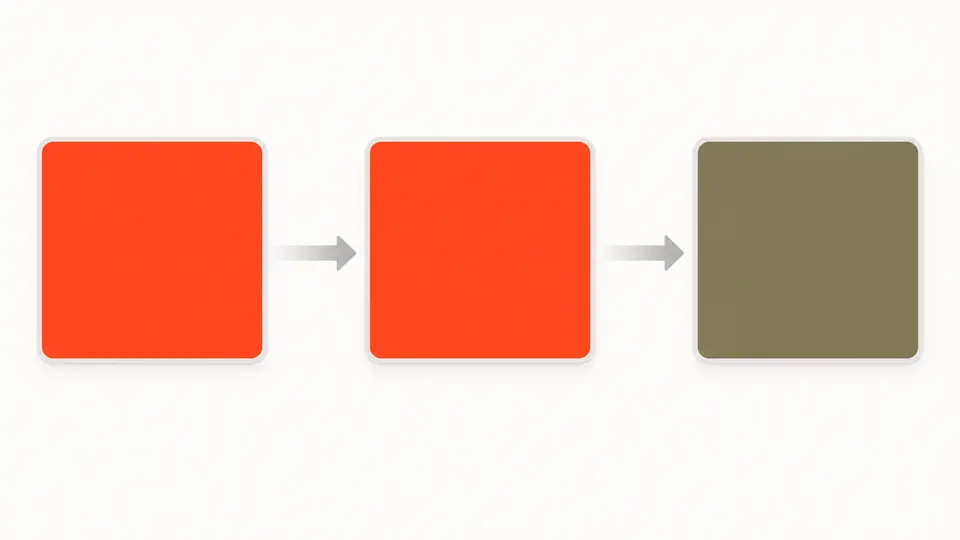
A HEX swatch remains visible as you move from 0% to 100% simulation strength. The control blends in linear light, so an intermediate percentage is a preview parameter rather than a medical severity rating.

The same original HEX swatch beside two simulated swatches at zero and full strength.

Make the comparison meaningful

01

Use the input that carries meaning

Choose Color for a design token or Image for a screenshot, chart or map. The image picker accepts local PNG, JPEG and WebP; drag or paste works too. Files above 10 MB or 12 megapixels are rejected instead of silently resized.

02

Choose the axis and strength

Deuteranopia is the default because red-green distinctions are a frequent design risk. Change the type or strength and the preview updates after 350 ms; turn Auto preview off to run with the button or Ctrl/Cmd+Enter.

03

Export only a current result

Look for a color-coded distinction that no longer survives. Changing a value immediately disables Copy or Download until the new simulation finishes, so a previous PNG cannot be mistaken for the new setting.

Two input paths, one review workflow

Four distinct vision modes

Protanopia, Deuteranopia and Tritanopia use published Machado 2009 matrices in linear sRGB; Achromatopsia uses linear luminance. A deuteranopia simulator is especially useful for checking red-green status and chart legends.

Real image resolution is preserved

The image preview keeps its original width and height. Download creates a PNG of the current simulated pixels, including alpha, rather than a reduced screenshot of the preview pane.

HEX and image results have different exports

Copy the simulated six-digit HEX from Color mode or download a PNG from Image mode. The color vision deficiency simulator keeps those actions separate so a copied value is never mistaken for a whole-image result.

Limits that matter when interpreting the preview

Simulation is not diagnosis
The model cannot establish whether you or someone else has a color-vision deficiency. Strength is a mathematical blend; it cannot measure the severity of any individual’s condition.
No accessibility pass or repair score
The output shows possible color confusion, not WCAG contrast, text readability or whether color is the only cue. Use a contrast checker and add labels, icons or patterns before calling a design accessible.
Only local static raster images
PNG, JPEG and WebP are accepted up to 10 MB and 12 megapixels. Animated GIF, SVG, HEIC, remote URLs, camera streams and batches are outside this tool; unsupported files produce an error.
Screen and gamut still matter
The matrices operate on decoded sRGB values; display calibration, wide-gamut/HDR sources and individual perception can change the appearance. The preview is an approximation for design review.

Color blindness simulator questions

How accurate is the simulation?

A color blindness simulator approximates which color distinctions may collapse. It cannot reproduce one person’s subjective vision, so compare the original and simulated design to find information conveyed only by hue.

Which types of colour blindness are simulated?

The tool shows Protanopia, Deuteranopia, Tritanopia and an Achromatopsia grayscale approximation. It does not label intermediate strength as a separate diagnosed anomaly.

Is my image uploaded anywhere?

No. Selected or pasted images are decoded and transformed in this browser. The page does not send them to a server or put their contents in the URL.

What is the difference between protanopia, deuteranopia, and tritanopia?

They affect different color axes: Protanopia and Deuteranopia commonly compress red-green distinctions, while Tritanopia affects blue-yellow distinctions. Compare all three when your design relies on those hues.

Does this tool check WCAG contrast ratios?

No. A color vision deficiency simulator reveals a different question from WCAG contrast ratios. Check contrast separately, and do not rely on color alone to mark an error or category.

Still have a question?

Try the color blindness simulator

Bring a chart or screenshot into the color blindness simulator, compare it with the original, then revise any meaning that disappears when hues merge.