Linux & Shell

Command line parserSee the boundaries

Inspect lexical tokens, PATH order or environment keys without running a command.

command line parser

Input text

Parsed entries

Input stays in this browser. Commands are never executed.

Input options

Dialect: POSIX sh / Bash quoting subset. Tokens are lexical words, not runtime argv. Expansions and shell operators are rejected.

Up to 65,536 UTF-16 units and 512 entries. Display expands by 50.

Result is out of date. Parse again before exporting.

A command line parser is useful when a filename with spaces becomes two arguments, an empty argument disappears, or a copied command ends inside a quote. Compare each original fragment with its decoded value before changing the caller.

Switch to PATH for an ordered directory list, or to environment keys for a names-only inventory. These are separate input formats: a shell assignment, a raw PATH value and a list of NAME=VALUE lines are not interchangeable.

Why use this command line parser?

Keep meaningful boundaries visible before editing the source.

An empty argument is still an argument

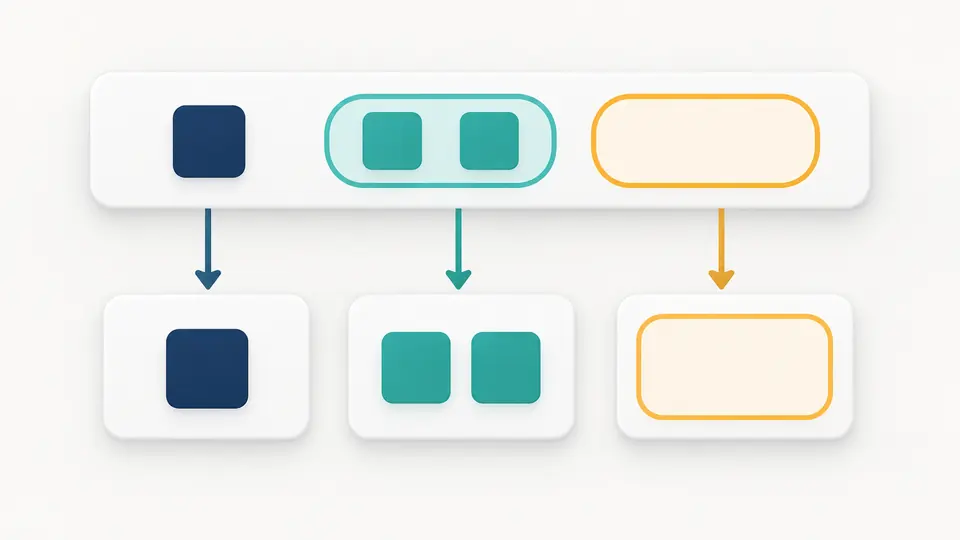
This command line parser preserves empty quoted tokens and joins adjacent quoted fragments. The display includes source text and physical positions, so a missing quote produces a diagnostic instead of a silently repaired command.

Grouped input fragments become separate tokens, including one empty outlined token.

Remove duplicates without sorting the search path

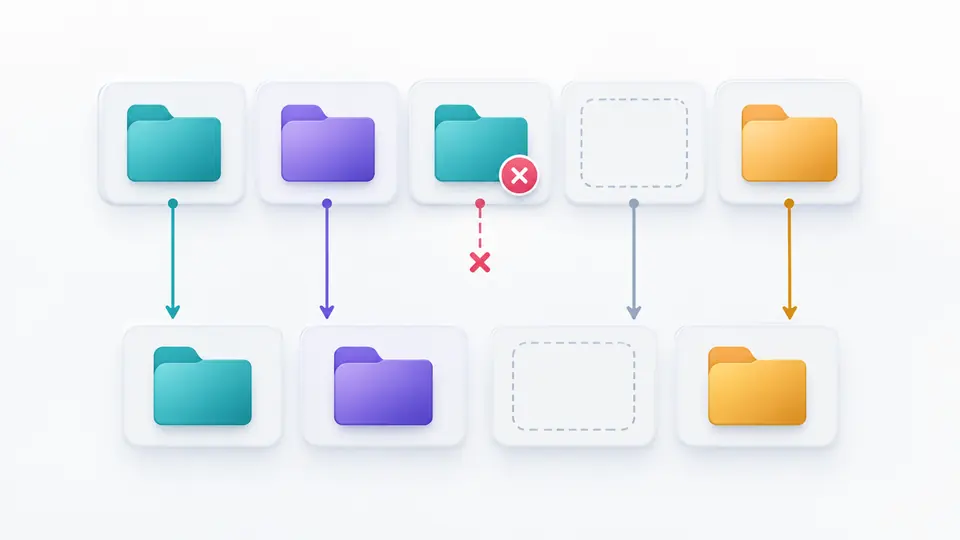
PATH entries retain their original spelling and order. A duplicate refers back to its first occurrence; an empty slot remains visible. Preview exactly what would change, apply it, and restore the previous input and result with one undo.

A repeated folder is removed while the remaining folders and an empty slot keep their order.

Check the assumptions before exporting

01

Choose the input grammar

Command mode uses the POSIX sh quoting subset shared with Bash. PATH mode accepts the raw variable value; environment mode accepts one NAME=VALUE record per line. Changing modes does not replace your input.

  • The semicolon PATH separator does not enable Windows command parsing.
02

Read the positions and empty slots

Values are shown as JSON strings so spaces, empty strings and embedded newlines remain distinguishable. PATH duplicates point to their first occurrence; environment duplicates identify repeated key names.

  • Rows and columns are one-based; source offsets use UTF-16 units.
03

Review every input rewrite

PATH removal and movement, loading an example and clearing text open a preview first. Automatic parsing runs after 350 ms; when it is off, use the Parse button or Ctrl/Cmd+Enter.

  • A changed input or setting disables both exports until a fresh result exists.

Three views of the same debugging problem

Quoted and unquoted fragments

Shell quoting controls word boundaries. Single quotes preserve their contents; double quotes retain spaces and support the limited POSIX backslash rules. Adjacent fragments form one token, and -1 remains a token rather than a guessed option.

Ordered PATH entries

Choose colon or semicolon explicitly. The result shows directory order, duplicate references and empty entries. Deduplication keeps the first exact nonempty match; moving an entry affects two positions and requires confirmation.

Environment key inventory

Read ASCII variable names, optional export prefixes, blank lines and whole-line comments. Repeated names are retained with their positions. Values after the equals sign are neither interpreted nor included in the result or JSON export.

Complete reports from a bounded preview

The panel shows 50 entries at a time and can reveal more. JSON export includes every entry, with source positions and duplicate markers. A failed parse does not yield a partially successful report that can be copied by mistake.

What these results do and do not establish

Lexical tokens, not runtime argv
Command results include assignment-looking words such as NAME=value. No application option schema, alias, builtin, reserved-word grammar or shell runtime is consulted. A successful split does not prove the command will work.
No execution or expansion
Unquoted shell operators and expansion characters are rejected. Dollar expressions and backticks are rejected inside double quotes too; single quotes or the appropriate escapes can make them literal. Variables, globbing, substitution and ANSI-C quoting are not evaluated.
One logical command
Unescaped newlines between commands, pipelines, redirections and command lists are unsupported. Backslash plus LF continues a logical line; trailing LF is accepted. CR characters are rejected in command mode instead of being silently normalized.
Raw paths stay raw
No trimming, case folding, slash normalization or filesystem lookup occurs. /bin and /bin/ are different strings. Empty colon-separated entries denote the current directory and survive deduplication. Quotes and variable references in PATH remain literal.
A key list is not a dotenv validator
Environment values are opaque, even if their quotes are unfinished. A continuation line without NAME= is rejected. Editing values or changing system environment variables belongs elsewhere; this view does not claim dotenv compatibility.
Explicit local limits
Input is limited to 65,536 UTF-16 units and 512 entries. These limits apply to this browser tool, not the operating system. Windows CRT, cmd and PowerShell command lines, file uploads, command lookup and shareable input URLs are not supported.

Command line parser questions

Which shells does it understand?

Only the POSIX sh/Bash common quoting subset described above. It is not a full script parser, and a semicolon-separated PATH is still just a list. Windows CRT, cmd and PowerShell quoting need their own implementations.

Why are single quotes not recognized as expected in shell arguments?

A shell treats quotes written in its source differently from quote characters already stored in a variable. This inspector processes the source you paste once; it does not reparse expanded variable contents or use eval. Check which layer actually owns the quotes.

How can I remove duplicate PATH entries while keeping their order?

Select PATH mode, choose its separator and parse the raw value. Preview deduplication removes later exact nonempty duplicates while retaining the first. Empty entries are preserved, and applying the preview can be undone.

Which command wins when two PATH directories contain the same name?

For a normal PATH search, earlier directories have priority. Aliases, builtins, cached lookups and shell rules can affect actual execution. This page only shows the pasted order and cannot tell which executable exists on your machine.

When does an empty PATH entry mean the current directory?

In a POSIX colon-separated PATH, an initial, trailing or adjacent colon creates an empty entry that denotes the current directory. The inspector keeps every such slot. An entirely empty editor is treated as missing input, not as a request to inspect the live system PATH.

Have a prefix or address case to check?

Inspect the next input

Return to the command line parser to compare the raw fragments and positions, then export the current report only after reviewing its boundaries.

No command is executed and no system environment is modified.