CI/CD tools

Semantic release calculatorversion, changelog and build number from your commits

Paste commits, enter your current version, and get a suggested release: next version, changelog draft, and build number.

Semantic release calculator

Commits (one header per line)

Commits and version numbers are parsed in your browser. Nothing is uploaded, and no Git or CI service is ever called.

Result

Paste commits or enter a version to begin.

Options

Unrecognized lines never block the calculation; this only controls whether they show up in the changelog draft's "Other" section.

Paste commits or enter a version to begin.

Before you tag a release you usually answer three questions by hand: what the next version number is, what goes in the changelog, and what build number ships with it. This semantic release calculator answers all three from the same batch of commits, so the version, the changelog and the build string never drift apart.

It differs from typing a version bump yourself or copying entries into CHANGELOG.md: every suggestion comes from parsing each commit header with the same grammar as our Conventional Commit Builder, not from guessing at a diff or calling an AI service. Nothing you paste leaves your browser, and the tool never creates a tag, pushes, or calls any Git or CI API — it only produces text for you to use.

Why use this semantic release calculator

See what changes when the version, the changelog, and the build number all come from the same commits.

Deterministic suggestions, not AI guesses

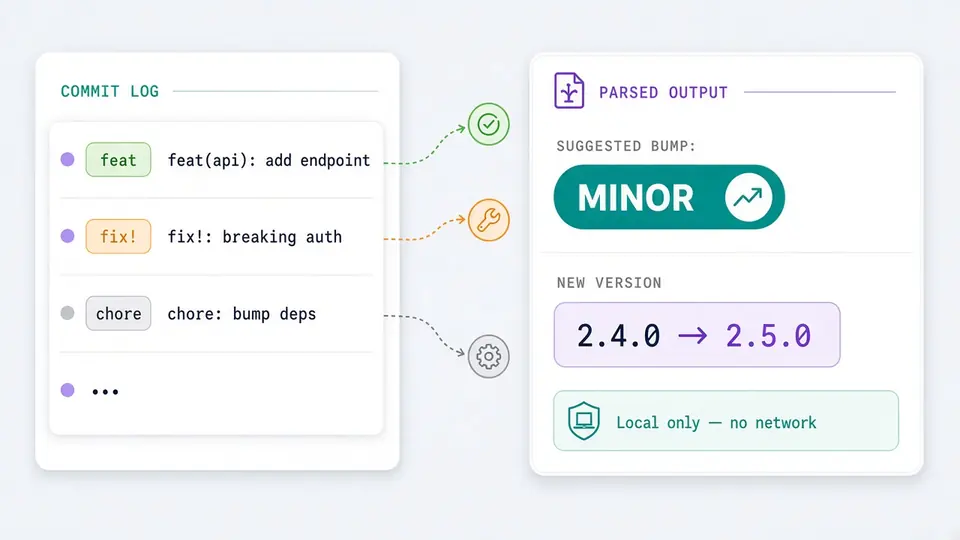
Some release calculators ask you to describe your changes in free text and send it to an AI to guess a version bump. This tool instead parses each commit header with the same conventional-commit grammar as our Conventional Commit Builder — the same input always produces the same suggestion, and nothing is ever sent over the network.

A list of commit headers with type, scope and breaking marker parsed into a version-impact badge, with no network request drawn

Version, changelog and build number share one number

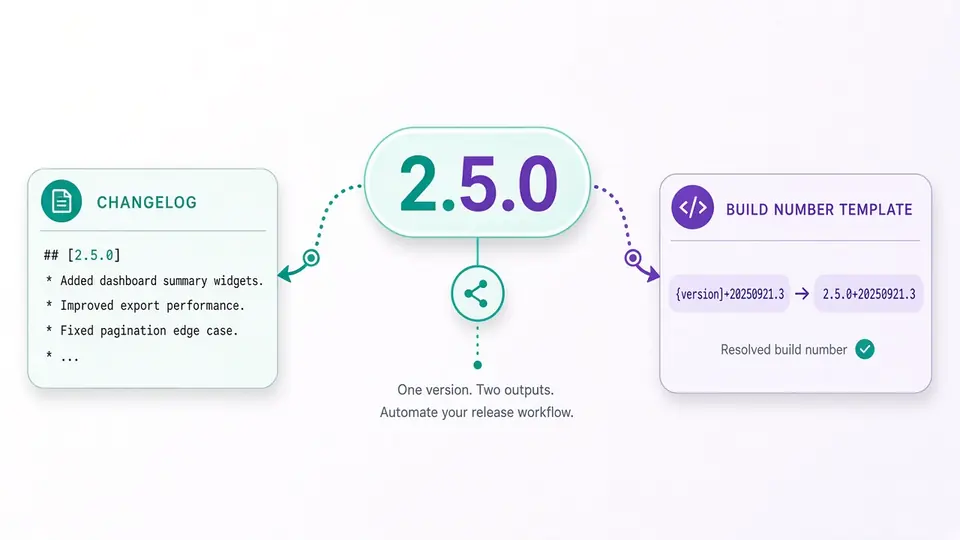
A standalone version calculator, a changelog generator and a build-number generator don't know about each other's output. Here the suggested version feeds directly into the changelog heading and into the {version} placeholder of your build number template, so all three stay in sync.

The suggested version number flowing into both the changelog heading and the build number template

A jump to ENV diff before you ship

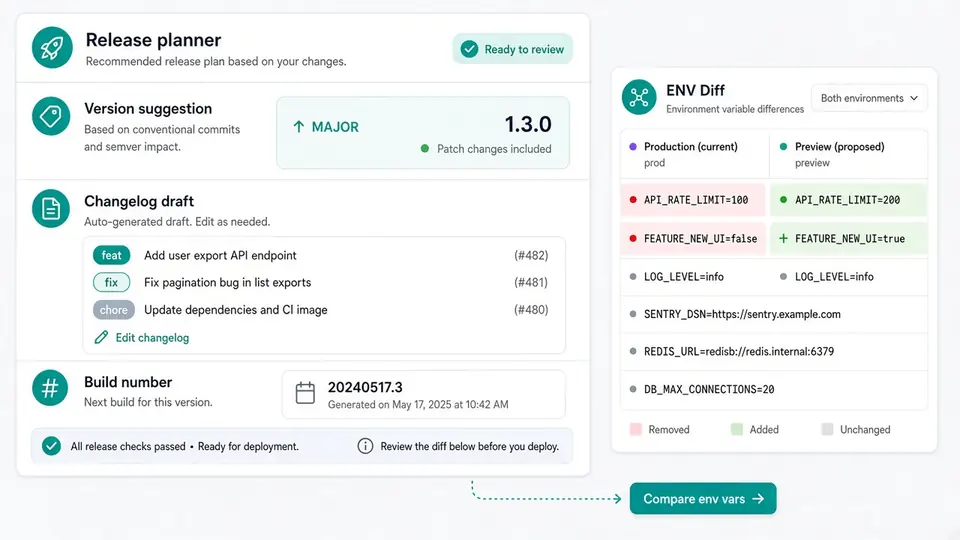
Once the release is drafted, the result panel links straight to our ENV diff tool so you can compare environment variables before deploying — a step every standalone changelog and build-number generator we compared leaves out.

The result panel with an outbound link from the generated release plan to the ENV diff tool

Three things that trip people up the first time

What to know before you paste your first batch of commits.

01

Paste one commit header per line

Paste subjects the way `git log --pretty=format:%s` prints them — one `type(scope)!: subject` line per commit. Full multi-line messages with a body or a `BREAKING CHANGE:` footer aren't parsed here; mark breaking changes with `!` right after the type or scope instead.

  • Load either example first to see the exact header syntax before pasting your own commits.
Jump to the calculator
02

Set the current version and the build number template

Type your current version as strict semver (like 1.4.2) and, if needed, edit the build number template. The default `{version}+{yyyyMMdd}.{count}` uses the suggested version, today's date, and a build count you fill in yourself — the tool has no CI context to read a real build number from.

Turn off auto-generate to edit several fields before recomputing, then press Ctrl/Cmd+Enter to run once.

03

Read the impact badge, then export

The badge (major, minor, patch or no change) shows which commit forced the bump — a breaking marker always wins over a plain feat or fix. Copy or download the changelog, copy the build number, or follow the ENV diff link before you tag the release.

Any input change grays out the previous result and disables copy/download until you regenerate it.

See what stays unparsed

What the calculator does with your commits

Four pieces that turn a batch of commit headers into a ready-to-use release draft.

Header-only conventional commit parsing

This semantic release calculator reads `type(scope)!: subject` lines with the same grammar as our Conventional Commit Builder, ranks every recognized line's impact, and keeps the highest one — a single `!` or one `feat` anywhere in the batch is enough to raise the whole release.

Keep a Changelog draft, breaking changes first

Recognized commits are grouped into Breaking Changes, Features, Fixes and Other, rendered as Markdown you can copy, download as CHANGELOG.md, or paste straight into your release notes — breaking entries are always listed first.

A build number template you control

Combine `{version}`, `{yyyy}`, `{yyyyMM}`, `{yyyyMMdd}` and a manually typed `{count}` into whatever build-number format your pipeline expects; unknown placeholders are left untouched and flagged instead of silently dropped.

Unrecognized lines never block the result

A line that isn't a valid commit header is skipped for the version suggestion and counted separately instead of stopping the whole calculation — turn off "ignore" to still see it listed under Other in the changelog.

What this tool does and does not parse

The edge cases worth knowing before you paste a real release's commits.

Only single-line commit headers are read
Multi-line commit messages with a body or a `BREAKING CHANGE:` footer aren't supported — once messages are concatenated one per line, a blank-line footer boundary can't be told apart from the next commit's header. Mark breaking changes with `!` instead.
Up to 1,000 lines or 100,000 characters per run
Pasting more than that returns an error rather than silently truncating your commits — split a very large release window into smaller batches.
The current version must be a strict semver string
Values like `v1.4.2`, `1.4`, or a version with leading zeros are rejected with a located error; the suggestion stays blank until the field holds something like `1.4.2`.
Nothing is published, tagged, or read from your CI
No commit is fetched from a repository, no tag is created, and `{count}` is never read from a real build number — this tool only turns pasted text into a version, a changelog draft, and a build string for you to use elsewhere.

Semantic release calculator FAQ

Answers to what people actually ask before trusting a commit-driven version suggestion.

Why isn't the patch version increasing based on my commit message?

Check that the line matches `type(scope)!: subject` exactly — a missing colon, a stray space, or unsupported syntax makes the whole line unrecognized, and unrecognized lines never contribute to the version suggestion. The recognized-line count under the result tells you how many lines were actually parsed.

I expected a patch bump, but one commit forced a minor or major bump instead — why?

This calculator always takes the highest impact across the whole batch. If most of your commits are `fix:` but even one is `feat:` (or carries `!`), the entire release bumps minor (or major), not patch — mixing a single feature commit into an otherwise patch-only release changes the outcome for all of them.

How do I get a build number into my version string?

Edit the build number template in Options. The default `{version}+{yyyyMMdd}.{count}` inserts the version this semantic release calculator suggested, today's date, and a count you type yourself — there's no CI environment here to read a real build number from, so `{count}` stays manual.

What's the difference between a version number and a build number, like on iOS or Android?

A version number (semantic version, like 1.5.0) communicates compatibility to people and package managers; a build number (iOS's CFBundleVersion, Android's versionCode) is usually just an identifier CI systems use to tell builds apart, even across two builds that ship the same version. Neither is derived from the other automatically — bridging that gap by deriving both from the same commits is what this tool does.

In this tool specifically, what's the difference between the version and the build number?

The version above the changelog comes from your commits' impact (major, minor, patch or no change) applied to the current version you typed. The build number is a separate string rendered from the template in Options — it can include that same version via `{version}`, plus a date and a manually typed `{count}`, so two builds of the same version can still get different build numbers.

Didn't find your answer?

Use the semantic release calculator now

Paste your commits into this semantic release calculator, confirm the current version, and get a version suggestion, a changelog draft and a build number in seconds.

Everything runs locally in your browser — no sign-up, no upload, and no tag or deploy is ever triggered for you.

All parsing happens locally in your browser, and nothing is ever tagged or published for you.