Protocols / Binary serialization

WebSocket frame decoderinspect the bytes

Paste hexadecimal bytes starting at a frame header. Try the masked, fragmented or truncated examples.

WebSocket frame decoder

Frame bytes (hex)

Start at a frame header: 81 05 48 65 6c 6c 6f. Hex pairs; whitespace, commas or colons; 0x per byte.

Result

Enter frame bytes or choose an example.

Everything runs in this browser tab. Inputs are not sent or saved.

Options

Enter frame bytes or choose an example.

A log can contain several frames even when an application reports one message. This WebSocket frame decoder keeps each boundary visible, so a ping between two fragments does not look like part of the text. Compare the byte offset with your capture to find where the next header really begins.

Use the WebSocket hex decoder on bytes captured after the HTTP upgrade. Browser message events normally contain application data with the framing already removed. Start with a known frame header; interpreting a TCP packet or a plain message as a frame gives misleading results.

Why use this WebSocket frame decoder

Follow every frame in a capture

The WebSocket frame decoder advances by the actual header and payload lengths instead of stopping at the first frame. Each card keeps its absolute offset. If a later frame is truncated, earlier complete frames stay visible and report export is disabled until the input is complete.

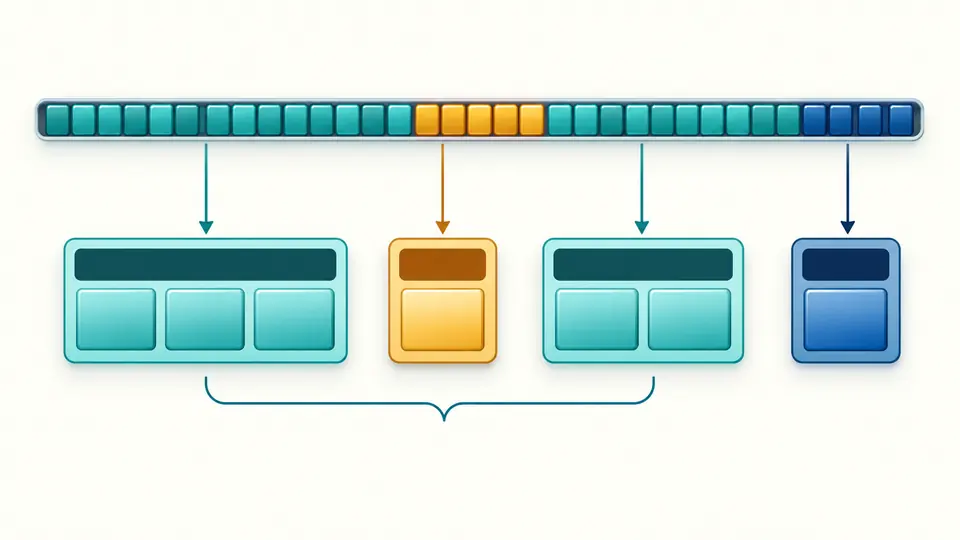
A byte stream separates into data frames with a small control frame between two fragments.

Compare bytes before and after masking

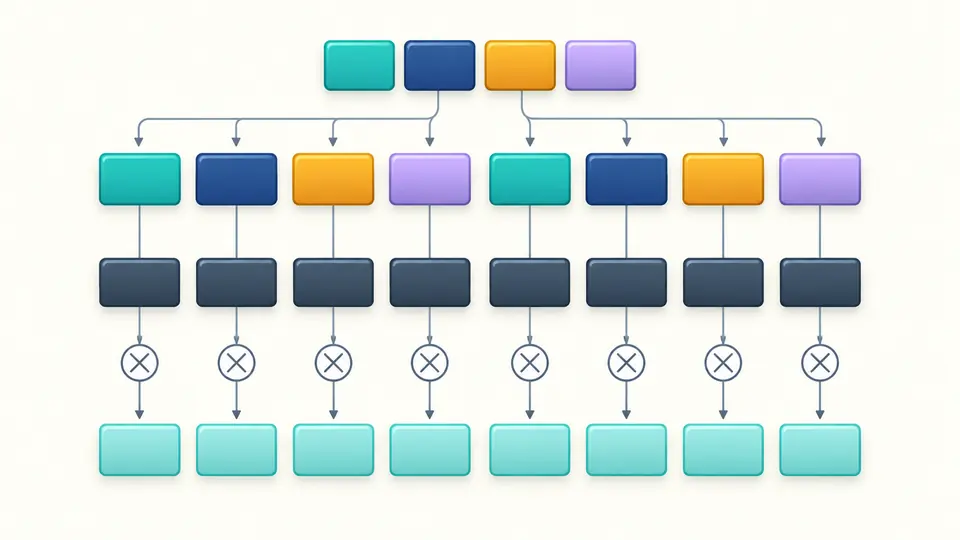
A WebSocket masking key contains four bytes and repeats across the payload. The view shows the bytes on the wire beside their XOR result. A different key starts again at each frame; changing the mask does not change the payload length.

Four colored key bytes repeat above masked payload cells and transform them into a second byte row.

Read a capture without losing its boundaries

01

Choose a single direction

The direction option checks whether MASK matches a client or server sender. Leaving it unspecified skips only that check; it does not split an interleaved conversation. Include frames from the same direction and retain their original order.

02

Distinguish short previews from missing data

Each payload preview stops at 256 bytes. That is a display limit, whereas a truncated frame means the input contains fewer bytes than the header declares. The status and error location distinguish the two; only a complete parse can be exported.

03

Control the refresh point

Automatic parsing waits 350 ms after an edit. Switch it off to reveal Parse frames and use Ctrl/Cmd+Enter. Editing bytes or direction immediately disables export. Example and Clear first show a replacement preview; Undo restores both input and result.

Headers, payloads and diagnostic evidence

Read all length forms

The WebSocket frame parser reads the 7-bit value and the 16- or 64-bit extended length in network byte order. Large declarations are checked as exact integers before allocation. Non-minimal length encodings remain visible with a protocol warning.

Inspect control frames

Close, ping and pong are separate frame types. Close payloads expose the two-byte status and UTF-8 reason, while invalid control lengths, FIN values or close codes are flagged. An observed close frame does not prove that the connection closed cleanly.

Keep text interpretation honest

Standalone text frames use strict UTF-8. Binary payloads may have a readable preview without becoming text messages. A code point cut by the display limit is withheld, while invalid complete text receives a warning. Fragment and extension payloads are not presented as complete text.

Locate structural failures

Incomplete headers, extended lengths, masking keys and payloads stop parsing at an explicit byte offset and source line and column. The view preserves earlier complete frames. Unknown opcodes and RSV flags instead remain inspectable warnings because their byte boundaries are still known.

What these bytes can and cannot tell you

Frame bytes only
Accept continuous even-length hex or complete bytes separated by whitespace, commas or colons. A 0x prefix belongs to exactly one byte. Base64, bit strings, file imports and hexdump address columns are unsupported; remove wrappers before pasting.
One direction, no message reconstruction
Continuation order and unfinished messages are flagged. Control frames do not end an active fragmented message. This page neither joins fragment payloads nor validates UTF-8 across fragments, so a successful parse is not proof of a valid complete message.
No extension or application decoder
RSV bits are reported without guessing negotiated extensions. There is no permessage-deflate decompression, TLS decryption or automatic JSON, Socket.IO, Protobuf or MessagePack interpretation. Masking is reversible XOR, not encryption.
Bounded inspection
Input is limited to 1 MiB of decoded bytes, 6 MiB of characters and 1,000 frames; an individual declared payload cannot exceed 1 MiB. Results reveal 50 frames at a time. JSON export retains full payload hex and available text within these limits, beyond the 256-byte preview.
Warnings preserve evidence
The tool never repairs bytes. Protocol warnings can be exported for diagnosis; structural errors disable report export. Close codes are checked against the base protocol and known ranges, without proving application registration or a completed closing handshake.

WebSocket frame decoder questions

Why is the client payload masked?

Client frames carry a four-byte key so their wire bytes cannot be chosen freely in ways that confuse intermediaries. The same repeating XOR operation removes that mask. It provides no secrecy: anyone with the frame has the key. Server frames are unmasked under the base protocol.

What do payload lengths 126 and 127 mean?

126 and 127 are markers, not literal payload sizes. They select the next two or eight bytes as an unsigned, big-endian length. The 64-bit form must have its top bit clear. WebSocket payload length excludes the header and the optional four-byte masking key.

Can I paste several frames at once?

Yes. Paste concatenated frames from one direction in wire order. The parser advances by each declared length and lists every complete frame, including empty payloads and intervening controls. If a frame is incomplete, fix the capture before exporting the report.

How are close frames interpreted?

An empty close payload has no status code. Otherwise the first two bytes hold the code and the remaining bytes hold a UTF-8 reason. A one-byte payload, forbidden code or invalid reason is flagged. The page reports the value rather than inventing a reason for an empty close frame.

Does this tool decode HTTP WebSocket handshakes?

No. HTTP Upgrade requests and responses belong to the handshake, before this frame format begins. Extract the subsequent WebSocket bytes first. The tool cannot remove TCP/IP or TLS framing, establish a connection or validate the server handshake.

Found a calculation or validation issue?

Return to the captured bytes

Use the WebSocket frame decoder to compare offsets, inspect the masking key and isolate the first incomplete frame before changing your application parser.