FILE PATHS & PATTERNS

Glob testercheck your actual library

Enter one glob and one path per line. Choose the matching library and adjust its options below.

Glob tester

Candidate paths

Patterns and paths are processed in this browser; no files are read or changed.

Path results

Enter a pattern and at least one candidate path.

Matching options

Windows separators converts \ to / in the pattern and paths. Use POSIX when \ is an escape. Case remains a separate option.

One pattern. Empty path lines are skipped; spaces and duplicates are preserved. Native ! and # semantics depend on the selected library.

Limits: 256 units per pattern, 200 paths, 512 per path, 131,072 total UTF-16 units; 1,000 minimatch brace alternatives; 2-second worker limit.

Results are outdated or being calculated.

A build includes too many files, or a watcher misses a nested directory: the pattern alone may not explain it. This Glob tester lets you hold a candidate list steady while changing the engine and its options, so you can isolate the cause before editing a configuration.

Use the glob pattern tester as a wildcard matcher for representative paths, including one expected hit and one expected miss. A minimatch tester is only useful when its settings match your project; copying a successful pattern between unrelated glob implementations can change its meaning.

Why use this Glob tester

See the directory boundary

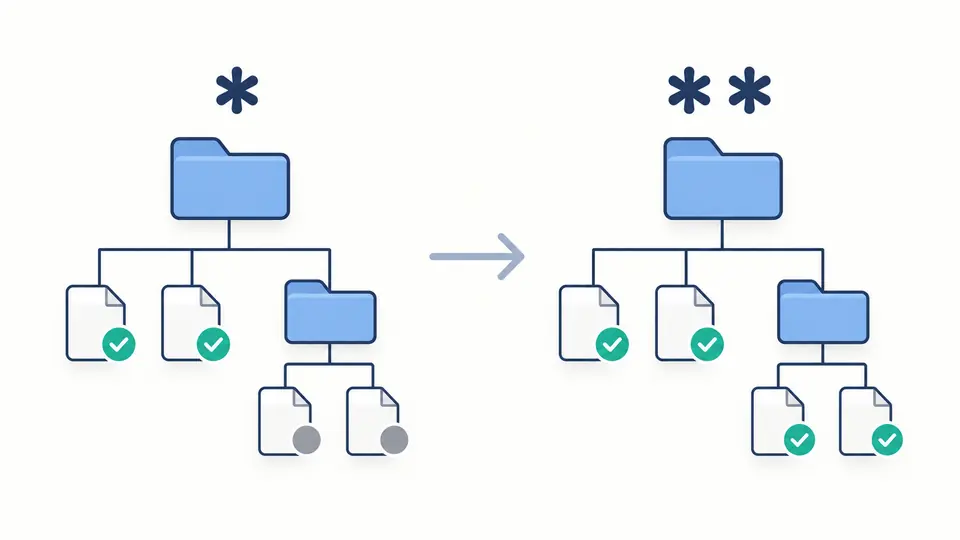
The Glob tester makes depth visible through per-path results. Compare src/*.ts with src/**/*.ts: the first selects immediate children, while the second also reaches nested candidates. Original line numbers let you find the exact test case without reorganizing your list.

A shallow folder selection beside a recursive selection that also reaches nested files.

Expose the hidden-file switch

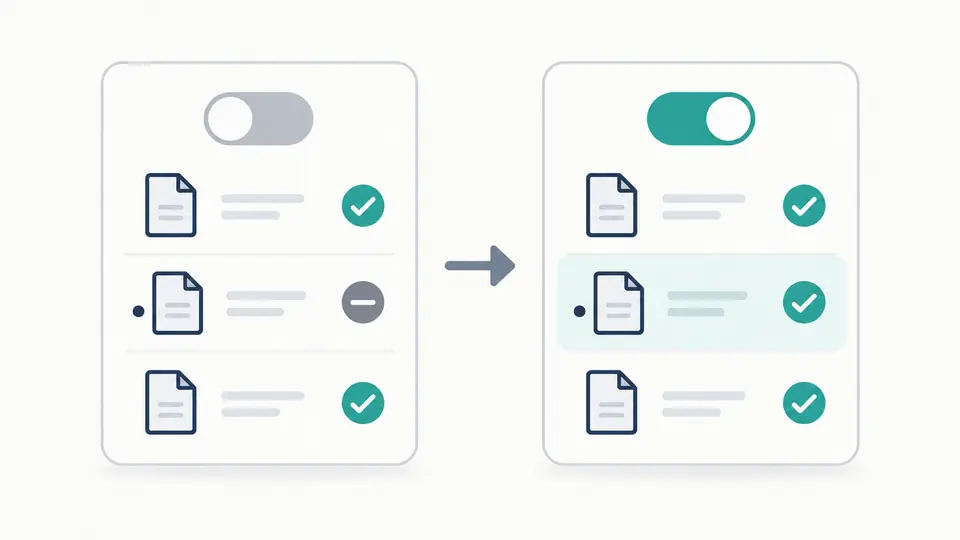
A normal source file can keep matching while a hidden sibling changes state when dot is enabled. The prefilled sample includes both. Case sensitivity is a separate setting, so enabling hidden files will not quietly include an uppercase extension.

The same file list before and after enabling hidden files, with only the dotted file gaining a match.

Reproduce the settings behind a surprising match

01

Choose the dependency first

Read the package and version used by your build tool. The selector exposes minimatch 10.2.6 and picomatch 4.0.7; their defaults and advanced syntax do not form a universal shell dialect.

  • Leading ! and # are interpreted by the chosen engine.
02

Separate path style from case

Use POSIX for / paths and escaping. Windows separators replaces backslashes in both the pattern and candidates before matching, while preserving the originals in the report.

  • Windows separators does not automatically enable case-insensitive matching.
03

Wait for a current result

Automatic testing runs after a 350 ms pause. Turn it off for explicit testing with the button or Ctrl/Cmd + Enter. Changes immediately disable exporting the previous report.

  • Only 50 rows appear initially; JSON export still includes every tested path.

Compare paths with explicit matching controls

Two real matching engines

This Glob tester calls the selected dependency directly. The report records its version, pattern, options, original paths and tested paths, which makes a case or separator experiment reproducible.

Wildcards and alternatives

Test single characters with ?, character sets with [abc], directory traversal with ** and alternatives with {js,ts}. Positive extglobs such as @(foo|bar).js are also handled by the engine, without replacing your pattern with a homemade approximation.

Basename matching when requested

With basename enabled, a slash-free pattern such as *.js can select src/app.js. A pattern containing / continues to test the path. This distinction helps explain why an extension filter works in one build configuration and misses files in another.

Keep misses as evidence

Each candidate retains its original line number and a match or no-match status. Duplicate paths remain separate rows. The complete JSON report includes misses too, so reviewing a filter does not erase the negative cases that justify it.

Know the boundary of the experiment

One pattern, no ordered rule list
Newlines in a pattern are rejected. Commas remain part of the expression, allowing brace alternatives. There is no last-rule-wins evaluation and no Git parent-directory exclusion logic; use the dedicated Gitignore tester for that task.
Library dialects can disagree
By default minimatch treats a leading # as a comment and a leading ! as negation. Picomatch treats # as literal text and can interpret !(foo).js as a negative extglob. Numeric brace ranges also differ; test them with the exact selected library.
Separators are an explicit transformation
Windows separators converts every backslash to / in the tested strings. A backslash cannot also escape a wildcard in this mode. POSIX preserves your input; the tool does not resolve .., remove drive letters or simulate Windows filesystem behavior.
Candidate lines retain their content
Empty lines are skipped, while duplicates and leading or trailing spaces are preserved. LF, CRLF and CR separate candidate lines. Control characters and malformed Unicode are rejected; this is not an input format for filenames containing embedded newlines.
Bounded runs return no partial success
The limit is 256 UTF-16 code units per pattern, 200 nonempty paths, 512 units per path and 131,072 units across the inputs. Minimatch expansion is limited to 1,000 alternatives. A worker exceeding 2 seconds is terminated, and exporting stays disabled.
Matching does not prove a file exists
No directory is scanned and no URL or file contents are loaded. The engine tests only the supplied strings. Unclosed syntax such as [ may be treated as literal text; a no-match result is not itself a syntax error.

Glob tester questions

How do * and ** differ in a path pattern?

An ordinary star stays within one directory segment. For recursion, put ** in its own segment, as in src/**/*.ts. Adding another star inside a filename is not a portable replacement for a recursive directory segment.

Can I use brace alternatives?

Yes. A pattern such as *.{js,ts} tests either extension with both engines. Minimatch also expands ranges such as file{01..12}.js. Picomatch has different range behavior, so verify numbered alternatives with representative candidates.

Does matching distinguish uppercase from lowercase?

Yes by default. Enable Ignore case to use nocase. For example, **/*.ts normally misses APP.TS; the switch changes that behavior without changing which hidden directories are traversed.

Why can src/**/*.ts also select src/index.ts?

The directory segment ** can consume zero directories. Try src/*/*.ts if you need exactly one intermediate level; keep a direct child and a nested child in the list to check that requirement.

Why does a wildcard skip a dotfile?

The default dot setting is false in both engines. Enable Include dotfiles to allow implicit matches of dotted segments, or name the dot explicitly in the pattern. For example, src/.hidden.ts can be selected by its literal path without enabling dot.

Found a path case worth checking?

Try the next edge case

Keep the expected match and miss beside each other, change one option, then save the current report.