01
Let the input select its scheme
Parsing reads mqtt, mqtts, amqp, amqps, ws or wss from the URI itself. The scheme selector belongs to Build mode and never silently changes a pasted address.
Protocol tools
Inspect a connection address without contacting its server.
Processed in this browser; no broker, DNS or other endpoint is contacted. Source text remains visible here.
The mask covers results, previews, copies and downloads. It does not hide the source editor, host or path. Turn it off explicitly to export original values.
Syntax only: no broker connection, DNS, TLS or authentication test. AMQP covers RabbitMQ 0-9-1 URI syntax; ws/wss addresses cannot contain userinfo or fragments.
One URI, up to 100,000 input units and 500 query entries. Preview shows 20,000 units; exports keep the full accepted result.
Enter a URI or load an example.
An MQTT URL parser helps when a broker address looks plausible but the client reads a different host, port or path. Paste one URI to see its parts before changing a configuration file.
The same workbench acts as an AMQP URI parser and a WebSocket URL builder. It keeps an MQTT broker URL separate from a RabbitMQ connection URL: the schemes share URL punctuation, but their path rules are different.
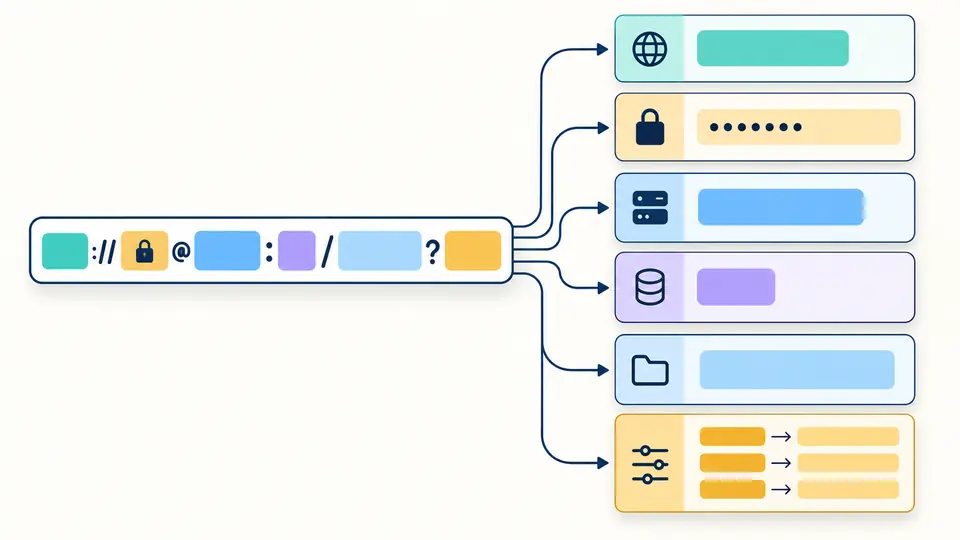
The MQTT URL parser separates scheme, host, explicit port, path and ordered query entries. Usernames, passwords and query values are concealed in the result by default; no broker is contacted.
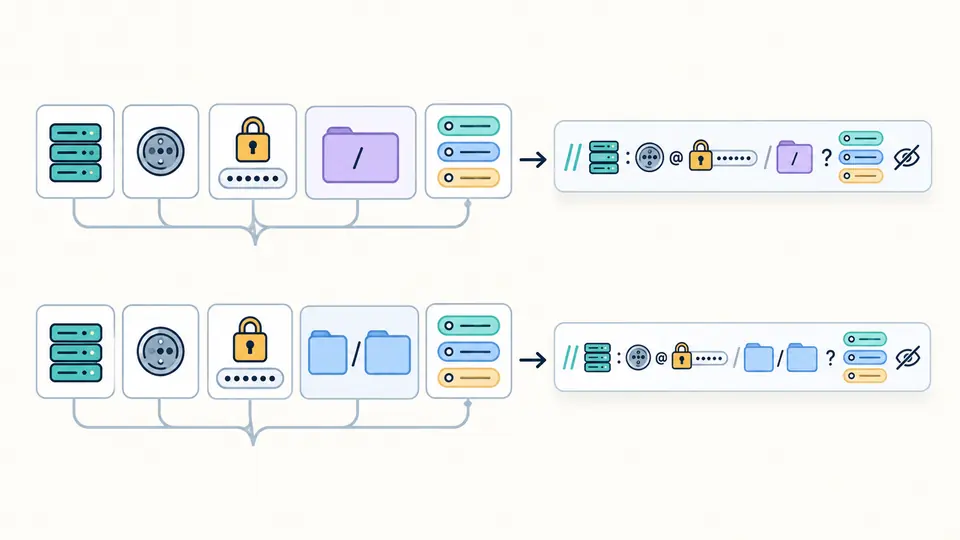
An AMQP vhost named slash becomes %2F in one path segment, while a WebSocket endpoint keeps its multi-segment path. The builder encodes credentials and leaves inferred ports out of the generated URI.
Parsing reads mqtt, mqtts, amqp, amqps, ws or wss from the URI itself. The scheme selector belongs to Build mode and never silently changes a pasted address.
For RabbitMQ, no path means no stated vhost, a trailing / means an empty vhost, and /%2F names the slash vhost. Enter the decoded vhost in Build mode; the builder handles its encoding.
Automatic processing waits 350 ms after an edit. Disable it to use the action button or Ctrl/Cmd+Enter. Changed fields immediately disable copying and downloading until the result refreshes.
See whether a port was actually written. The 1883/8883 and 5672/5671 annotations describe MQTT and AMQP conventions; 80/443 are URL-layer references for ws/wss, not universal broker listeners.
Repeated keys, empty values and key-only entries remain distinct. The tool does not turn RabbitMQ or MQTT query names into supposedly universal client settings.
Malformed % escapes, invalid UTF-8, unbracketed IPv6 and ports outside 1–65535 produce field-level errors. Builder credentials are encoded as components, so @ inside a password does not split the authority.
Choose one of six schemes and edit host, port, path or vhost, credentials and query rows. The generated URI is a separate result; your pasted source remains unchanged.
Get the actual hostname, port, credentials and vhost from your deployment configuration or provider. A RabbitMQ connection URL often starts amqp:// or amqps://; this MQTT URL parser can inspect its structure but cannot discover a server address.
Write /%2F after the authority to explicitly name the slash vhost. A missing path leaves the vhost unspecified and a trailing / names an empty vhost. A client may supply a default for a missing value, but that is outside the URI.
Encode that character as %40 inside the password component, for example amqp://user:p%40ss@host/%2F. In Build mode, enter the decoded password p@ss once; the builder encodes it.
A syntactically valid ws/wss URL can still target the wrong listener or path, such as /mqtt versus /ws. TLS, authorization and the broker's WebSocket configuration also matter. This page checks text only and never attempts a connection.
No. Percent encoding and this page's display mask do not encrypt the URI. Use amqps:// when the server offers TLS, and treat any full URI containing credentials as a secret in configuration and logs.
Found a URI that parses incorrectly?
Use the MQTT URL parser to inspect another URI or build a masked copy after checking the protocol-specific path rule.
Static processing stays in this browser.