Date and time

RRULE generator · See the dates behind a calendar rule

Build a calendar recurrence or inspect a rule, with an explicit start, timezone and date preview.

RRULE generator

Recurrence input

BYDAY: MO,WE or 2TU,-1FR (ordinals only monthly/yearly). BYMONTHDAY: −31…−1, 1…31; BYMONTH: 1…12; BYSETPOS: −366…−1, 1…366 and another BY filter. Lists use commas; blank filters are omitted.

Rule and date preview

Your input is processed in this browser and is not sent to a server.

Options

Start: local ISO date-time with seconds, such as 2026-09-14T09:00:00. UNTIL: UTC ISO with Z. DTSTART must itself match the selected recurrence.

DST gaps use the pre-transition offset and show the shifted clock time; overlaps use the first occurrence. Invalid calendar dates are skipped.

Calendar frequencies only. 8,192 UTF-16 units; 100 exclusions; COUNT up to 10,000. Preview: 1–1,000 dates, ten years from DTSTART, through year 2099; five-second timeout.

Input or options changed. Refresh the results before exporting.

Use the RRULE generator when a meeting repeats every other week, an invoice falls on the last day of each month, or one appointment must be excluded. A valid-looking string is only part of the check: the start date, calendar filters and timezone must agree.

The RRULE parser accepts an iCalendar recurrence rule and optional date properties. Use the RRULE tester to inspect next occurrences before putting the fragment into an event. The preview starts at DTSTART, not at the current date.

Why use this RRULE generator

The 31st and month-end are different

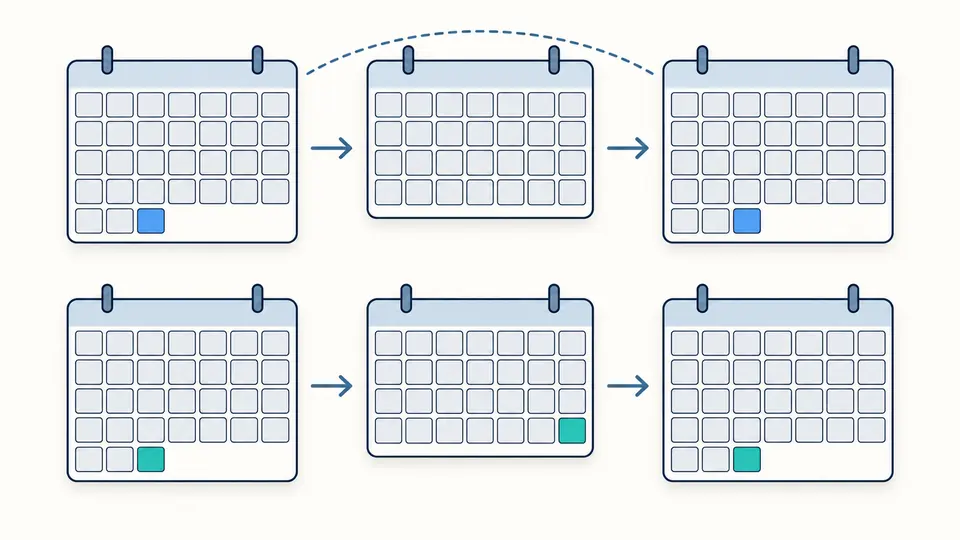
The RRULE generator keeps these two intentions distinct. BYMONTHDAY=31 skips months without a 31st; BYMONTHDAY=-1 selects each month’s last day. Choosing the negative index makes February visible instead of silently changing the meaning of a fixed date.

Two calendar sequences compare a fixed 31st, which skips a short month, with the last valid day of every month.

An exclusion does not extend the series

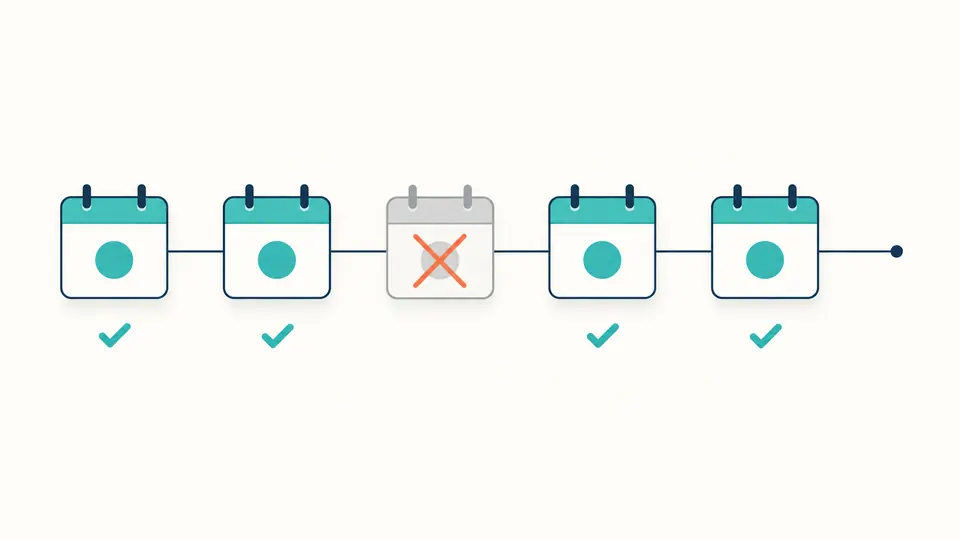
EXDATE removes an exact occurrence after COUNT has limited the original series. If a five-occurrence schedule loses one date, four remain. The report shows the removal count and preserves the original end condition.

A sequence of five occurrence markers has its middle marker crossed out, leaving four and adding no replacement.

Check the start before changing the pattern

01

Choose a matching first occurrence

Start with a preset to get both the rule and a matching DTSTART. Changing a Monday rule to a second Tuesday requires changing the start too. Form and parsing modes retain separate input; changing modes does not overwrite either draft.

02

Separate the recurring clock from its endpoint

The start and form exclusions are local ISO date-times with seconds in the selected IANA zone. UNTIL is an absolute UTC date-time ending in Z. An embedded DTSTART overrides the fallback fields and is shown in the report.

03

Check the completion status before exporting

Automatic calculation waits 350 ms; switch it off for Analyze or Ctrl/Cmd+Enter. Edits disable stale exports. More dates appear in batches of 50; copied reports and JSON contain the entire calculated preview. Example and Clear require review, with one-step undo.

Calendar conditions you can inspect

Day, week, month and year intervals

INTERVAL advances the chosen frequency. BYDAY uses weekday codes or ordinal weekdays for monthly and yearly rules. WKST determines the week boundary, which can change an every-other-week pattern.

Positions inside a candidate set

BYMONTH selects months; positive and negative BYMONTHDAY values select dates. BYSETPOS then selects positions from the frequency period’s candidates. Combining weekdays with position -1 finds the last Monday-to-Friday date, without assuming a holiday calendar.

One source of date context

A bare rule uses the selected start and zone. DTSTART lines must use UTC Z or TZID. The canonical fragment records that effective context, so copying a rule does not quietly lose the calendar’s starting point.

Local clocks beside UTC instants

Each row includes the requested clock time when a gap shifts it, the resolved local time, its offset and UTC. A weekly morning meeting normally retains its local hour while its UTC time changes across daylight saving transitions.

Supported rules and deliberate boundaries

A supported subset, not an event validator
Only DTSTART, one RRULE and up to 100 EXDATE values are accepted. Full VEVENT/VCALENDAR input, RDATE, EXRULE, vendor extensions, all-day DATE and floating explicit dates are rejected. Text exports are fragments, not importable ICS events.
Four frequencies and selected BY fields
SECONDLY, MINUTELY, HOURLY, BYHOUR, BYMINUTE, BYSECOND, BYYEARDAY and BYWEEKNO are unsupported. The daily clock comes from DTSTART. Unknown fields are errors; they are never silently discarded.
A consistent start and one end condition
DTSTART must match the recurrence. COUNT is 1–10,000 and cannot coexist with UNTIL. UNTIL must be UTC, at or after the first occurrence, and includes a matching instant exactly on the endpoint.
Calendar dates and clock gaps differ
Impossible dates are skipped without consuming COUNT. DST gaps follow RFC 5545’s verified erratum 4271: use the offset before the transition, displaying the shifted time. Repeated clock times choose the first occurrence. Timezone data depends on the browser.
Exclusions target instants
An EXDATE removes a matching instant, including DTSTART itself. It does not remove an entire day or add an extra occurrence. Duplicate exclusions are normalized; holiday rules and rescheduling are outside this tool.
A bounded preview
Input is limited to 8,192 UTF-16 units. Request 1–1,000 dates, within ten years of DTSTART and years 1970–2099; computation stops after five seconds. A count limit, a genuine series end and a search horizon are reported separately.

RRULE generator FAQ

What is the difference between UNTIL and COUNT?

COUNT limits original occurrences, including the matching start, before exclusions. UNTIL is an inclusive UTC cutoff. Select one: a finite count can produce fewer visible dates after EXDATE removes occurrences.

Where can I use the generated rule?

Use the fragment in software that accepts recurrence properties. A complete calendar event additionally needs event metadata such as UID and DTSTAMP; this tool neither supplies those fields nor validates a full ICS file.

How do I exclude a date in an RRULE?

EXDATE is a separate property, not a parameter inside RRULE. Enter the exact local time in the form or supply an EXDATE line with Z or TZID. The normalized output writes exclusions as UTC instants.

How does daylight saving time affect recurring dates?

The chosen IANA zone controls each local date. A regular 09:00 meeting keeps that hour across the transition. A nonexistent time uses the pre-transition offset; an ambiguous repeated time chooses its first occurrence.

Can a rule repeat on the 31st or the nearest available day?

BYMONTHDAY=31 skips shorter months. Use BYMONTHDAY=-1 for the last day of every month. The tool does not automatically replace the 31st with a nearby day, because that would change the rule.

Unexpected schedule?

Review your next recurrence

Use the RRULE generator to compare the effective start, exclusions and resolved dates together. Export the fragment only after the preview reflects the recurrence you intend.