Date and time

ISO 8601 converterRead the date without guessing the zone

Enter one ISO or RFC date per line. Missing time zones stay unspecified unless you explicitly choose UTC.

ISO 8601 converter

Input

Your input is processed in this browser and is not sent to a server.

Results

Options

One date per line: 2024-01-01T08:00:00+08:00, 2024-01-01, 08:00, or Sun, 06 Nov 1994 08:49:37 GMT.

Up to 9 fractional digits. Unix seconds/milliseconds round down; nanoseconds stay exact. HTTP output requires whole seconds.

1000 lines; 100000 UTF-16 code units total; 512 per line. Empty lines are errors.

Enter input or choose an example to begin.

Use this ISO 8601 converter to investigate a date copied from an API response, email header or server log. A clock reading and an instant are different: the offset tells you how to connect them.

A malformed calendar date is reported on its own line. Original fields remain beside the normalized result, so an unexpected day change can be traced to the offset instead of hidden by a permissive parser.

Why use this ISO 8601 converter?

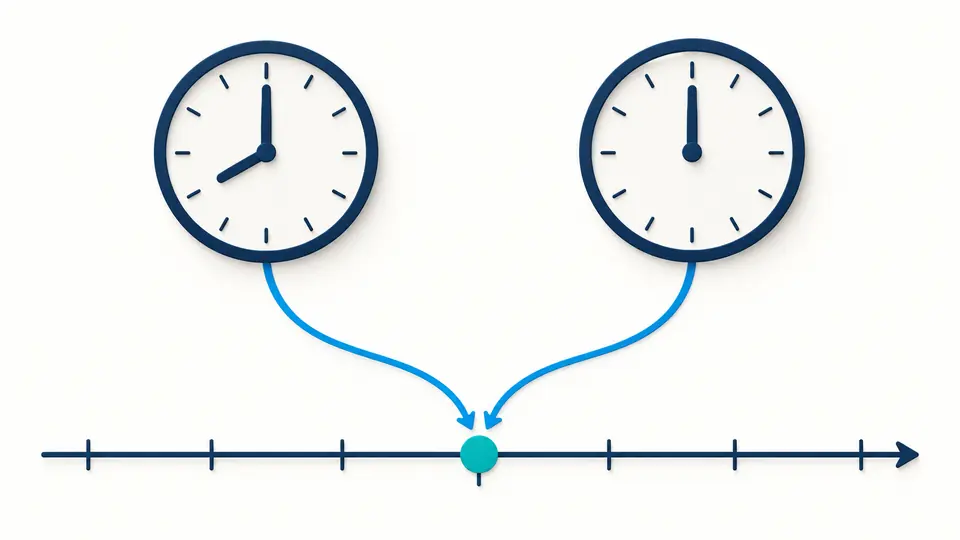
See two representations of one instant

The ISO 8601 converter keeps 08:00 at +08:00 distinct from 00:00Z in its field report while giving both the same Unix value. This helps explain why a displayed date can change when an API normalizes to UTC.

Two clocks with different hand positions connect to the same point on a shared timeline.

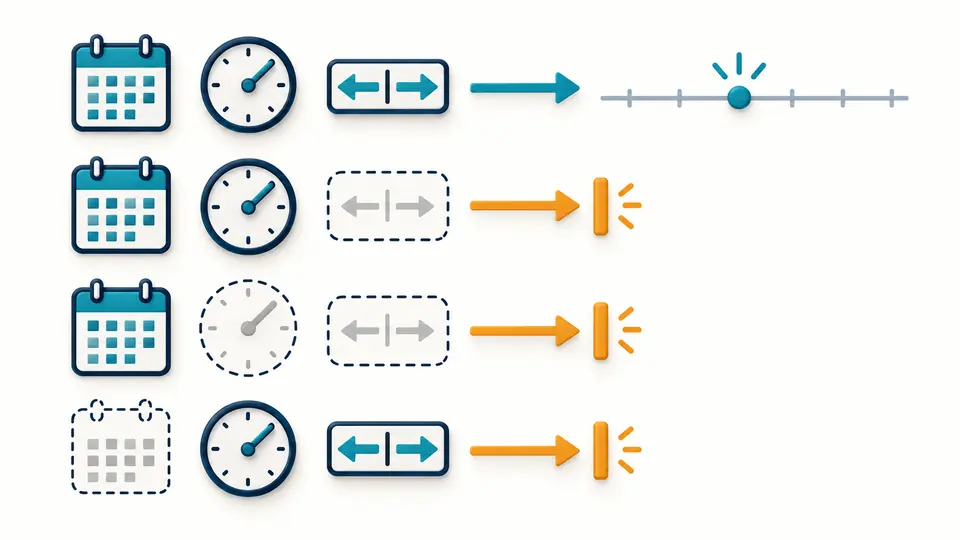
Keep missing context visible

A date alone does not include a clock time. A time alone lacks a calendar date. Neither becomes a timestamp here; even the explicit UTC option cannot fill those missing parts.

A complete date and time with offset passes to a timeline, while incomplete combinations stop beside amber markers.

Check context before comparing results

01

Read the detected format

The ISO 8601 parser labels full RFC 3339 strings separately from compatible inputs with a space, omitted seconds or a compact offset. The ISO 8601 date formatter always shows the normalized form beside the original fields.

02

Choose an assumption deliberately

Leave missing zones unspecified for logs whose origin you do not know. Choose UTC only when that is what the source means. The report records the assumption, while explicit offsets always take precedence.

03

Verify warnings before exporting

Automatic parsing waits 350 ms. Turn it off to use Parse or Ctrl/Cmd + Enter. Any edit disables export until results refresh; Show more adds 50 rows, while both exports include every input line.

From source fields to comparable values

Calendar and clock validation

Year, month and day are checked together, including leap years. Hours, minutes and seconds have fixed bounds. Invalid dates are rejected rather than rolled into the next month.

RFC mail and HTTP dates

Read the declared RFC 2822/5322 subset, including numeric offsets and GMT or UT. A supplied weekday must match the date. Canonical IMF-fixdate is identified as HTTP; compatible mail forms remain labeled as mail.

Exact fractions and Unix units

The RFC 3339 converter keeps up to nine fractional digits. UTC uses nine digits; Unix nanoseconds remain an exact integer string. Seconds and milliseconds are floored, including instants before 1970.

A usable HTTP representation

The HTTP date converter emits IMF-fixdate only for whole seconds and UTC years 1900–9999. Fractions are never discarded to make a header: the exact ISO result remains available with an explanation.

The supported subset and its limits

No implicit local time
A complete date-time without an offset is preserved by default. UTC, Unix and HTTP values are absent. Explicit UTC interpretation adds a warning; date-only and time-only values remain incomplete in either mode.
Calendar input, not every ISO form
Accept YYYY-MM-DD and HH:mm[:ss[.fraction]], joined with T, t or one space. Z/z and ±HH:MM or ±HHMM are supported. Years and normalized UTC must stay within 0001–9999; week dates, ordinal dates, basic dates, intervals and durations are rejected.
Finite precision, no silent repair
Seconds stop at 59 and hours at 23. Leap seconds, 24:00, decimal commas and more than nine fractional digits are rejected. A negative-zero offset retains its unknown-local-offset meaning while still locating UTC.
A limited RFC grammar
Mail input uses English month names, optional matching weekday, four-digit years from 1900, and a numeric offset, GMT or UT. Comments, folded headers, two-digit years, other zone abbreviations and obsolete HTTP formats are outside this subset.
Text batches with explicit limits
Up to 1000 physical lines, 100000 UTF-16 code units overall and 512 per line. Blank lines stay as errors. There is no file or URL import, region-zone conversion, numeric timestamp input or locale-dependent slash-date guessing.

Questions about the ISO 8601 converter

What does the Z mean in an ISO 8601 date?

Z marks a zero UTC offset. For example, 08:00+08:00 and 00:00Z on the same date identify the same instant. This does not identify the place where the clock reading originated.

What is the difference between ISO 8601 and RFC 2822?

ISO date-time uses numeric calendar fields; RFC mail dates use English month names and may include a weekday. This page converts the supported mail subset to ISO and UTC, and checks the weekday instead of silently ignoring it.

Does ISO 8601 require a time zone?

ISO includes representations without an offset. Those fields alone may not identify an instant. This tool preserves that distinction and only applies UTC to a complete unzoned date-time after you select that option.

Why won’t my ISO string parse?

Check the declared grammar first: week dates, zone annotations, decimal commas, leap seconds and overly long fractions are not supported. The error stays on its original line, so other valid lines can still be inspected.

Does ISO 8601 allow for dates past the end of the month? (e.g. 2025-09-31)

No. September has 30 days, so 2025-09-31 is rejected. This tool validates the actual Gregorian calendar date rather than relying on a runtime that might normalize overflow to October.

Unexpected result?

Inspect the timestamp at its source

Return to the ISO 8601 converter with the original value, then compare its fields, offset and precise UTC representation before using an exported report.