01
Check the source notation
Auto detection accepts XML, supported Gradle calls or one coordinate per line. Bare coordinates use g:a[:v[:classifier]], where the fourth segment is always the classifier, not a Maven packaging field.
Versioning & Packages
Convert dependency declarations between Maven XML, Gradle Groovy and Kotlin DSL, or start with a coordinate.
Conversion runs in this browser. Your declarations are not uploaded or sent to a repository.
Coordinates: g:a[:v[:classifier]]. One Gradle call or coordinate per line; wrapper braces on separate lines.
Up to 65,536 characters and 200 dependencies. Only literal external modules; no project files.
Input or options changed. Convert again before exporting.
A Maven to Gradle converter is useful when a library README gives you the wrong build syntax. Paste just the dependency declarations so project plugins, repositories and parent configuration stay out of the conversion.
Choose the destination explicitly. The result is a declaration to review in your project; it does not prove that a version exists or that the dependency graph will resolve.
This Maven to Gradle converter carries group, artifact, version and classifier through XML, Groovy and Kotlin output. Switching DSL changes the declaration syntax while keeping a supported Gradle configuration intact.
Maven scope and Gradle configuration have different meanings. Review the mapping notices before you move an application dependency, a library API or test support into another build system.

Auto detection accepts XML, supported Gradle calls or one coordinate per line. Bare coordinates use g:a[:v[:classifier]], where the fourth segment is always the classifier, not a Maven packaging field.
For Maven compile and bare coordinates, implementation is the default. Select api only when a Java library exposes that dependency; an existing Gradle configuration is preserved when changing DSL.
Auto conversion waits 350 ms after edits. Turn it off for Ctrl/Cmd + Enter conversion. Changed input or options immediately disable exports; review the count and notices when the new result arrives.
Gradle to Maven accepts implementation, api, compileOnly, runtimeOnly and the three supported test configurations. Maven output omits compile because it is the default scope.
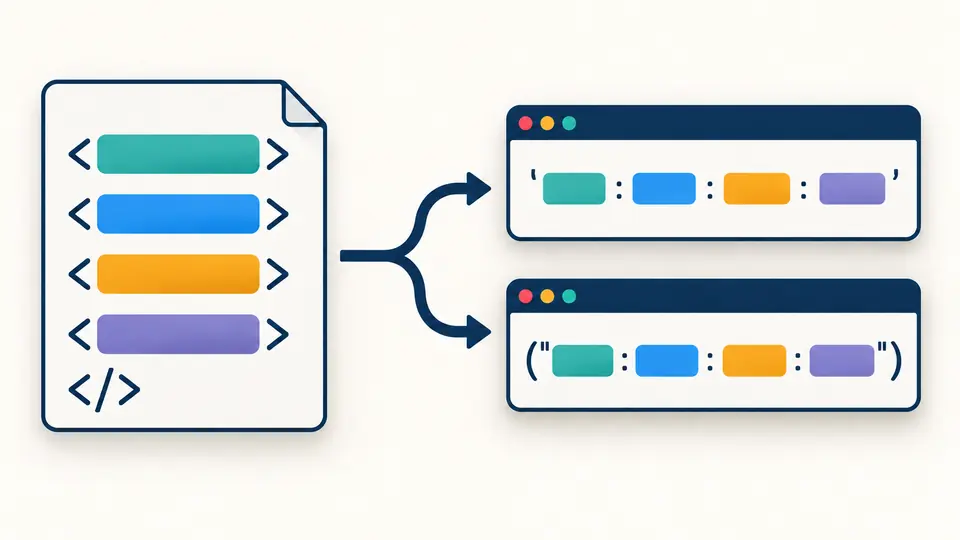
Groovy output uses single-quoted notation; Kotlin DSL uses a parenthesized double-quoted string. Existing api or testRuntimeOnly declarations retain their configurations between these two formats.
A fourth coordinate segment becomes classifier in XML. A declaration without a version stays versionless and receives a notice: an existing platform or dependency-management setup must supply it. A classifier requires an explicit version.
Convert up to 200 declarations in their input order. The dependencies wrapper is optional and uses the destination syntax. Duplicates remain visible; comments and original whitespace are not retained.
The four supported scopes map as shown in the rules. Type is accepted only when absent or jar; test-jar and pom are rejected because their artifact and platform behavior needs more context than a textual rename.
Yes. group:artifact and XML without version are accepted. No version is invented: the output must be used with a suitable existing BOM, platform or dependency-management configuration.
No. Resolve the property first and paste a literal version. Copying a Maven property into a Gradle string could change its meaning or leave a build-time expression that this converter cannot evaluate.
Select Kotlin as the target and paste the supported dependency calls. The converter adds the appropriate parentheses and quotes. Tasks, plugins, maps and arbitrary Groovy logic must be migrated separately.
This page supports Gradle to Maven dependency snippets. It does not turn a complete build.gradle into a complete POM; plugins, repositories, publishing settings and module structure still require a project migration.
Why this conversion
Use the Maven to Gradle converter above, check the scope notices, then copy the latest result into the correct dependencies block.