Docker & Containers

Docker Compose editor

Review one Compose YAML document, its declared connections and unresolved references.

Docker Compose editor

Compose YAML input

Analysis results

The YAML stays in this browser. No Docker, environment-file or network request is made.

Review options

The source is visible. Revealing output enables YAML export with its original values, including secrets.

Static check: Compose schema fee041b (2026-09-01). No interpolation, file loading, profile activation or container execution.

Up to 200,000 UTF-16 units, 100 services and 500 relation records. Views show 50 records at a time.

Input or options changed. Analyze again before exporting.

Use the Docker Compose editor before reviewing a stack change: a valid YAML file can still contain two services bound to the same host port or a volume name that nobody declared. Keep the original text beside a formatted result, then follow each diagnostic back to its source. The report describes declarations, not running containers.

Why use this Docker Compose editor

Read connections without losing the source

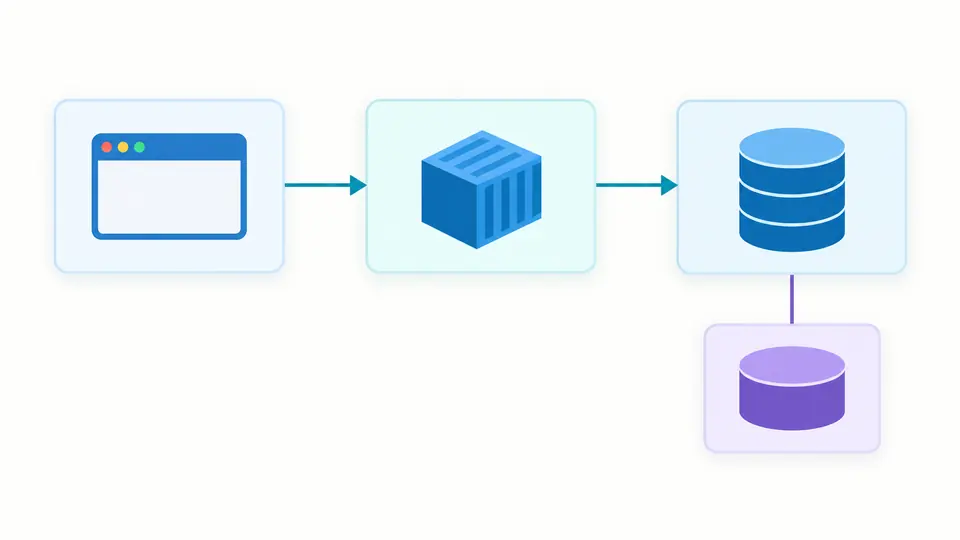
The Docker Compose editor puts service dependencies, volume mounts and published ports beside the YAML. An arrow runs from the dependent service to its dependency; it does not imply that a database is healthy. Explicit namespace and link relationships also appear, so an indirect connection is not hidden in a long service block.

Three service cards connected in sequence, with the database attached to a volume below.

Separate definite collisions from open questions

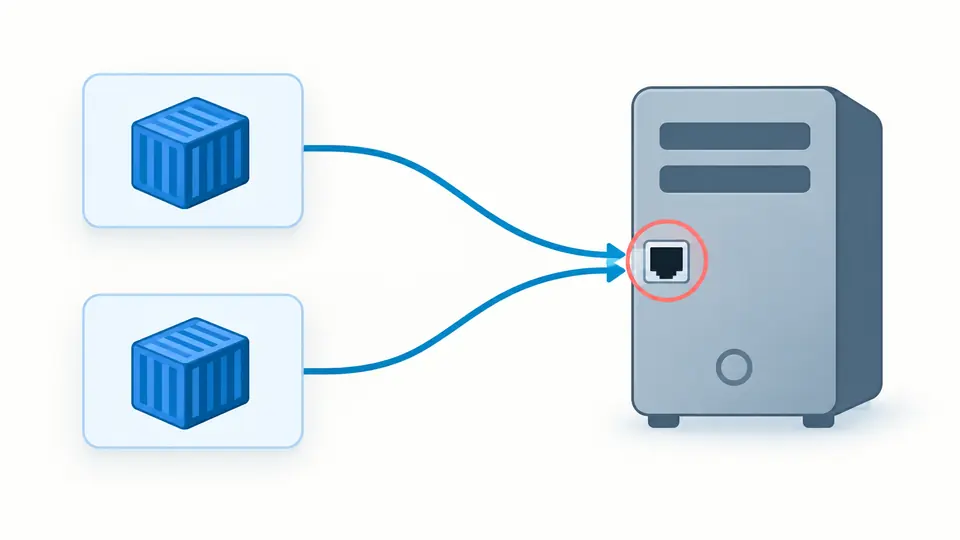
A fixed host binding can collide even when its container target differs. TCP and UDP are checked separately. Overlapping allocation ranges, mixed IPv4/IPv6 wildcards and profiled services receive a potential-overlap warning, because the final allocation or active service set is unknown.

Two service cards point to the same host socket, highlighted for review.

Read the result in the right order

01

Start with the diagnostic path

Syntax errors include a source line and column. Schema findings identify the offending field; fix these before relying on the semantic views. The official schema is bundled at a fixed revision, so a version field does not select an older validation mode.

02

Compare host bindings, not target ports

The port view separates host and container sides. Two containers can both listen on port 80. A collision concerns the host address, published port and protocol. Variables and automatic assignments remain unresolved rather than becoming invented numbers.

03

Reveal configuration only when you need it

The source editor remains visible, but the full output is hidden initially. Enable Show configuration values before copying or downloading YAML. ENV export always contains empty values. Turn automatic analysis off to use Analyze or Ctrl/Cmd + Enter; changing input immediately disables old exports.

One document, several useful views

Schema and semantic checks

This Docker Compose validator uses the official 2026-09-01 schema snapshot plus focused checks for absent services, undeclared resources, dependency cycles and invalid port syntax. Unknown fields are reported rather than silently removed. Formatting does not sort keys or rewrite the input.

A Docker Compose viewer for declared edges

Inspect depends_on in short or long form, its condition, service namespace links and volume sources. Named volumes are checked against top-level declarations. Bind paths are displayed without opening them, and anonymous volumes remain distinct from named resources.

ENV references without default values

The compose file checker scans string values for $VAR and braced expressions, including nested alternatives. Double dollars escape interpolation. Bare environment entries and null map values are recorded as shell passthrough. The template sorts unique names and emits NAME=, never a guessed secret.

Reviewable exports

A YAML download keeps actual values, comments, anchors and interpolation text. The JSON report omits the full YAML and variable defaults but retains diagnostic paths and relations. Views reveal 50 records at a time; exports contain all records within the documented limits.

What static analysis cannot establish

No container execution
Nothing starts Docker, pulls an image, probes a port or tests a healthcheck. A successful structure check cannot prove runtime compatibility, filesystem permissions or network reachability. Recheck the final configuration with your own Docker version before deployment.
One document and no external resolution
Multi-document YAML, unsupported tags, cyclic aliases and duplicate keys are rejected. include and extends block configuration export because their external context is unavailable. This page does not merge overrides, load .env or read env_file. Paste a locally resolved configuration when needed.
No profile activation or port allocation
All declared services participate. A Docker Compose port collision warning involving profiles or allocation pools can be conservative. Unresolved port variables and dynamically assigned host ports are marked separately; this is not a scan of ports already used by other programs.
Values stay unchanged
Hiding output is a display control, not redaction of the source or downloaded file. YAML export requires explicit reveal and no error findings. The ENV template always leaves values blank. A report can be downloaded even when it contains errors; it is not an approval certificate.
Bounded input and a pinned specification
Accepts YAML 1.2 with bounded anchors and merge keys, at most 200,000 UTF-16 units, 100 services and 500 relation records. Expansion is capped at 20,000 nodes and depth 40. The schema commit begins fee041b; newer specification fields may require a future update.
Limited mount and binding semantics
Common bind, named-volume and tmpfs mounts are inspected. Other schema-supported mount types are flagged for manual review. Host paths are not normalized against a real machine. Dependencies describe declarations and cycles, not application readiness or a simulated startup schedule.

Docker Compose editor questions

Does this run Docker Compose?

No. It parses the document and checks its structure and selected relationships in a browser worker. It cannot inspect a Docker daemon or tell whether an image, volume, secret or network really exists on your host.

Can it validate every Compose feature?

The pinned schema covers its documented structure, while the additional semantic rules have a narrower scope. Environment interpolation, external files, runtime health and deployment behavior remain outside the analysis. Warnings identify some unresolved cases; passing does not replace a real configuration check.

Does it support old version 2 and version 3 files?

It checks against the modern Compose Specification snapshot, not the historical versioned schemas. A version key is retained and receives a compatibility warning. An older file can pass if its fields match this schema, but the version number does not switch engines.

Can I validate a project with several override files?

Not directly. The input is one YAML document. include and extends are reported as unsupported context rather than fetched or merged. Resolve the project with your local Compose tooling first, then review the resulting single-file configuration here.

Why is a port overlap flagged when I use profiles?

The checker does not know which profiles you will activate. It considers every declared service and downgrades overlaps involving profiled services to potential conflicts. Confirm the active set and allocated host ports in the environment where you will start the stack.

Found a Compose declaration that needs a clearer diagnosis?

Inspect the declarations before starting the stack

Return to the Docker Compose editor, resolve the diagnostic paths, and export the configuration only after checking its host bindings and external dependencies.