Git & Version Control

Git diff viewerread the patch you already have

Inspect a unified patch, navigate changed files and keep old and new line numbers in view.

Git diff viewer

Patch input

Changes

The patch stays in this browser. No upload, repository access or patch execution.

Display options

Limits: 1 MiB UTF-8, 20,000 lines and 200 files. Path filtering ignores case.

Input changed. Parse again before exporting.

Exports always include the entire patch or summary, regardless of filters and pagination.

Git diff viewer is useful when a review arrives as a patch attachment and you have neither the repository nor both complete source files. Read the changes already recorded in that attachment.

A patch viewer does not need to regenerate a comparison. It can retain the exact added and removed lines while showing which file each hunk belongs to.

Why use this Git diff viewer?

Turn an existing patch into a review you can navigate.

See both sides without rebuilding files

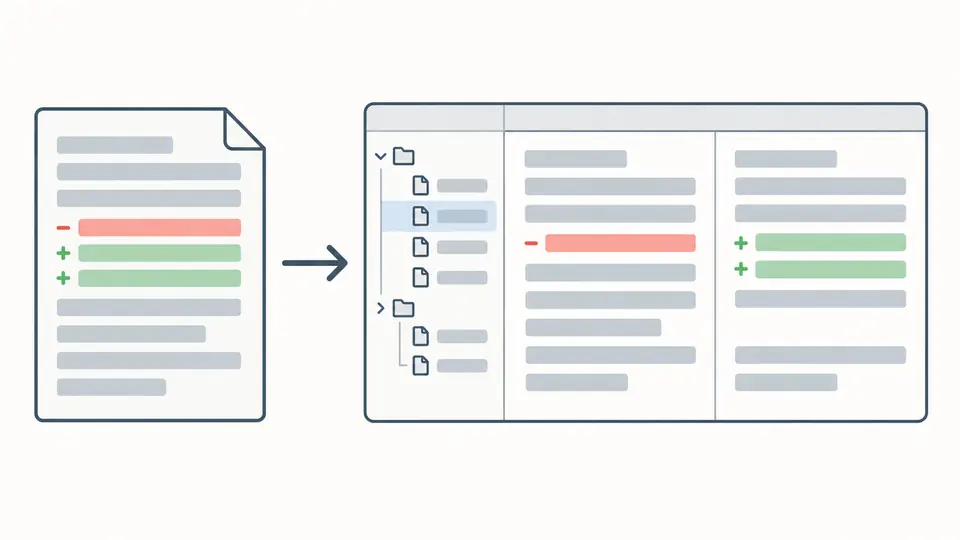
Git diff viewer separates the old and new line numbers from a unified diff. Adjacent removals and additions are aligned by order; unchanged context stays visible on both sides. Missing source lines are never invented.

One patch becomes a file tree and two columns of removed and added lines.

Focus on one path, retain the whole review

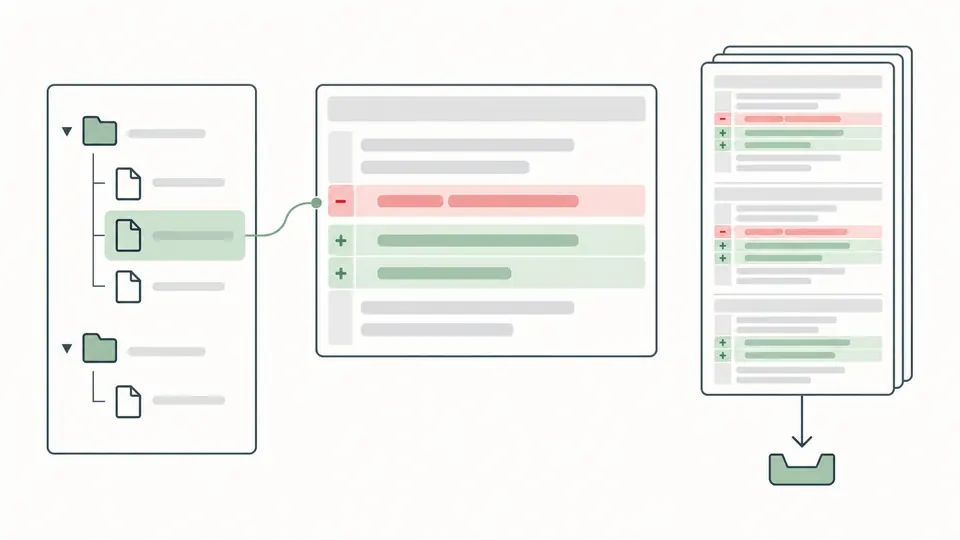
Find a file by its old or new path, then inspect only its hunks. The file filter changes the navigation, while whole-patch totals and exports remain complete. A narrowed view cannot silently produce a partial patch.

A file tree highlights one document while the full patch remains alongside it.

Read the ranges before judging the change

01

Export a plain patch

Use git diff --no-color, or a standard unified diff with paired file headers. Remove mail envelopes by exporting a bare diff from the source repository.

  • The local file picker reads UTF-8; replacing existing text first opens a preview.
02

Choose how to align the lines

The side-by-side diff pairs adjacent removed and added lines in their original order. Switch to unified when the exact sequence of deletions and insertions matters more than column alignment.

  • Turn off automatic parsing for a long editing session; Ctrl/Cmd + Enter runs the current input.
03

Check totals before taking the patch away

Compare the whole-patch file, hunk and text-line totals with the selected file. Binary markers are counted separately because they contain no inspectable binary payload.

  • Pagination and path filters never trim the copied patch or JSON summary.

File structure, line ranges and review evidence

Recognize more than edited text

New files use /dev/null on the old side; deleted files use it on the new side. Git rename, copy and permission headers remain visible even when there is no text hunk. Paths quoted by Git are decoded for navigation.

Check the hunk envelope

Each @@ range declares old and new line counts. The parser checks them against context, deletions and additions, rejects truncated or overlapping ranges, and points to the input line to inspect. It does not repair the evidence.

Keep git diff stats auditable

The JSON summary includes every file path, status, mode when supplied, text additions, deletions and hunk count. A binary marker is reported separately, so zero text lines never implies identical binary content.

What a patch can and cannot establish

Format checks are not application checks
A valid structure says nothing about the current contents of your checkout. This page cannot run git apply --check, stage files, execute code or create a commit. Use the target repository separately to test applicability.
Only two-sided, bare unified patches
Email-wrapped git format-patch output, mbox, combined merge diffs, raw/name-only/stat output and colored terminal escape sequences are rejected. Supply ordinary headers and @@ hunks, not two complete text files.
Binary contents remain unknown
Binary files … differ is accepted as a metadata marker. GIT binary patch literal/delta payloads are rejected rather than decoded. Image differences and binary applicability cannot be inferred from the marker.
Finite input, complete output
The whole input must fit 1 MiB in UTF-8, 20,000 physical lines and 200 files. A violation stops the entire parse. Navigation expands by 50 files and the selected view by 100 rows, without truncating exports.
No rewriting or missing context recovery
There is no whitespace-ignore mode, reversal, automatic count repair, syntax highlighting or semantic analysis. Filtering is a case-insensitive path substring, not regex or glob. Unshown source context cannot be reconstructed from a patch.

Git diff viewer questions

Which diff formats are supported?

Bare Git patches and standard unified diff with paired --- and +++ headers are supported. Both display modes use the same parsed data. Combined diffs, email wrappers, ANSI colors and binary payloads are outside the supported format.

Can it show renames and binary files?

Yes. Rename and copy headers show the old and new paths, and mode-only changes remain visible. A binary marker is displayed as metadata only; the actual binary bytes are neither available nor validated.

Is the patch uploaded?

No. Pasting and local file reading do not upload the patch. There is no URL import or share-link storage, and this viewer never opens a repository.

Which view mode should I use?

Use split view to compare the two line-number columns. Use unified view to preserve the patch’s original insertion and deletion order. Split pairing follows line order and does not claim that paired lines have matching meaning.

Does this tool support syntax highlighting?

No. The view highlights added and removed lines, not programming-language tokens. Code and HTML inside a patch are rendered as text; viewing a patch does not execute it.

Still have a question?

Inspect your next review

Open Git diff viewer with a plain patch, inspect a changed path and export the complete original when the counts make sense.

Structural validation cannot establish repository applicability.