
HTML tools

HTML formatterMake markup readable

Automatic beautification waits 350 ms; minification is explicit. Select a structure notice to return to its original line.

HTML formatter

HTML source

Result

Your HTML stays in this browser tab. Static preview blocks scripts and outside resources.

Options

Paste HTML or load the example.

When a CMS export arrives as a single line, finding the element behind a broken section takes too long. This HTML formatter separates structural tags while keeping inline wording and protected blocks intact.

It also gives you a parsed tag outline and source positions. Use those clues to investigate suspicious nesting before moving the source into your editor or a dedicated standards checker.

Why use this HTML formatter

See the structure without rewriting text

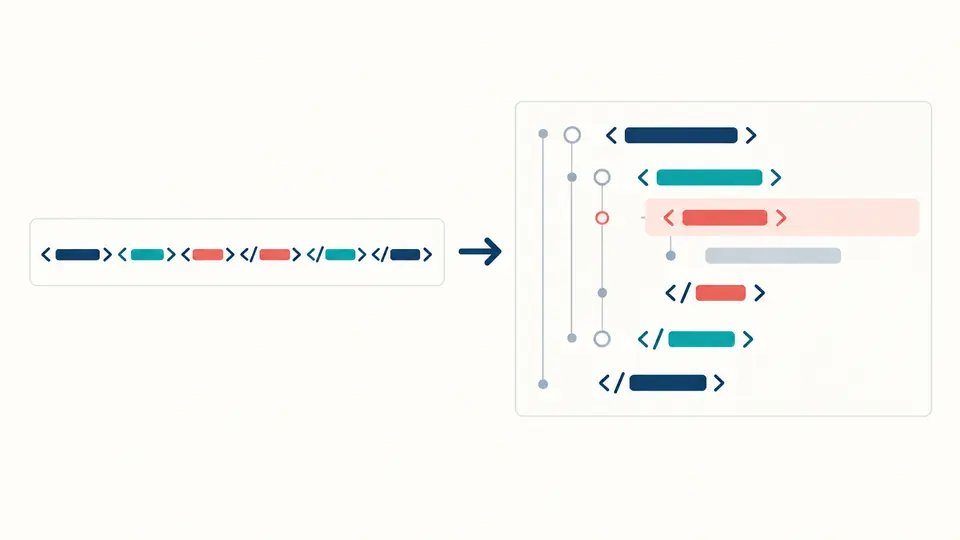
A dense fragment becomes an indented outline. The HTML formatter keeps adjacent inline words, comments and the contents of pre, textarea, script and style blocks as supplied.

Dense tags on the left become indented rows with one source location highlighted.

Preview only after you choose to

The HTML formatter opens a separate static frame only for the current result. Scripts, forms and outside resources cannot run inside that preview.

Code flows into an isolated static preview; external requests stop at its boundary.

Check the boundaries before exporting

01

Keep the original source

Example replaces the input only after a preview showing the character count; one Undo restores both input and result. Pasting your own HTML never silently overwrites it.

  • Try the example to see preserved inline text and preformatted spacing.
02

Choose readable or compact output

Automatic beautification waits 350 ms after an edit. Turn it off for Ctrl/Cmd+Enter; compression is always an explicit action from the original source.

  • Changing indentation makes the previous result stale and disables export.
03

Inspect the clue, then export

A structure row or diagnostic jumps to its original line. Check the byte comparison and render the isolated preview if useful; a clean list is not standards certification.

  • Copy and download become available only for the current result.

Read, compact and inspect markup

Conservative indentation

Adds line breaks between structural tags but does not split inline wording or rewrite attributes.

Deliberate compression

Removes structural spacing and reports UTF-8 bytes before and after; ordinary comments and embedded code remain.

Source-linked tag outline

Shows the HTML5 parser’s element hierarchy, including browser-inserted nodes, and lets you return to a source line.

Isolated static preview

A separate sandboxed frame strips active elements and blocks outside loads; preview stays off until you select it.

Where this check stops

Structure is not standards validity
Parser errors and likely missing closing tags can point to a line; the HTML formatter does not check every content model, accessibility rule or W3C conformance requirement.
Whitespace can affect rendering
The formatter preserves inline gaps and protected blocks, yet CSS white-space rules can make even structural gaps significant. Compare the result in your real layout before shipping.
No template or repair engine
Vue, JSX and Liquid placeholders are treated as source text. The tool does not guess missing tags or write browser-inserted nodes back into your code.
No network fetch or embedded minifier
It does not fetch a URL, upload a batch, delete comments, reorder attributes or minify CSS and JavaScript inside HTML.

HTML formatter questions

Will formatting change how my page renders?

Usually only layout between structural tags changes, but CSS can make whitespace significant. Inline text and preformatted blocks stay literal; compare the output in the actual page.

Can it format broken HTML?

The HTML5 parser can recover enough to display a structure. Diagnostics flag located parser issues and likely unclosed tags; they do not repair the source.

Is an HTML formatter the same as a validator?

An HTML beautifier improves readability, while a validator checks conformance. This HTML formatter gives only a bounded structure check; use a dedicated checker for a standards verdict.

Is minifying HTML as safe as minifying CSS?

No. HTML whitespace can become text. Compact mode changes only structural gaps and tag spacing outside quotes, keeps comments, and leaves inline gaps alone.

Does my HTML get uploaded to a server?

No. Parsing and formatting run in this browser tab. Static preview is opt-in, isolated and barred from external requests.

Found an unexpected result?

Try the HTML formatter on a real fragment

Paste a CMS export or load the example, inspect the structure, then copy the current result.