01
Start from the original CSS
Load the sample to see custom properties and a media rule. The rule list always points into the input, even when a formatted result has different line breaks.
HTML / CSS Dev Tools
Run Format, Minify or Check explicitly. The result never replaces your source; edits disable export until you run again.
CSS stays in this browser tab. No upload or saved history.
Run an action to list selectors and at-rules.
Enter CSS and choose an action.
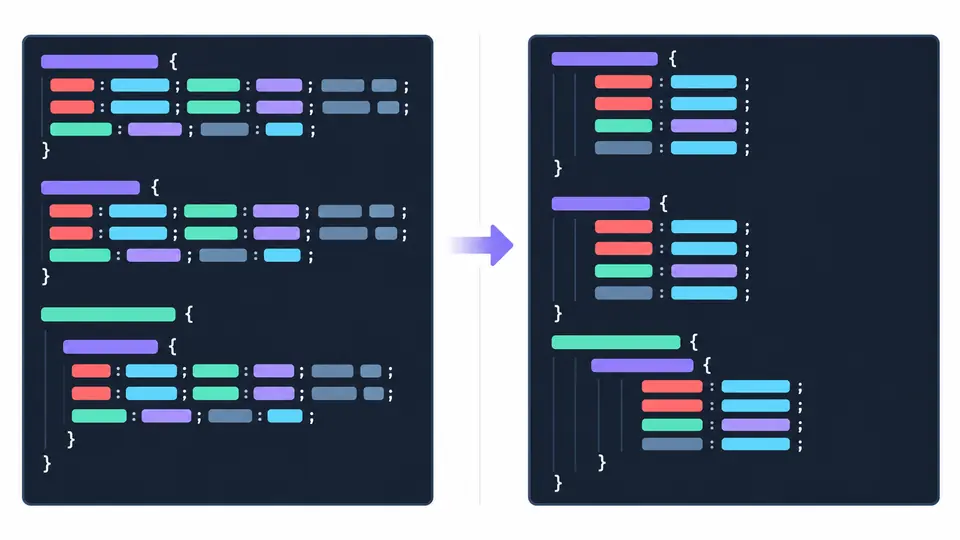
A compressed stylesheet can hide a duplicate declaration or a media rule in one long line. If you need to format CSS online, this CSS formatter opens it up while keeping selector and declaration order intact, so you can inspect the cascade before changing it.
Use the CSS beautifier view to read code, or minify CSS for a smaller handoff. The CSS formatter also works as a structural CSS validator: it reports a source line and column when parsing fails instead of silently returning partial output.
Readability and diagnostics share the same original input.
The CSS formatter keeps declarations and repeated properties in their source order. A readable result appears beside the input, so the browser's later-wins rule is still easy to inspect.
The rule list names selectors and at-rules with their original line numbers. Select one to jump back to the source, or use a syntax error's line and column to locate an unclosed block.

Load the sample to see custom properties and a media rule. The rule list always points into the input, even when a formatted result has different line breaks.
Format uses 2 spaces by default; switch to 4 spaces or tabs if needed. Minify and Check each read the original input, never the prior output.
When the input or indentation changes, Copy and Download are disabled until another Format or Minify run. Ctrl/Cmd+Enter runs Format; Check reports syntax without replacing a result.
Prettier lays out nested blocks and declarations while retaining comments and their source order, making a dense file easier to review.
The compact result removes optional spacing and ordinary comments without sorting declarations, merging rules or shortening values.
Selectors and @ rules are listed from the original CSS with line numbers. Long lists show 50 at a time; copying still uses the full result.
Yes. Paste the compressed CSS and run Format. The result adds readable line breaks and indentation; comments already removed by earlier minification cannot be recovered.
The parser reports structural problems such as an unclosed block or malformed declaration with a source line and column. It does not run a cross-browser compatibility audit.
No version switch is required for standard CSS. A new or vendor-specific feature may still need testing in the browsers your project supports.
No. CSS comments use /* and */. A double slash is not a CSS comment and may be treated as invalid tokens or part of a value; replace it before relying on the result.
This page runs on pasted text when you choose an action. For automatic formatting of repository files, use a formatter in your editor or build workflow.
Still have a question?
Return to the CSS formatter, check the original rule locations and export only a fresh result.
Formatting and minifying leave the original CSS in the left editor.