01
Choose where labels live
Label-map mode reads the entire object. Resource mode reads only metadata.labels from a single object, an array, or a Kubernetes List. It does not descend into a Deployment’s Pod template.
Kubernetes
Check label syntax, then see which conditions select each supplied resource.
Inputs stay in this browser. No cluster connection, upload or network lookup.
= · == · != · in · notin · key · !key. Commas join conditions with AND; an empty selector matches all inputs.
Limits: 500,000 JSON characters, 8,192 selector characters, 500 resources, 64 conditions, 256 labels per resource.
Semantics: Kubernetes 1.35 / apimachinery v0.35.0; equality, set and existence selectors only.
Input changed. Test again before exporting.
A Kubernetes label selector can look right and still choose an unexpected Pod. The usual surprise is a missing key: env!=prod also accepts an object with no env label. Inspect the actual condition results before changing a Service or a kubectl query.
Use a label map for a small experiment or choose resource mode for JSON returned by kubectl. Both modes keep their own input, so switching views does not turn a label named metadata into a resource wrapper.
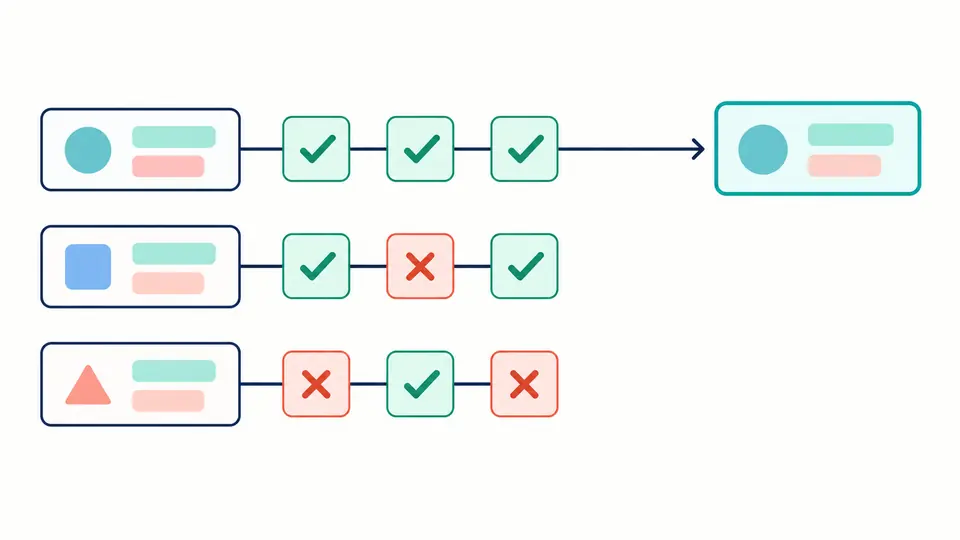
This Kubernetes label selector tester evaluates every clause, even when an earlier clause fails. A web Pod in development can fail the environment condition while still passing !paused. You get a diagnosis for that specific object, rather than guessing from an empty list.
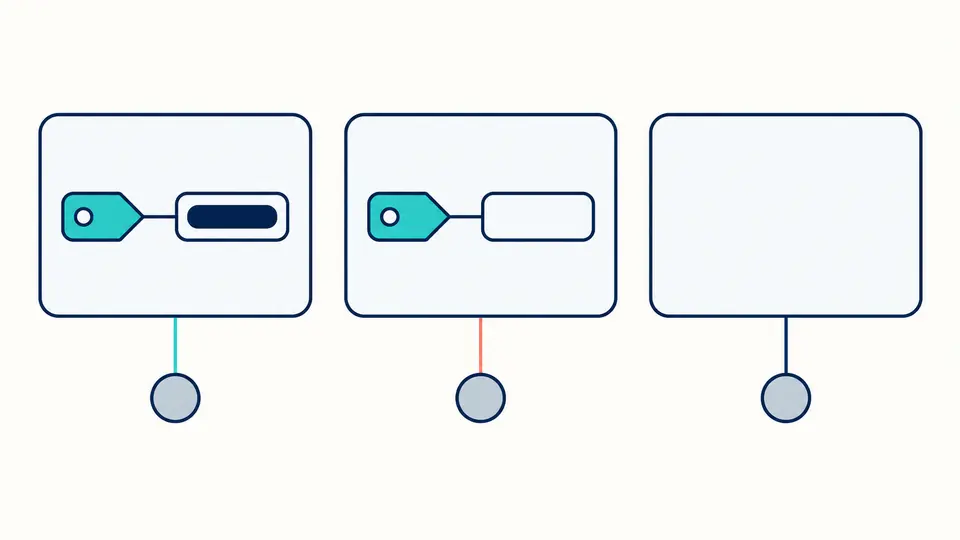
A label with the value "" still exists. An absent key has no value at all. The explanation shows these states separately, so a negative condition cannot quietly be mistaken for an existence check.
Label-map mode reads the entire object. Resource mode reads only metadata.labels from a single object, an array, or a Kubernetes List. It does not descend into a Deployment’s Pod template.
Change production to development, then remove the environment key. Compare in with notin to see how absence changes the decision. Turn off auto test to run with Ctrl/Cmd + Enter instead.
Expand a resource to inspect its labels and all conditions. Results appear 50 at a time; copying or downloading still includes every resource. Any input edit disables export until a fresh test finishes.
The Kubernetes label validator checks an optional lowercase DNS prefix, a 1–63 character name and a value of up to 63 characters. Names may include uppercase letters; values may be empty. Reserved prefixes remain syntactically valid.
Use = or == for equality, != for exclusion, and in or notin for a set-based selector. Each comma between clauses is AND. Several alternatives for the same key belong inside one in expression; a second clause narrows the result.
Resource mode records the original index, JSON path, kind, namespace and name when supplied. Missing or null metadata.labels becomes an empty map. Duplicate names remain separate entries, so no item disappears through deduplication.
The label selector tester refuses numeric, boolean or null label values. It also rejects duplicate JSON keys instead of letting a later value overwrite an earlier one. A string such as "01" stays distinct from "1" throughout matching.
Join requirements with commas, for example app=web,environment=production. Both must pass. Keep any DNS prefix in the key, such as app.kubernetes.io/name=web. Namespaced and unprefixed keys are different labels.
There is no cross-key OR in this syntax. For alternatives on one key, environment in (production,staging) accepts either value. Combining two equality clauses for that key uses AND and may be impossible to satisfy.
Yes, encode it as {"maintenance":""}. maintenance checks that the key exists; maintenance= checks for the empty string; !maintenance requires the key to be absent. In string syntax, maintenance in () also selects an existing empty value.
Use !key and read the matched count. This finds objects without that particular key, not necessarily objects with no labels at all. For cluster-wide counts, obtain a complete resource list separately; this page counts only the supplied snapshot.
Negative equality and notin include missing keys. Add an existence condition, env,env!=prod, when you require a present value other than prod. The per-condition explanation distinguishes that case from a present nonmatching value.
Still have a selector question?
Run the Kubernetes label selector against your current JSON and inspect the failed clauses before editing a workload configuration.