01
Select the resource context
Choose CPU, Memory or Generic Quantity. CPU rejects values that are not whole millicores; Generic can parse finer and negative values. Containers expects a JSON array with named entries.
Developer tools
Convert CPU and memory or total the resources explicitly declared by application containers.
Your input is processed in this browser and is not sent to a server.
Enter a Quantity or load an example.
Quantity value semantics: k8s.io/apimachinery v0.34.1 (Kubernetes 1.34). Normalized decimal output; not Go String() serialization or cluster validation.
CPU mode requires a nonnegative parsed value in whole millicores (1m = 0.001 CPU). Generic Quantity accepts finer values.
Tool limits: 256 characters per Quantity, exponent from -100 to 100, 100,000 UTF-16 input units, 100 containers, 80 characters per name. At least one digit is required.
Input or options changed. Calculate again before exporting.
The Kubernetes resource calculator separates Quantity parsing from CPU and memory rules. Check 100m as CPU, compare Mi with M, or paste an array of application containers to inspect requests and limits.
Use the Kubernetes CPU converter for cores and millicores, or the Kubernetes memory converter for exact bytes, Mi and Gi. The displayed sum describes your input, not measured usage or a recommended allocation.
In CPU mode, 100m is one tenth of a CPU: the same amount expressed in two units. The Kubernetes resource calculator reads 100m of memory as 0.1 byte. Comparing decimal and binary units makes a mistaken m, M or Mi visible before you reuse a value.

Separate container rows show declared requests and limits alongside their sum. Missing fields remain marked instead of becoming a misleading zero or an invented limit.
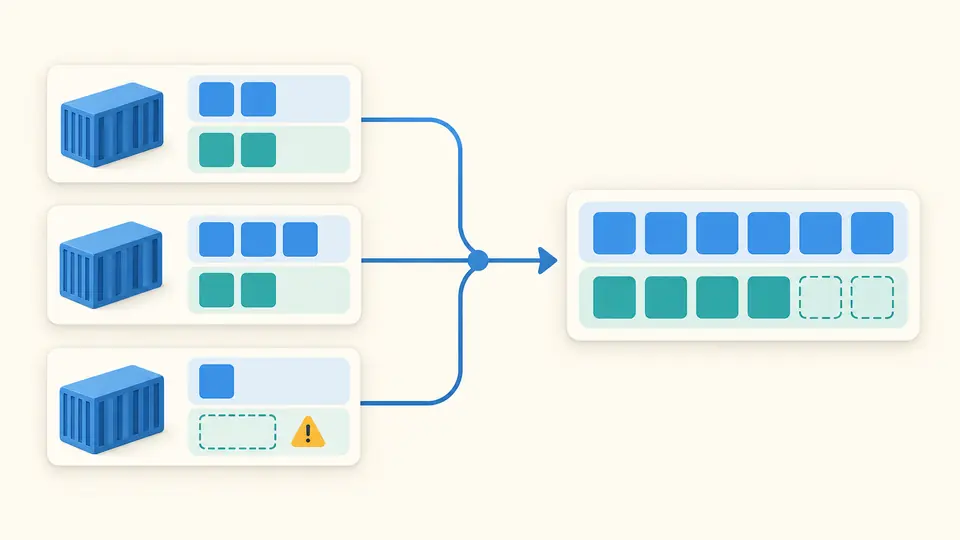
Choose CPU, Memory or Generic Quantity. CPU rejects values that are not whole millicores; Generic can parse finer and negative values. Containers expects a JSON array with named entries.
Inspect each resource and its missing-field count. A sum of entered limits does not establish a finite total cap if any limit is absent. No request is filled from a limit automatically.
Automatic calculation waits 350 ms. Turn it off for Calculate or Ctrl/Cmd+Enter. Example, Clear and normalized input use Preview, Apply and Undo; stale results cannot be exported.
Read cores and whole millicores together: 100m equals 0.1 CPU. Negative resources and fractional millicores are rejected.
Compare exact bytes, Mi and Gi. Fractional bytes remain visible, with a separate whole-byte value rounded up.
Inspect a normalized decimal value using apimachinery v0.34.1 value semantics, including nano rounding and BinarySI saturation flags.
Supply name, requests and limits in JSON. Inspect CPU and memory sums, missing fields and limits below requests without contacting a cluster.
100m means 100 millicores, or 0.1 CPU. In the Kubernetes resource calculator, 1000m and 1 represent one CPU; 0.5m fails CPU precision validation.
Mi is 1,048,576 bytes; M is 1,000,000 bytes. Case also matters: m is one thousandth of a byte. Use Memory mode to compare their exact values.
If no admission mechanism supplies a request, Kubernetes can copy the specified limit into the missing request. This tool preserves the missing field and explains that condition instead of silently applying cluster defaults.
A request may exceed available node capacity, but affinity, taints and other constraints can also block scheduling. These local totals cannot diagnose a cluster; inspect Pod events and node allocatable resources.
Use measurements from representative load and your workload requirements to choose settings. This Kubernetes resource calculator checks quantities and sums declared values; arithmetic alone cannot select safe or optimal requests and limits.
Unexpected resource value?
Paste a Quantity or container array into the Kubernetes resource calculator, inspect the current result and export the JSON report.