AI / LLM Dev Tools

Structured output schema checker

Check a JSON Schema or function parameters schema against a dated provider profile. Read the diagnostics before changing the contract.

Structured output schema

JSON Schema

Validation report

Paste a JSON Schema to begin.

Inputs and references are processed in this browser; no validation data is uploaded and no remote reference is fetched.

Paste the schema itself. For a function, paste only the object inside parameters.

Rules reviewed: 2026-09-15. Official rules

Local preflight only; it does not certify API acceptance or a particular model.

Paste a JSON Schema to begin.

A schema can describe exactly the data you want and still be rejected by a model endpoint. This structured output schema checker separates the JSON Schema structure check from provider rules, so a missing required field is not confused with a JSON syntax error.

Use this LLM JSON Schema validator when moving a contract from an ordinary validator to OpenAI strict mode, or when comparing it with Gemini structured output. The report names the target and the rule review date so the result remains meaningful when shared with another developer.

Why check a structured output schema?

Separate two kinds of correctness

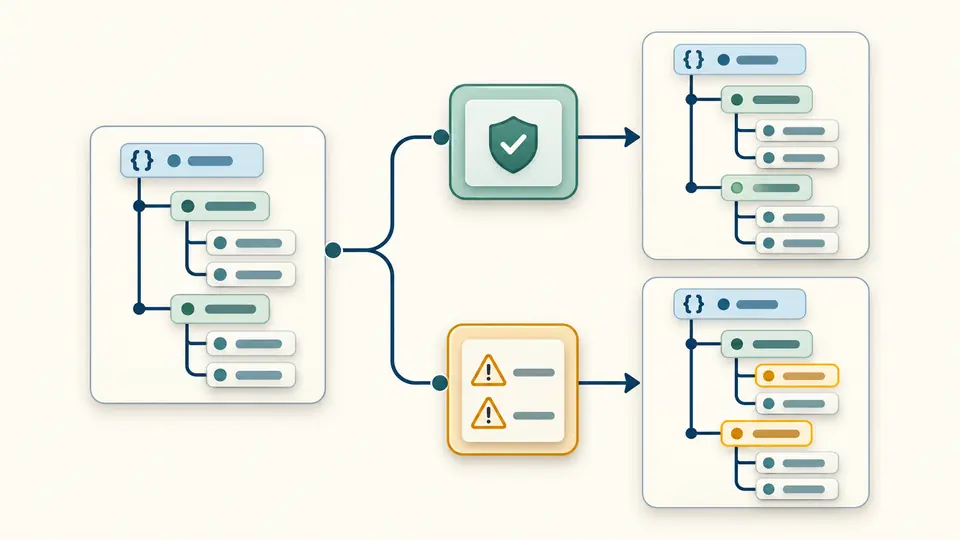
A general validator may accept an object with optional fields and open keys. A structured output schema for strict OpenAI output has additional requirements. The same input produces a structural verdict and a separate list of target diagnostics, with a path and a suggested next step.

A schema tree passes a general check while a second check marks two unresolved branches.

Compare targets without changing your contract

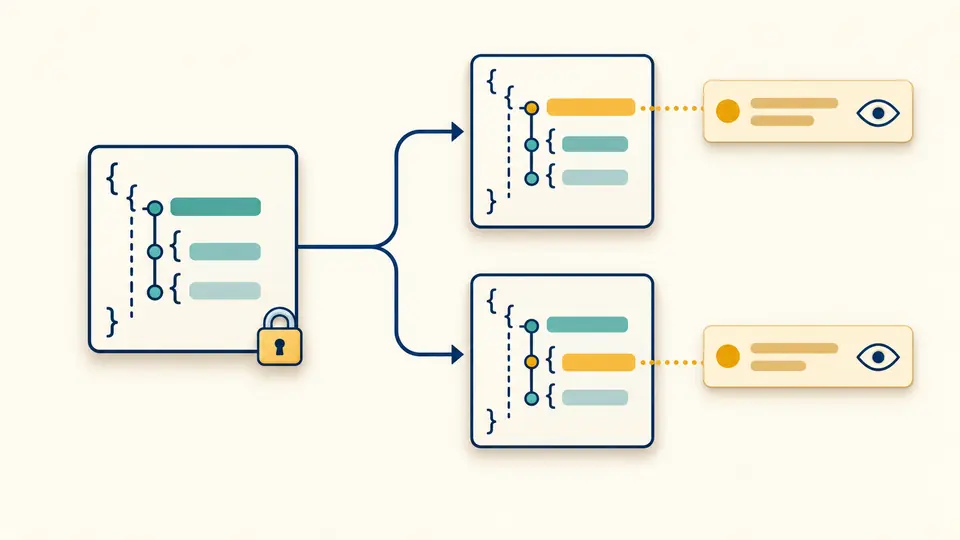
Switch from OpenAI to Gemini to see which findings depend on the target. The source remains intact: missing required entries and open object keys are not silently rewritten. You decide whether the suggested change fits your application before editing and checking again.

An unchanged schema branches into two target profiles with different diagnostic markers.

Read the result without losing the original meaning

01

Choose the schema body

For function calling schema checks, select the OpenAI function profile and paste the parameters object itself. Function names, strict flags and API request wrappers belong to the integration code and are not validated by this page.

02

Use both examples to compare profiles

The valid example contains a required nullable field. The problem example leaves object constraints incomplete for OpenAI; switching to Gemini demonstrates that those same omissions are not universal errors. Loading either example first shows a replacement preview.

03

Keep exports tied to the current input

Auto check waits 350 ms after an edit. Disable it to use the check button or Ctrl/Cmd + Enter. Editing the input or changing the adapter immediately disables report export until a new check finishes. Undo restores the previous input and result together.

Inspect constraints before wiring the API

Structure before provider rules

A bundled JSON Schema 2020-12 meta-schema checks keyword types and schema positions. The parser rejects duplicate keys and numbers that JavaScript would silently round. Comments, trailing commas and Markdown fences are treated as syntax problems rather than repaired without consent.

Paths through nested definitions

Diagnostics use JSON Pointer paths, including escaped property names. Local references into schema positions are checked for missing targets. Ordinary property names such as allOf are treated as names, while the actual allOf keyword is inspected as a schema rule.

Explicit coverage warnings

The OpenAI profile covers strict output and strict function parameters for non-fine-tuned models. Gemini uses its documented JSON Schema subset. Unlisted keywords and formats receive a review warning; an unknown rule is never turned into an unconditional compatibility claim.

A portable review report

Copy or download the adapter, rule date, structural verdict, counts and diagnostic codes as JSON. Long lists show 50 findings at a time, with more available on request. Export includes the complete report, even when only the first group is visible.

What this preflight can and cannot establish

A rule snapshot is not an API test
The profiles were reviewed on 2026-09-15. No model is called. Account access, endpoint behavior, SDK normalization, refusals and particular model versions need a real integration test. Fine-tuned OpenAI models, Anthropic, Gemini function calling and third-party proxies do not have profiles here.
One dialect and local pointers
The structure check uses 2020-12. An explicit older draft is reported, not silently reinterpreted as supported. Remote references and named anchors are outside scope. Local pointers must identify a schema position; recursive definitions are inspected without infinitely expanding every possible response.
Bounded work and honest limits
Input is limited to 500000 characters, 50000 parsed nodes and 40 JSON nesting levels. A worker stops after 5 seconds; more than 1000 diagnostics stops the check without a partial success. These browser limits are separate from OpenAI property, nesting, enum and string budgets.
Suggestions preserve your decisions
The checker does not remove keywords, close dictionaries or make optional fields required. Adding null to a type does not mean the field may be omitted, and an enum must permit null separately. Reconcile these semantics in your application before applying any suggested redesign.
Returned values still need validation
This page checks the schema supplied to a model, not a model response. It does not infer a schema from a sample, generate sample output, repair broken JSON, or prove that business values are correct. Validate the actual returned JSON and apply domain checks before using it.

Structured output schema questions

How can I check schemas before sending them to a provider API?

Run a local structural check and then the target-specific preflight. Review both errors and coverage warnings. This catches many integration mistakes earlier, but the final step is still a request against the exact endpoint and model you intend to use; a local result cannot certify their behavior.

Why does OpenAI strict mode require every field to be required?

Strict output uses a constrained object shape. Every property must be declared as required, including values that may be unknown. Represent an unknown value with a nullable type when that matches your contract. If the property has an enum, include null in that enum as well.

How do structured outputs differ from tool use?

Structured output shapes a model’s final answer. Tool use supplies arguments for a function your application can execute. Here the two OpenAI profiles check the shared strict schema restrictions; the function profile expects only parameters and does not check the function wrapper or execute a tool.

Can I paste a sample JSON object instead of a full schema?

No. A sample such as a city name cannot express whether other fields are optional, whether extra keys are allowed, or which values are valid. Provide a JSON Schema with types and constraints. Use the included schema example as a starting point, then adapt it to your real contract.

Why is JSON.parse() or a linter not enough?

Parsing checks JSON grammar. It does not establish whether properties and required have the right schema structure, whether a reference exists, or whether an endpoint supports a composition keyword. A syntactically valid document can therefore still produce structural errors or provider diagnostics here.

Share a missing case

Review the contract before sending it

Return to the structured output schema checker, choose your target and resolve the first diagnostic. Keep the original contract nearby when deciding whether a proposed change should narrow or widen the allowed data.