Logs & Observability

Traceparent parserand W3C Trace Context validator

Paste a traceparent header to see its version, trace-id, parent-id and flags decoded field by field, or switch modes to batch-validate several headers or generate a fresh test one.

Traceparent parser

traceparent header

Parsed and generated entirely in your browser. Nothing is uploaded or sent to a tracing backend.

Result

Paste a traceparent header, or load an example, to begin.

A traceparent header looks simple — four hyphen-separated fields — until one microservice logs a request with a trace-id of all zeros, or a proxy silently rewrites the version byte to something the spec forbids. This traceparent parser checks the header against the actual W3C Trace Context grammar instead of just eyeballing the dashes, so you can tell a genuinely broken header from one that merely looks unfamiliar.

Reach for it when a distributed trace goes missing between two services and you need to know whether the header itself was ever valid, when you're wiring up manual header propagation and want a header to test against, or when you're reviewing logs and need to decode a stack of traceparent values at once instead of one at a time.

Why use this traceparent parser

Built for tracking down real header bugs, not just pretty-printing a valid one.

Every field decoded and color-coded

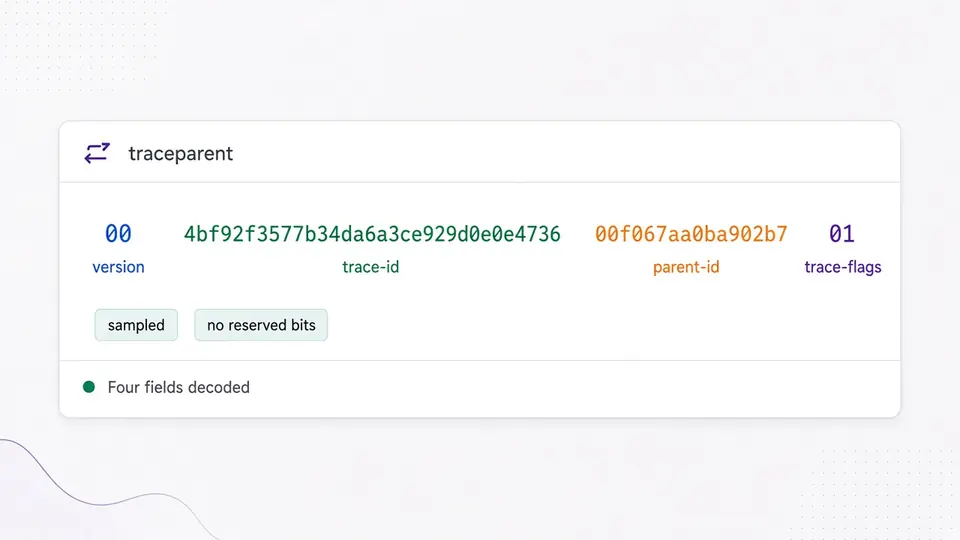
This traceparent parser splits a header into its version, trace-id, parent-id and trace-flags, each shown in its own color, plus a plain-language read of the flags byte (sampled or not, and whether any reserved bit is unexpectedly set).

A traceparent header split into four color-coded fields: version, trace-id, parent-id and trace-flags

Catches the exact cases the spec forbids

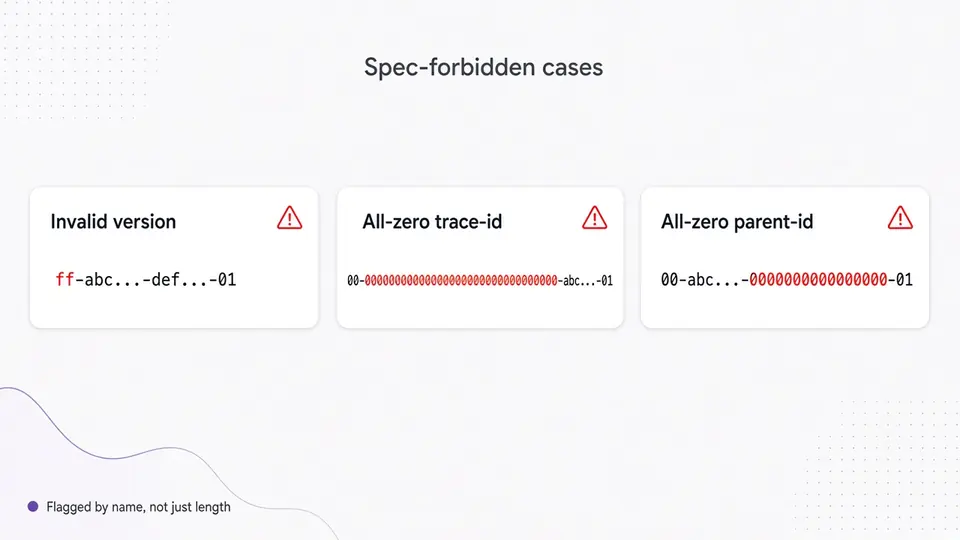
Version ff, an all-zero trace-id, and an all-zero parent-id are all syntactically hex-shaped but explicitly invalid per W3C Trace Context — this traceparent parser flags them by name instead of only checking length and character set.

Three spec-forbidden invalid cases highlighted: version ff, an all-zero trace-id, and an all-zero parent-id

What this parser checks that a quick glance won't

Three things worth knowing before you paste a header from production logs.

01

Paste one header, or load a boundary example

Parsing runs automatically 300ms after you stop typing — no button needed unless you turn auto-parse off. The three example chips aren't random: they load a valid header, a version-ff header, and an all-zero trace-id, the exact three edge cases the spec calls out by name.

  • Ctrl/Cmd+Enter parses immediately, bypassing the debounce
02

Add a tracestate value, or switch to batch mode

The tracestate field is collapsed by default since not every header carries one — turn it on to validate vendor=value pairs against the spec's 32-member and 256-character limits. If you're checking a whole log export instead of one header, switch to batch mode and paste one traceparent per line.

  • Batch mode is manual on purpose: it won't re-run on every keystroke while you're still pasting
03

Read the per-field result, then copy or export

A version-00 header is fully validated; anything higher is decoded but its trailing fields are shown as-is, never interpreted. Copy and download stay disabled the moment you edit the input, so you can never accidentally export a stale result.

  • Switch to Generate to produce a fresh, spec-valid traceparent for a test request

What the parser and generator actually do

Real W3C Trace Context validation, not a regex that only checks the dash positions.

Full four-field breakdown

Version, trace-id, parent-id and trace-flags are each parsed and labeled on their own, including a plain-language reading of the sampled bit.

Strict spec-accurate validation

Rejects version ff, all-zero trace-id, all-zero parent-id, wrong field lengths, and uppercase hex — the cases a loose regex typically waves through.

Batch validation with a per-line summary

Paste an entire log excerpt of traceparent values and get a valid/invalid/blank count plus the exact failing field for every bad line.

tracestate structure checking

Validates key=value members against the spec's key charset, tenant@vendor form, 256-character value limit, 32-member cap, and duplicate-key rule.

Spec-valid test header generation

Generates a version-00 traceparent with cryptographically random, non-zero trace-id and parent-id, so you never accidentally test with an invalid placeholder.

What this tool checks, and what it deliberately doesn't

Read this before assuming a green result means your tracing pipeline is healthy.

A valid header does not prove a trace exists
This tool only checks a string against the W3C Trace Context grammar. It never contacts Jaeger, Datadog, Honeycomb, or any other backend, so "valid" only means "well-formed," not "actually recorded."
Only W3C Trace Context is supported
Zipkin's B3 headers, Google Cloud's X-Cloud-Trace-Context, and Sentry's sentry-trace use different field counts and separators. This parser does not read or convert those formats.
Invalid input is reported, never silently corrected
A 31-character trace-id is not zero-padded, and uppercase hex is not lowercased before validation — both are exactly the kind of real-world mistake that breaks trace propagation, so they're surfaced instead of hidden.
Batch input is capped at 500 lines
Everything runs in your browser tab, so extremely large log pastes are limited by available memory. Split bigger exports into chunks of 500 lines or fewer.

Traceparent parser FAQ

Real questions people run into while debugging W3C Trace Context headers.

What does the sampled flag (01) in trace-flags actually mean?

trace-flags is a single byte written as two hex characters; bit 0 is the sampled flag. 01 means the caller recommends this trace be recorded by the tracing backend, 00 means it doesn't — it's a recommendation passed along the call chain, not a guarantee that any system actually captured the trace.

Why is version ff invalid in a traceparent header?

The W3C Trace Context spec reserves ff so it can never be confused with a future version number — it's explicitly forbidden regardless of how the rest of the header is formatted. This parser rejects it by name rather than treating it as just another two-hex-digit version.

Why is a trace-id of all zeros invalid?

An all-zero trace-id can't identify anything, so the spec forbids it outright even though "32 zeros" passes a naive hex-format check. The same rule applies to an all-zero parent-id (span-id).

What's the difference between traceparent and tracestate?

traceparent carries the four required fields — version, trace-id, parent-id, and trace-flags — that every W3C-compliant system must understand. tracestate is optional, vendor-specific key=value data that individual tracing systems can attach without other systems needing to understand it.

Is parent-id the same thing as span-id?

Yes, in practice. The W3C spec calls the field parent-id, while OpenTelemetry and most tracing libraries call the equivalent value span-id. This tool labels the field "Parent-id (a.k.a. span-id)" so both names are easy to find.

How do I fix an invalid W3C Trace Context header?

Parse it here first to see exactly which field fails and why. Most real-world breakage comes from a proxy or logging pipeline truncating the header, mixing in uppercase hex, or accidentally forwarding a template value like all zeros instead of a real generated ID.

Found a header this parser gets wrong?

Use the traceparent parser now

Paste a traceparent header, validate a batch of them, or generate a fresh test header — entirely in your browser, with nothing uploaded.

Bookmark it for the next time a trace goes missing between two services.

Part of the Developer Tools & DevOps category on HeyUtils.