Logs & observability tools

Syslog parserfor RFC 3164 and RFC 5424 batches

Paste one or many syslog lines, click Parse syslog, and get a field table with facility/severity filters — mixed BSD and RFC 5424 in the same paste is fine.

Syslog parser

Example:

Syslog messages

Runs locally in your browser. Syslog text is never uploaded.

Filters

Parsed messages

Parse syslog to see rows here.

Paste syslog lines or load the example, then click Parse syslog.

A single `<165>1 2023-10-11T22:14:15.003Z …` line is easy to eyeball, but a firewall export or a journalctl snippet is hundreds of lines mixing old BSD syslog with RFC 5424 forwards, each with its own PRI, hostname, and optional structured-data block. Whether you call it a syslog parser, a syslog viewer, or an RFC5424 parser, the job is to turn those angle-bracket priorities into facility and severity names you can actually filter on.

Use it when you already copied syslog text from a ticket, a `/var/log/syslog` tail, or a SIEM export and need PRI/facility/severity, timestamps (with RFC3164 ambiguity called out), hostname, app-name, and structured data — not a generic log prettifier. Everything runs in your browser tab; nothing you paste is uploaded.

Why use this syslog parser

Built for mixed RFC 3164 and RFC 5424 pastes, not a single-line demo.

Batch many lines with per-line format detection

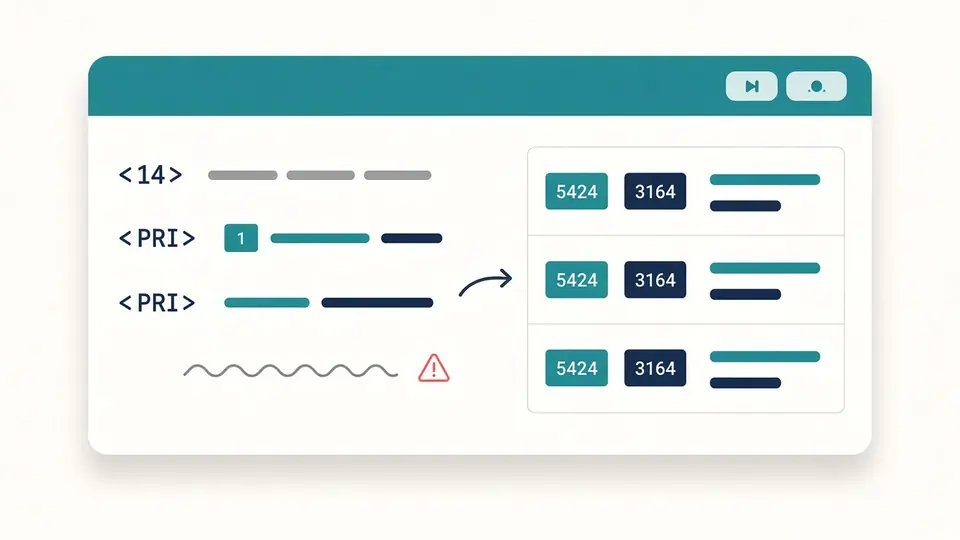
Paste a whole excerpt from journalctl, a firewall, or rsyslog forwarding — RFC5424 lines (`<165>1 …`) and BSD RFC3164 lines (`<34>Oct 11 …`) can sit in the same box. Each row is classified on its own, so you never have to pick one format for the entire paste.

A table of syslog rows showing both RFC3164 and RFC5424 formats parsed from one paste

RFC3164 timestamps show ambiguity, not silent guesses

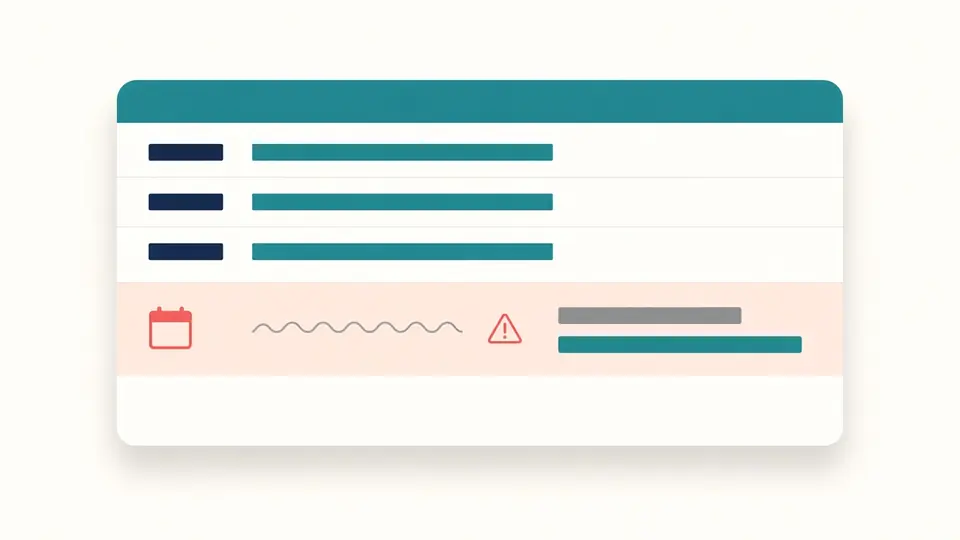
BSD syslog timestamps like `Oct 11 22:14:15` have no year and no time zone. This syslog parser keeps the raw string visible, adds a clear badge, and shows any guessed ISO time in a separate column labeled as an estimate — so you never treat a browser-local guess as the message's real clock.

An RFC3164 row with a badge for missing year and time zone next to the raw timestamp

Three things this syslog parser does beyond one-line viewers

Parse once, filter without re-running, export structured fields.

01

Parse a whole paste on your schedule

Multi-line syslog pastes can be thousands of lines, so parsing runs only when you click Parse syslog (or press Ctrl/Cmd+Enter), not on every keystroke. A Web Worker keeps the tab responsive while PRI, facility, severity, timestamps, and structured data are extracted line by line.

  • Load the built-in mixed example to see RFC3164, RFC5424, structured data, and intentional bad lines without typing
  • Bad lines are collected separately — they do not stop valid messages from appearing in the table
02

Filter facility, severity, hostname, and app-name instantly

After a parse, severity uses the usual syslog-or-worse rule (pick warning and you keep warning through emerg). Facility is a multi-select checklist. Hostname and app-name filters are simple substring matches. All of this re-filters the already parsed rows — no second parse pass.

  • An empty facility selection means no facility filter (all facilities stay visible)
  • Changing filters does not invalidate copy/download until you edit the input or parse again
03

Expand structured data and export flat columns

RFC5424 structured-data elements open inline as key/value tables. Copy or download exports the filtered table as CSV, JSON, or plain text, with structured-data keys flattened as `sdid.param` columns where needed.

  • Copy and download stay disabled while results are stale (input changed after the last parse)
  • Use Undo clear to bring back the previous input, filters, and table after a mistaken clear
Jump to the parser

What you get from each syslog line

Protocol fields, filters, and exports aimed at real triage work.

PRI split into facility and severity names

Every parsed row shows the raw PRI plus numeric and named facility (0–23) and severity (0–7), matching the RFC5424 tables — the same breakdown people reach for a syslog PRI calculator, but on full messages.

RFC5424 structured-data blocks

Multiple `[sdid@enterprise key="value" …]` elements are listed per message and can be expanded without leaving the table.

Four filter dimensions after one parse

Facility multi-select, severity-or-worse, hostname substring, and app-name/tag substring — combined the way network and platform teams actually narrow syslog dumps.

Bad-line list with reasons

Lines that are not syslog (or break PRI rules) stay in a separate list with line numbers and a short reason instead of failing the whole batch silently.

What this syslog parser does and does not do

Local text parsing only — no listeners, no cloud APIs.

No UDP/TCP syslog listener
This tool only reads text you paste. It does not open port 514 or receive live streams from your network.
RFC3164 times are ambiguous by specification
When a BSD-style timestamp has no year or zone, the parser marks it and any guessed ISO time is explicitly labeled as an estimate using your browser's local calendar — not as ground truth from the message.
One paste is capped at 300,000 characters and 20,000 lines
Large exports should be split into batches so parsing stays within the browser worker timeout.
No CEF/SIEM-specific export dialect
Exports are generic CSV/JSON/text tables. Dedicated CEF or vendor SIEM formats are out of scope for this viewer-style syslog parser.

Syslog parser FAQ

Common questions before pasting production syslog into a browser tool.

What is the difference between RFC3164 and RFC5424 syslog?

RFC3164 (BSD syslog) often looks like `<34>Oct 11 22:14:15 host tag: message` with no version field and no year in the timestamp. RFC5424 adds a version number after PRI (`<165>1 …`), ISO 8601 timestamps, hostname, app-name, procid, msgid, optional structured data, and the message. This syslog parser detects the format per line automatically.

How do I decode syslog PRI, facility, and severity?

PRI is the number inside angle brackets. Facility is PRI ÷ 8 (integer), severity is PRI mod 8. The table shows both numbers and standard names (for example `auth` + `crit`). For a single PRI value you can also use dedicated PRI calculators, but here the split happens on every parsed message.

Is it safe to paste syslog into an online parser?

Yes for this tool: parsing runs entirely in your browser tab with JavaScript. No syslog text is uploaded, stored, or logged on a server. Still review messages for secrets before sharing exports from your machine.

Why does RFC3164 show a warning about year or time zone?

The BSD format simply does not include those fields. Showing a guessed full timestamp without a warning would look more precise than the protocol allows, so the raw timestamp stays visible and any filled-in ISO time is labeled as a guess.

Can I mix RFC3164 and RFC5424 lines in one paste?

Yes. Each line is classified independently — typical when old network gear logs RFC3164 next to rsyslog or journald forwards in RFC5424.

Does this replace a syslog server or SIEM?

No. It helps you read and filter text you already exported. It does not collect, index, or alert on live syslog traffic.

Found a syslog line this parser misreads?

Parse your syslog paste now

Paste RFC3164 and RFC5424 syslog lines and get a filterable table in seconds — no upload, no account.

Bookmark this free syslog parser for the next firewall or journalctl excerpt that lands in your inbox.

All parsing happens locally in your browser.