
YAML / TOML / ENV Config

Config converterSee what the target can represent

Choose a supported direction; inspect every rejected value and floating-point notice before exporting.

Config converter

Input

Result

Content is processed in this browser; no input is uploaded.

Options

Type and compatibility report

No type notices to display.

Result is out of date.

Config converter helps when a service expects another configuration format but its values must keep their meaning. A port written as 0080 in an INI file stays text; a JSON number does not silently become an INI string.

This page includes INI to JSON, JSON to Properties, plist to JSON and TOML to YAML. Twelve verified directions share one workbench. Unsupported pairs remain unavailable, so a format name in the menu does not promise arbitrary conversion.

Why use Config converter

Check meaning before moving settings

Locate incompatible leaves

Config converter lists the paths that cannot be represented in the destination. A nested object aimed at Properties is rejected instead of flattened into dotted keys that may collide with existing names.

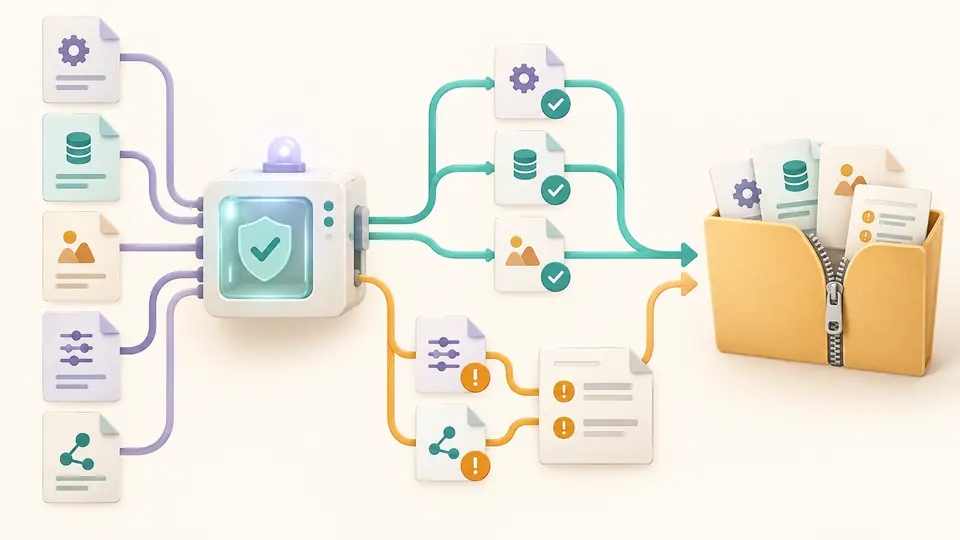
Typed tree leaves pass through a compatible shape filter while rejected paths appear in an amber report.

Keep batch failures visible

Each file receives its own result. A ZIP contains successful conversions and a complete report, including files that failed. A partial batch is clearly labelled instead of appearing fully successful.

Five input files split into three accepted outputs and two reported failures before ZIP packaging.

Choose a direction with known semantics

01

Select the source explicitly

INI starts with a section. Properties uses a flat key map. The tool does not guess a format from its extension or from a colon that could belong to several grammars.

  • Changing the source does not rewrite the input; load its example to try another grammar.
02

Check when conversion runs

Text updates after a 350 ms pause by default. Disable automatic conversion to use the button or Ctrl/Cmd+Enter. Batch mode always waits for an explicit run.

  • Changing a value or option immediately disables export until the current conversion finishes.
03

Read the report with the result

Inspect each rejected path and every binary64 notice. Downloads keep all report entries even when the visible list is paginated. ZIP names receive numeric prefixes to avoid collisions.

  • A batch can have successful files and failures; the report identifies both.

Migration with visible decisions

String-preserving flat formats

INI and Java Properties values remain strings. Leading zeroes, true-looking words and literal dotted keys are not interpreted as numbers, booleans or nested paths.

Typed formats with bounded semantics

JSON and YAML numbers pass through a lossless syntax tree. TOML and plist real values use binary64 and get explicit notices. Integers outside the signed 64-bit range are rejected for TOML and plist.

One report for each batch

Select up to 20 UTF-8 files of one source format. Download a ZIP with successful outputs and conversion-report.json. The numbered output names cannot replace that reserved report.

Exact boundaries before export

Twelve supported directions
JSON converts both ways with INI, Properties, plist XML, TOML and YAML. TOML also converts both ways with YAML. Identity conversions, generic XML, CSV and other pairs are unavailable.
INI is a narrow section dialect
Only section-to-string-map objects are supported. DEFAULT, global keys, repeated sections or keys, indented data lines and multiline values are rejected. Interpolation is disabled; names retain case. Values with edge whitespace cannot be exported faithfully and are rejected.
Properties uses Reader semantics
Uploads decode strictly as UTF-8, not ISO-8859-1. Java escapes and continued lines are read; output escapes non-ASCII characters. Keys stay flat. Duplicate decoded keys fail instead of overwriting, and objects, arrays, numbers, booleans or null are not coerced to text.
plist is XML with a type subset
Date, data and null have no implicit mapping. Binary plist is unsupported. Only the conventional Apple DOCTYPE is allowed; custom declarations and entities are rejected without fetching resources. Invalid XML characters fail; carriage returns are emitted as character references.
Numbers, dates and YAML syntax
TOML dates are rejected. Every TOML floating value is reported as binary64, with no promise to retain the original spelling. Target real overflow and underflow to zero fail. YAML accepts one document with core types, no aliases, merge keys or custom tags.
Limits and normalization
Each input has at most 500,000 characters and each uploaded file at most 2 MB; a batch has at most 10 MB. Depth is 100 and the node budget is 50,000. Comments, whitespace and quoting style are not preserved. These are data conversions, not source edits. Each output is limited to 2,000,000 characters.

Config converter questions

Why does JSON with arrays fail when exported as INI?

INI here represents an object whose values are section objects containing strings. Arrays and deeper objects cannot fit that structure, so their paths are reported and no result is exported. Choose JSON or YAML when your consumer needs arrays.

Can INI values stay strings instead of becoming numbers?

Yes. INI and Properties never infer value types. The characters 001 and false remain strings, while JSON input must already use quotes if the target requires strings. Config converter does not guess a conversion policy for you.

What happens to comments during conversion?

Comments, spacing and quote style are not carried into the new grammar. The normalization notice calls this out. Keep the original file if explanatory comments matter; converting back does not reconstruct them.

Why can a plist containing binary data fail to become JSON?

A plist data element is a byte sequence, not a JSON string. This version rejects both data and date elements with their paths, rather than inventing base64 or date-text conventions. Only the documented XML subset is accepted.

Can several configuration files be converted and downloaded together?

Yes. Batch mode takes up to 20 files with one chosen source format. Run it manually, inspect partial failures and download the ZIP. Successful outputs and the full per-file report are included, while failed files have no misleading output.

Need another supported case?

Use Config converter with a real sample

Config converter keeps the source available while you check destination constraints. Start with one file, then apply the same selected direction to a batch.

Review the consumer’s format contract before replacing a configuration.