IP & Network

IP converter

One value per line. Select the input format; every equivalent representation appears together.

IP converter

Values, one per line

Conversion report

Conversion stays in this browser; entered addresses are never queried.

Conversion options

Network byte order; unsigned integers. Address mode detects IPv4 or IPv6; numeric modes use the selected family.

100 nonempty lines · 65,536 UTF-16 units total · 256 per line. JSON includes invalid rows.

Input or options changed. Convert again before exporting.

Use the IP converter when a database stores an integer but a log shows a dotted or colon-separated address. Explicit format and address-family choices remove the guesswork: the number 1 can mean 0.0.0.1 or ::1. Compare both forms without changing the source records.

Why use this IP converter

Keep all 128 bits intact

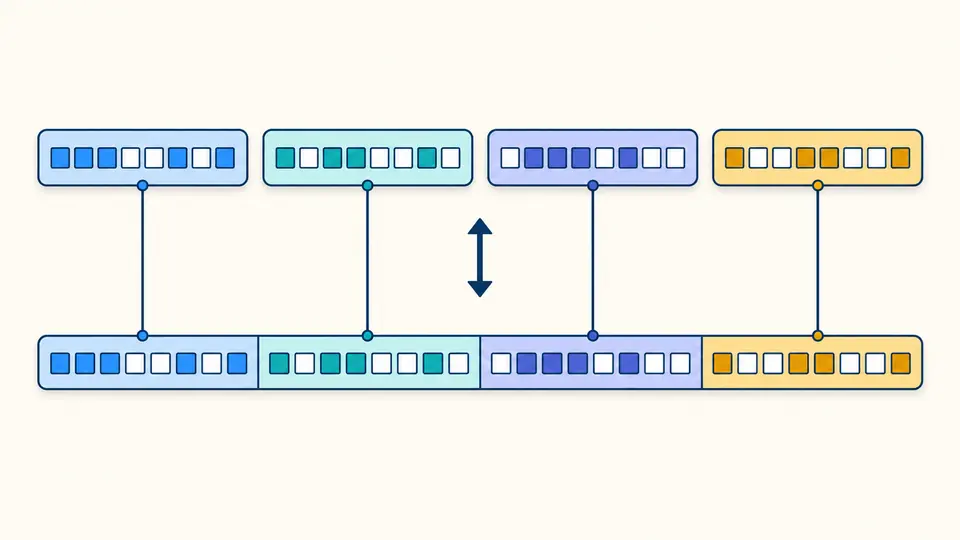
The IP converter calculates with exact integers. Decimal, hexadecimal and binary results describe the same network-order bits, even above JavaScript’s safe integer limit. JSON stores these values as strings, so another program can read the exported digits without rounding.

Four colored byte groups align with a continuous bit strip and an equivalent compact value.

Recognize equivalent IPv6 spellings

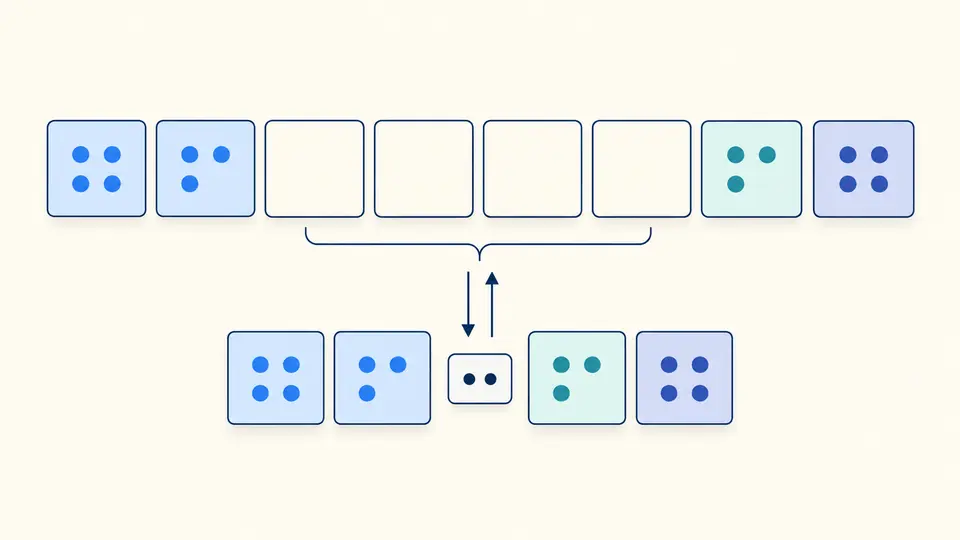
An expanded address has eight four-digit groups. The compressed result removes group-leading zeros and shortens the longest zero run, using the leftmost run on a tie. Both appear in the report; the original spelling remains available for comparison.

Eight IPv6 groups connect to a shorter row where a consecutive run of zero groups has collapsed.

Choose how the input should be read

01

Choose a format before interpreting digits

Address mode recognizes IPv4 and IPv6 text. For integer, hex or binary input, select both the format and the 32-bit or 128-bit family. The family control is inactive in address mode; it does not constrain mixed address batches.

02

Check the failed rows as well

Blank lines do not become entries, but later physical line numbers stay intact. One invalid line does not stop the rest. The first 50 rows are shown initially; Show more reveals the remainder while exports always retain every row.

03

Control when the report refreshes

Automatic conversion waits 350ms after an edit. Turn it off to use Convert or Ctrl/Cmd + Enter. Edits disable old exports immediately. Examples and Clear show a replacement preview; Undo restores the prior input and report together.

Representations you can compare

IPv4 to integer without signed overflow

Four decimal octets map to an unsigned 32-bit value in network byte order. For example, 192.0.2.1 becomes 3221225985, not a negative signed integer. Reverse conversion uses the selected numeric format and rejects out-of-range values.

IPv6 compression and expansion

IPv6 accepts valid shortened and full forms, including a dotted IPv4 tail. Output is lowercase, and one zero group is never compressed on its own. The all-zero address becomes ::. The report also includes fixed-width hex and 128 binary digits.

Mapped addresses with an explicit boundary

IPv4 generates a ::ffff: mapped representation. An IPv6 value inside ::ffff:0:0/96 exposes its embedded IPv4; other IPv6 values do not. IP to binary and decimal conversion still work for ordinary IPv6, without inventing an IPv4 counterpart.

What validation does and does not mean

Bare addresses, no hidden extraction
Do not include URLs, domains, ports, brackets, CIDR prefixes or zone IDs. Outer whitespace is trimmed per line; internal whitespace fails. A valid trailing IPv6 group is treated as address data, never guessed to be a port.
Strict dotted decimal
IPv4 requires four octets between 0 and 255. Leading zeros such as 0177.0.0.1, shortened IPv4 and mixed or octal notation are rejected. Hex and binary belong in their explicit numeric input modes.
Unsigned numbers in network byte order
Numeric input accepts digits only, with optional 0x for hex or 0b for binary. Signs, fractions, exponent notation and separated byte groups are rejected. No little-endian byte swapping is performed.
Syntax is not a connection test
The IP address converter does not resolve DNS, ping a host or identify its location. A valid address can be unreachable. Mapped notation does not enable IPv6 connectivity, NAT64 or a tunnel, and arbitrary IPv6 cannot be reduced to IPv4.
Bounded input, complete evidence
The limit is 100 nonempty lines, 65,536 UTF-16 units overall and 256 per line. Batch-limit failures block export; an overlong individual line stays as an error in the report. There is no file import, filtering, sorting or deduplication.

IP converter questions

How do I convert an IP address to decimal?

For dotted IPv4, each octet is a base-256 digit: a×16777216 + b×65536 + c×256 + d. Address mode displays that unsigned decimal result. To go back, choose Decimal and IPv4; 3221225985 reconstructs 192.0.2.1.

Can I convert an IPv6 address to a number?

Yes. IPv6 is a 128-bit unsigned value. This tool uses BigInt throughout and exports decimal digits as a string. Keep that string intact when importing the JSON; converting it to a floating-point Number can lose precision.

What is the valid range for an IP integer?

IPv4 accepts 0 through 4294967295. IPv6 accepts 0 through 340282366920938463463374607431768211455. The selected family determines the limit, so small values can still be interpreted as IPv6.

Can octets have leading zeros?

Not in dotted IPv4 here. An octet must be 0 or start with a nonzero digit. Some older parsers interpret a leading zero as octal, which is precisely the ambiguity this strict validator avoids. Leading zeros in IPv6 hexadecimal groups are accepted.

Does my address ever leave my browser?

Address conversion runs in this browser, with no lookup or request to the entered address. Copy and Download act only when you select them. A local syntax result does not report whether that address exists or responds.

Found an address representation we should examine?

Check another address

The IP converter gives you one report for spelling, bits and exact values. Select the intended numeric family before comparing a stored integer with an address.