JSON tools

jq playgroundfrom a filter to a working command

Run real jq on JSON or text. Choose an input mode, inspect stdout and keep the exact program for your shell.

jq playground

JSON / text input

jq program

Result

Preview is displayed in 5,000-character blocks. Copy and download include the complete result.

Input and programs stay in browser memory; no history is saved.

Allowed: -c -r -j -S -a -e (combined short flags and long aliases). Select -s/-R/-n using the mode control.

jq 1.8.2 · local WebAssembly · manual execution

Result is out of date; copy and download are disabled.

POSIX shell only. Save the input as input.json first; copied commands contain no input data.

The jq playground helps when an API response needs a smaller shape before it reaches a script. Test select conditions, map fields or build a new object while keeping the original input available.

A jq online session can produce several values, one array or no output at all. This jq filter tester keeps that distinction visible; a jq query tester should not silently wrap every result in an array.

Why use this jq playground?

Several outputs are not one array

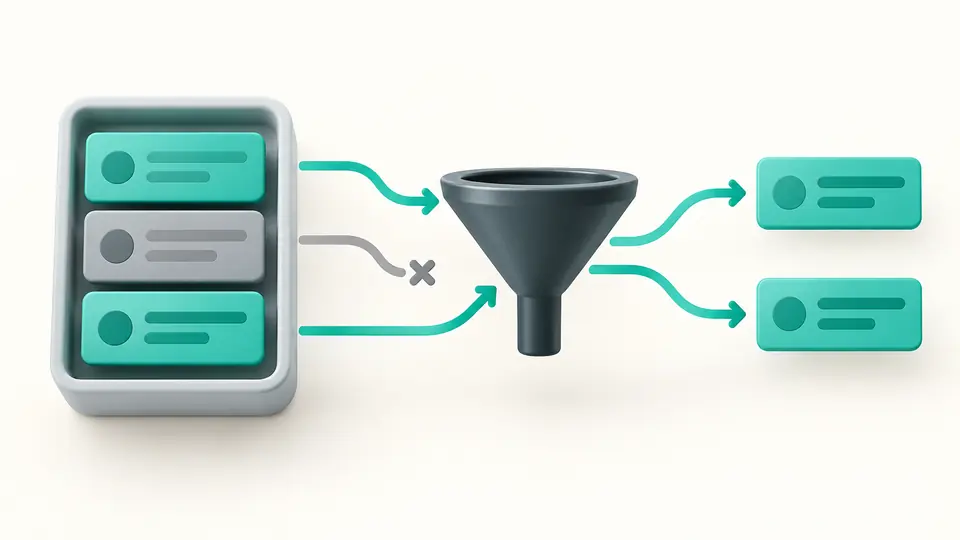
A filter such as .people[] | select(.age >= 18) | .name emits a separate string for each adult. The preview retains each output and its newline so you can see what the next process will actually receive.

Three records pass through a filter; two matching records emerge as independent results.

Collect a stream deliberately

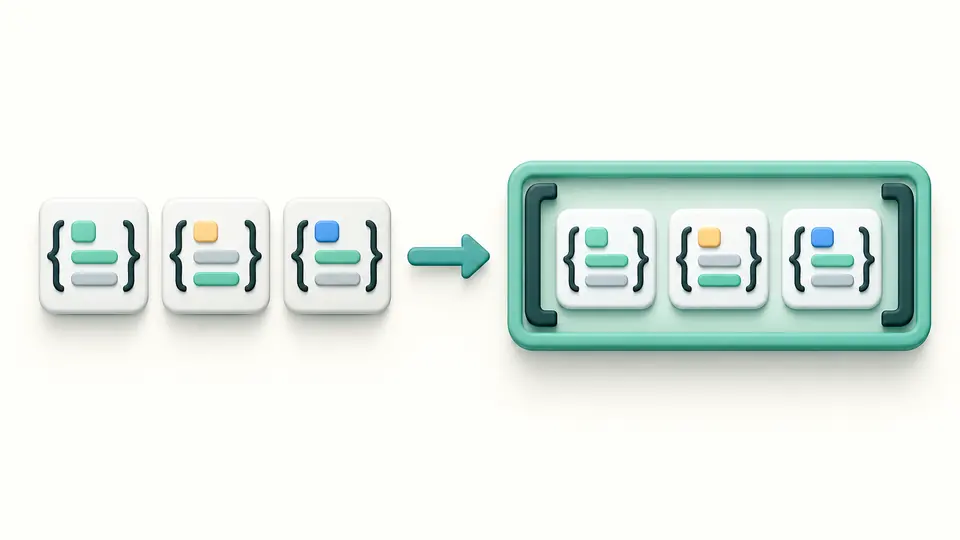
The jq playground applies -s before evaluating your program, collecting all JSON inputs into one array. This differs from wrapping a filter in brackets, which collects that filter’s outputs for each current input.

Three separate JSON objects are collected inside a single array container.

Choose the input contract before running

01

Separate JSON streams from text

JSON mode accepts consecutive JSON values. Slurp collects those values; raw mode reads text by line, while raw plus slurp reads one entire string. Null mode starts with null, but input and inputs can still read the supplied data.

02

Preview replacements and run explicitly

A file, sample or clear action first shows a preview. Apply replaces input, program and settings as shown; one undo restores the previous result as well. Run with the button or Ctrl/Cmd+Enter. Any edit makes export unavailable until another run.

03

Check the exit code before exporting

All engine exit codes are displayed. Nonzero codes disable export, even when -e merely reports false, null or no result. Remove -e and rerun when suitable. The POSIX command expects the same data saved in input.json.

Filters, transformations and real streams

Selection and mapping

Use select to retain records and map to produce an array of transformed items. The sample compares numeric ages and builds objects with an adult boolean; strings containing digits remain a different JSON type.

Full jq program syntax

The jq 1.8.2 WASM engine handles pipes, reduce, def, recursion, try/catch and regular expressions. It is not a JavaScript imitation of common filters. File modules and extra CLI file arguments are not exposed.

Text and formatting flags

Use -r for raw strings, -j to omit separators, -c for compact JSON, -S for sorted keys and -a for ASCII escapes. Short combinations and the corresponding long aliases are accepted; other flags are rejected.

Exact stdout with separate diagnostics

Whitespace, a leading BOM and NUL characters remain in the exported text. debug and stderr output appear separately. The preview expands in 5,000-character blocks; an accepted export contains the complete result.

Engine behavior and finite execution

Bounded input and execution
Input and files are limited to 500,000 UTF-8 bytes; programs to 8,000 bytes. Output options have a 256-character limit. Loading allows 15 seconds, then execution has a 3-second budget. Stop terminates the worker.
Memory and output budgets
WASM linear memory has a hard 256 MiB maximum; this is not the browser’s total memory. stdout and stderr together stop at 2 MiB before buffer growth. A time, stack, memory or output failure does not provide an exportable partial result.
Numbers and duplicate keys follow jq
No JavaScript JSON parsing occurs before jq. Unmodified large numeric literals can retain their decimal spelling; arithmetic uses floating point and may round. Duplicate keys follow jq’s last-key behavior. Quote identifiers that must remain exact.
Exit codes are not a type check
With -e, false/null normally returns 1 and no output returns 4. halt_error can use those same codes. For this reason every nonzero exit disables all export actions while stdout and diagnostics remain inspectable; the preview may be partial.
A playground, not a terminal
There is no --arg editor, --stream, --seq, module upload, filesystem browser, URL fetch or data-bearing share link. Commands use POSIX quoting, not PowerShell or cmd syntax. Environment-dependent jq builtins see the WASM environment, not your machine.

jq playground questions

How do I filter an array of JSON objects with jq?

For the sample use .people[] | select(.age >= 18) | .name. The [] iterator emits each record, select keeps matches and .name extracts one field. Wrap the full expression in brackets only if the next step needs one array.

How do I remove double quotes from jq output for Bash?

Add -r in Output options. It removes JSON quotes from string results but does not strip spaces inside the string. Objects and arrays are still serialized as JSON. Use -j only when you also want to remove output separators.

How do I collect select results into an array?

Write [.people[] | select(.age >= 18)]. The brackets collect all values emitted by the enclosed filter. An unmatched selection then becomes [] rather than an empty stream, which can matter to the next command.

How do I join multiple JSON objects into an array?

Choose Collect JSON (-s), then run . to inspect the array. For input arrays that need concatenating, -s with add combines the arrays. This is different from merging objects, where duplicate keys need a deliberate policy.

How do I convert key = value pairs to JSON?

Choose Text lines (-R) and start with split("=") | {(.[0]): .[1]} for simple lines. Trim key and value spaces as required. A value containing another equals sign needs different splitting logic; do not assume every configuration format has the same escaping rules.

Found a query this tool handles incorrectly?

Try a small example first

Use the jq playground to compare the multi-result example with map, then move a checked program into your own script.