01
Automatic or manual
Automatic mode updates the result 400ms after input or options change. Turn it off to show the run button, or use Ctrl/Cmd+Enter. Outdated results cannot be exported.
JSON tools
Automatic mode updates the result 400ms after input or options change. Turn it off to show the run button, or use Ctrl/Cmd+Enter. Outdated results cannot be exported.
These four actions process the input as text. Use the result as input to chain actions; Undo restores the previous state.
Your inputs stay in this browser tab. No upload or persistent storage.
A one-line API response hides the field you are trying to inspect. This JSON formatter doubles as a JSON beautifier: it opens up nested objects while keeping long IDs and decimal spellings intact. You can check the hierarchy before changing anything.
Use the JSON minifier for compact payloads and the JSON editor for targeted branch replacements. Formatting does not automatically sort or clean your data: those decisions have a separate preview.
A missing property and an explicit null can mean different things to an API. The cleanup preview shows the proposed document beside the current output. Null and empty-value removal applies only to object properties; array elements keep their positions. An empty container created by removing children can also disappear from its parent object.

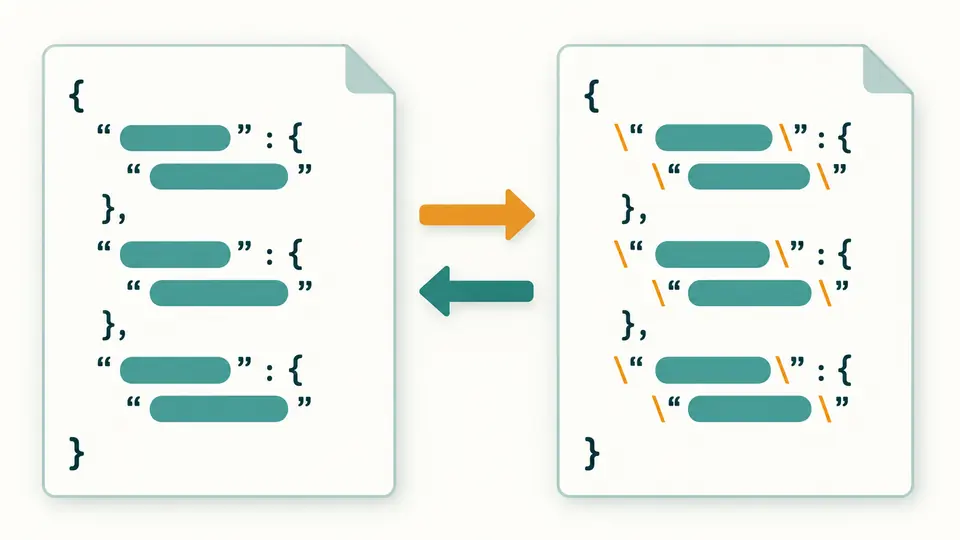
Logs often contain a JSON document inside a string. Escape adds one layer of backslashes without outer quotes; Unescape removes one layer, including surrounding quotes when provided. Compare both columns before using the result as input. Unicode conversion changes character spelling while keeping the layout and long numeric IDs.
Automatic mode updates the result 400ms after input or options change. Turn it off to show the run button, or use Ctrl/Cmd+Enter. Outdated results cannot be exported.
In tree view, expand a container and choose Edit. Replace a value or an entire branch with valid JSON; strings need double quotes. Saving updates both editors and keeps one undo snapshot.
Choose sorting, null removal or empty removal, then preview. Copy and download still refer to the current result until you apply the preview. Undo restores the state before the last applied edit or cleanup.
Numbers remain source tokens: 900719925474099312345, 1.00, -0 and exponent notation are emitted without converting them to floating point. This protects identifiers as well as precision-sensitive samples.
Expand objects and arrays on demand. Each container reveals 50 children at a time, with a button for more. Edit uses the selected path, so a key containing a slash or tilde still targets the right value.
See Unicode character count, UTF-8 bytes, maximum node depth and object-key count for the current result. Multibyte text explains why bytes may exceed characters; the root has depth zero.
Escape quotes, backslashes and control characters, or decode one JSON string layer. Convert non-ASCII characters to Unicode escapes and back, including emoji surrogate pairs. Text results remain copyable and downloadable even when they are not JSON documents.
No account or payment is required. The JSON formatter, the tree editor and the export controls are all free to use.
Yes. Processing stays in the current tab. There is no saved document history or shareable payload URL; copy and download are explicit actions.
It reports syntax failures with a line and column, but does not guess missing quotes or remove comments. Correct the source and run again.
Format and Minify check JSON syntax and duplicate keys before producing output. It does not validate against a JSON Schema or your application’s field requirements.
Replace a tree branch, inspect output statistics, or preview sorted keys and removal of empty object properties. Converting to another data format is a separate task.
Found an unexpected result?
Load the example to see how the JSON formatter handles indentation, compact output and a cleanup preview.