JSON tools

JSON mergechoose what survives

Choose object depth, precedence and array rules, then inspect the result before exporting.

JSON merge

Left JSON input

Right JSON input

Merged result preview

The editor shows a limited preview. Copy and download include the complete accepted result.

Both documents stay in browser memory; inputs are not uploaded or saved.

Deep mode combines nested objects. Shallow mode combines root fields but chooses whole nested objects; paired arrays still use the array strategy. Null is a value, never a deletion.

Concatenation keeps every item, left then right. Key matching keeps left order and appends right-only IDs; matched records combine deeply or are chosen whole in shallow mode.

Result is out of date; copy and download are disabled.

Use JSON merge when configuration files or API records overlap but their nesting rules matter. A replacement can remove fields that exist only inside the losing object; a recursive combination can retain them. The conflict list makes these decisions visible before you reuse the result.

To merge JSON objects, first decide whether nested fields should combine or remain whole. Deep merge JSON and shallow merge JSON are different choices, and neither specifies a universal array policy. This workbench keeps those decisions separate.

Why use JSON merge?

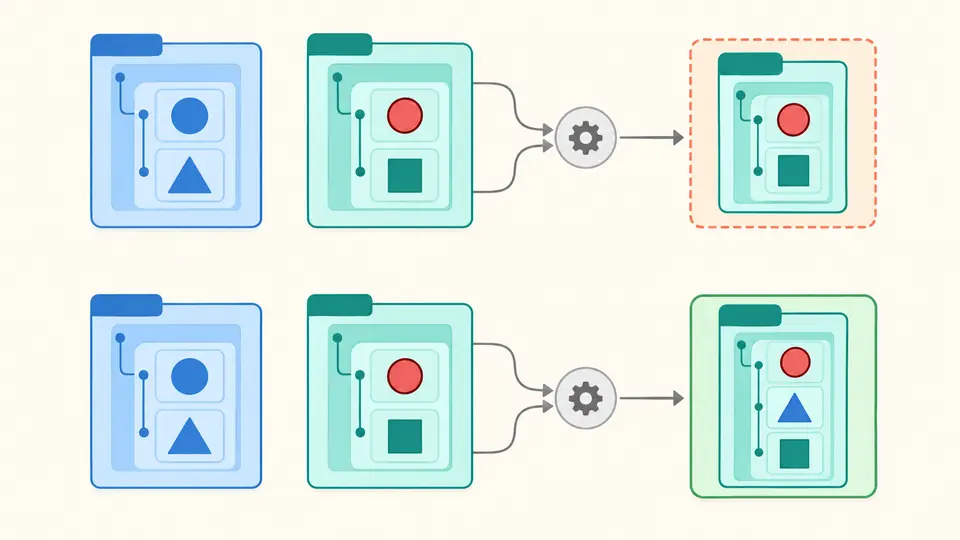
See the cost of replacing a subtree

JSON merge reports the location where a value is chosen. Replacing an object or an array produces one container conflict; recursive object merging reports only the conflicting descendants. Equal values and fields found on only one side are not conflicts.

Two nested configuration trees show a whole branch replacement beside a recursive combination that retains separate leaves.

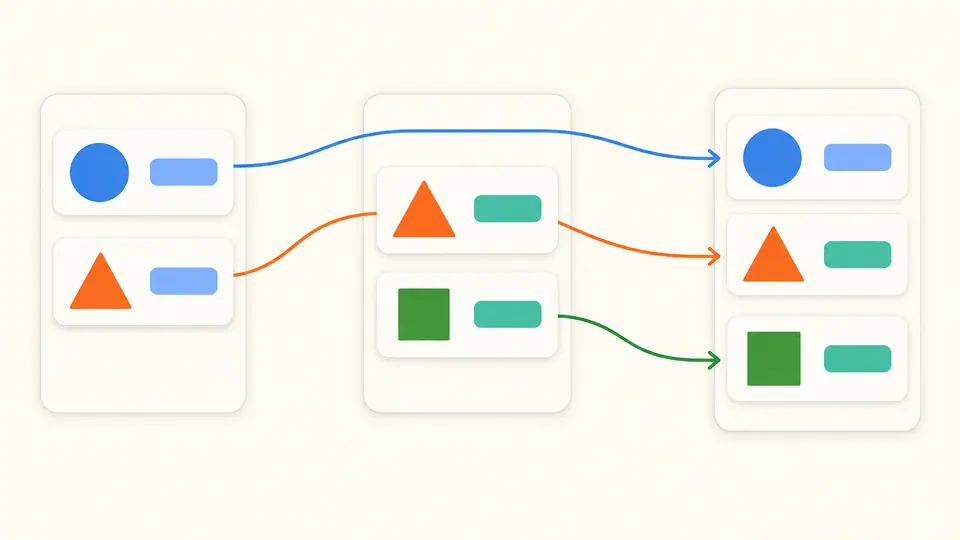
Match identities without losing their source

JSON merge can merge JSON arrays by key while retaining exact numeric identities. Left and right source paths remain separate from the result path, so a record matched across different array indexes still points back to the correct original value.

Matching colored identity badges connect records at different input positions to an output that keeps left order and appends a new record.

Make the merge rule explicit

01

Separate depth from array handling

Shallow mode combines root object fields but chooses each colliding nested object as a whole. Paired arrays still use Replace, Concatenate or Match by key. Deep mode recursively combines objects; the array choice remains independent.

02

Check identities before choosing key matching

The key is one nonempty direct property name, not a path expression. Every record in a paired array needs a unique string or number ID. A missing ID or two mathematically equal numeric IDs in one array fails the whole operation.

03

Read source paths before reusing the result

Press Ctrl/Cmd+Enter to run. Review both source paths for matched records, then copy the full output. To combine another document, preview the result as the left input and apply it; Undo restores both sources, settings and the previous output.

Control collisions and array order

Two object merge depths

Deep mode preserves unique fields throughout paired objects. Shallow mode preserves unique root fields but replaces a colliding nested object with the preferred whole object. Arrays can still combine in shallow mode; this is the explicit behavior of this tool.

Three independent array rules

Replace chooses the whole preferred array. Concatenate always appends the right sequence to the left, including duplicates. Key matching preserves left record order and appends right-only identities; priority does not reverse these sequences.

Exact numbers and literal keys

Numbers never pass through floating-point parsing. Numeric identity compares mathematical values, including huge exponents, while preserving the selected spelling in output. Object keys retain source order, including numeric-looking, empty and __proto__ keys.

Bounded, traceable conflict records

JSON merge conflicts include a result Pointer and two independent source Pointers. Each source value has a clearly limited preview. Replacing a whole container produces one decision, rather than pretending every descendant was merged. The complete output remains separate from this report.

Defined boundaries, no guessed semantics

A custom merge, not a patch standard
Null remains a value; it never removes a key. Any valid JSON root is accepted. Different types are selected whole using the priority. This tool does not generate or execute RFC 7396 Merge Patch or RFC 6902 JSON Patch, and does not wrap conflicts into arrays.
Strict input and output limits
Each input and the formatted output may contain at most 500,000 characters, 50,000 nodes and depth 100. Numeric tokens allow 1,000 characters. Comments, trailing commas, BOM and duplicate object keys fail. Combined output is validated again; there is no downloadable partial success.
Key matching rejects ambiguity
The ID field name must be nonempty and direct. Only paired arrays entered by the merge are validated, including a pair with one empty array. One-sided arrays are copied unchanged. Every checked item must be an object with a unique string or number ID; null, missing or duplicate IDs fail.
Equality and conflict counts are specific
Object key order is ignored for equality; array order matters. Numbers 1, 1.0 and 1e0 compare equal, as do -0 and 0, but strings do not equal numbers. Equal atomic values keep the preferred original token. Shallow keyed records are chosen whole; deep keyed records combine fields.
Budgets and unsupported operations
At most 5,000 conflicts are accepted. Cumulative traversed paths and saved value previews each have a 2,000,000-character budget; even conflict-free paths count. There is no index-based array merge, deduplication, nested ID expression, file import, URL fetching, automatic sorting or per-conflict editing. Process two pasted documents at a time.

JSON merge questions

How does a deep merge differ from a shallow merge?

JSON merge combines nested object fields in deep mode. Shallow mode combines root fields but chooses a colliding nested object whole, so fields inside the losing object can disappear. In this workbench, paired arrays still follow their selected strategy in either mode.

Which input takes precedence when keys collide?

Right wins by default; choose Left wins to reverse the choice. Only unequal values that need a whole-value decision produce conflicts. Object fields found on only one side survive, and priority does not change concatenation direction or keyed array order.

What options are available for combining arrays?

Replace, concatenate and match records by key are available. Concatenation preserves duplicates. Key matching requires unique direct string or number IDs in each paired array; missing or repeated IDs reject the operation instead of silently dropping records.

Can I combine a third document with the merged result?

Yes. Preview the result as the left input, inspect the replacement count and apply. Paste the third document on the right, choose the rules and run again. This is sequential two-input processing, not a batch file import. Undo restores the last applied replacement.

Does merging send my JSON to a server?

No. The merge engine works in browser memory and exports only when you choose copy or download. Inputs are not persisted. Refreshing the page starts again from the example, so save the full accepted result before leaving if you need it.

Found an unexpected merge decision?

Review the next collision

Try JSON merge with the example, switch to key matching and compare the source paths before exporting your complete result.