JSON tools

JSON Pointerone address, one exact value

Locate a value, inspect address tokens or generate an address with explicit encoding rules.

JSON Pointer

JSON document

Pointer text

Result preview

Copy and download contain the complete primary result: selected JSON value, token array, generated Pointer or transformed token. The reference details below are not included.

Inputs stay in browser memory and are not uploaded or saved.

Plain: empty input selects the root; / selects an empty key. Fragment: include # and use UTF-8 percent encoding. Spaces and line endings are significant; inputs are not trimmed.

Run again to refresh the result. Copy and download are disabled while it is out of date.

Use JSON Pointer to check the exact location named in an API response, schema error or patch path. A syntactically valid address may still point to a missing member. This workbench separates parsing an address from resolving it against a document, so these failures stay distinct.

A JSON Pointer tester helps distinguish the root, an empty property name and an array index. The JSON Pointer generator accepts explicit string tokens; the JSON Pointer resolver reads one value without editing its source. JSON Pointer escape and JSON Pointer unescape operate on a single token, keeping address syntax separate from JSON string escaping.

Why inspect a JSON Pointer?

Separate three easily confused addresses

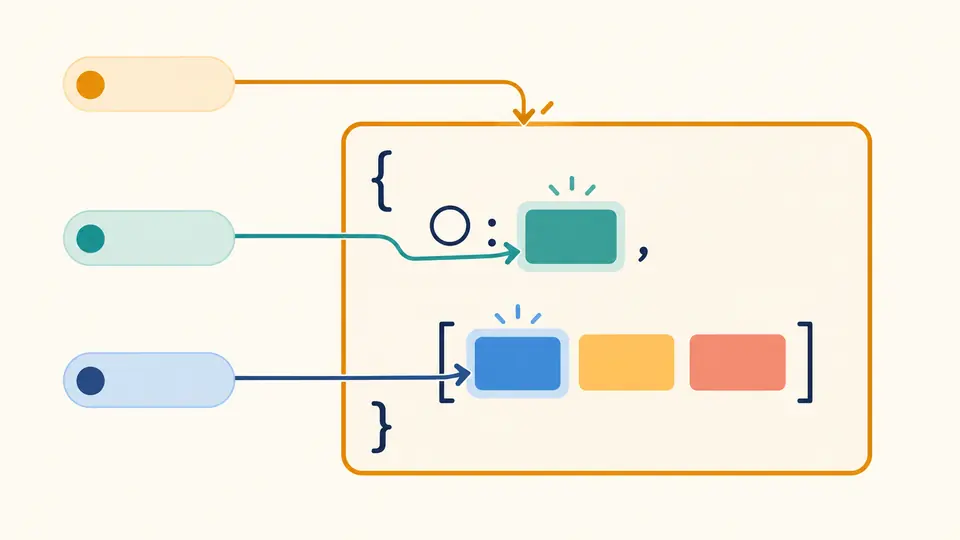
JSON Pointer uses an empty string for the entire document and / for a property whose name is empty. A token such as 0 becomes an array index only when the current value is an array. The same token can also be an ordinary object key.

Three colored pointers identify the outer document frame, a value under an empty circular key marker, and the first array item.

See each encoding layer

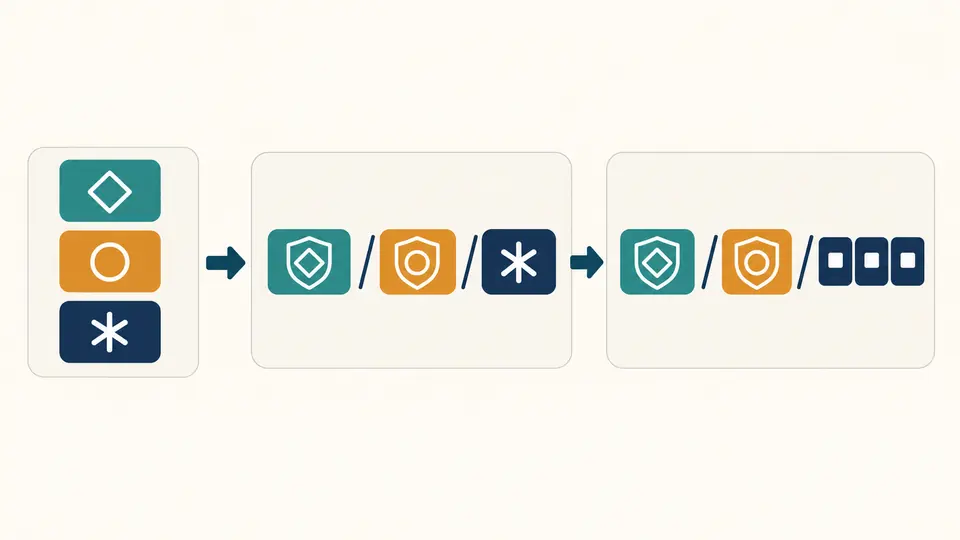
JSON Pointer first escapes each token, then joins tokens with slash separators. URI fragment output adds a separate UTF-8 percent-encoding layer. The decoded token list shows why one escaped slash belongs to a key while a path separator moves to another level.

Geometric tokens move through shielding for token escaping and groups of small byte blocks for URI encoding.

Choose the operation before entering data

01

Parse an address or locate its value

Parse needs only Pointer text and a representation. Locate value also requires a strict JSON document. Choose plain or URI fragment explicitly; the tool does not infer the format from #. Press Ctrl/Cmd+Enter or Run to process the current inputs.

02

Build from tokens or transform one token

Generate takes a JSON array of strings: [] addresses the root and [""] addresses an empty key. A number such as [0] is rejected. Escape and Unescape take one raw or encoded token; they ignore the representation setting and do not use the JSON document.

03

Review and export the complete result

The primary result is selected JSON, a decoded token array, a generated address or transformed token. Copy and download export this full result, excluding the reference details. Example and Clear preview their replacement before applying it; Undo restores inputs, settings and the previous result.

Inspect addresses without altering data

Five focused operations

Parse checks syntax without requiring the target document. Locate value walks the actual document. Generate joins explicit string tokens, while Escape and Unescape transform one token. Unrelated source text is ignored outside Locate value.

Explicit plain and fragment forms

Plain text preserves %, +, dots, backslashes, spaces and line endings literally. A fragment starts with # and requires valid UTF-8 percent bytes for spaces and non-ASCII characters. Percent decoding happens once before splitting the path; token decoding happens once afterward.

Exact JSON values

The selected subtree keeps JSON types, original object key order and numeric spellings, including large integers, precise decimals, large exponents and -0. Missing members produce errors; a successfully selected null, false, zero or empty string remains a real value.

Visible reference details

JSON Pointer results include decoded tokens and plain and fragment reference forms when available. JSON string display makes empty text and control characters visible. Those display quotes are not part of the raw address. Each detail preview is limited to 5,000 characters.

Addressing rules and processing limits

Root, empty keys and literal matching
Nonempty plain addresses begin with /. Leading, consecutive and trailing empty tokens are preserved; no input is trimmed. Object keys must match exactly, with no case folding, Unicode normalization or prototype lookup. Do not add outer JSON quotes to plain Pointer input.
Single-pass token decoding
Escape changes ~ to ~0 and / to ~1. Unescape rejects raw /, a lone ~ and unknown sequences such as ~2. It decodes ~1 before ~0, exactly once: ~01 becomes literal ~1, never /. Token escaping neither escapes JSON quotation marks nor decodes percent bytes.
Strict fragments and Unicode export
Fragments are fragment text, not full URLs. Invalid UTF-8, raw spaces, non-ASCII characters and an extra raw # are rejected. A lone UTF-16 surrogate remains intact in a plain result, but its URI form is unavailable and raw copy/download are disabled to prevent replacement. Parse can export a safely JSON-escaped token array; selecting a JSON value also exports escaped JSON. Explicit fragment generation fails on such a surrogate.
Array positions and read-only scope
Array indexes are 0 or decimal digits without leading zeroes and must be in range. The - token cannot read a nonexistent element after the array; an object key named - can still be read. Traversing beyond a scalar fails. No JSONPath filters, patch application, missing-node creation, full-tree listing, file import or URL fetching is provided.
Bounded input and complete output
Each relevant input allows 500,000 characters. The primary result plus reference metadata share a 500,000-character budget, although only the primary result is exported. Tokens and plain paths allow 100,000 characters each, with at most 1,000 tokens. JSON permits depth 100, 50,000 nodes and 1,000-character number tokens. Comments, trailing commas, BOM and duplicate keys fail. Any exceeded budget rejects the entire operation; stale results cannot be exported.

JSON Pointer questions

How do I reference a key that contains a slash?

Within one key, encode a slash as ~1. The token a/b therefore becomes a~1b, and its plain address is /a~1b. Passing /a/b instead selects a field b inside a. Use Escape for the token alone, or Generate with ["a/b"].

How do I reference a key that contains a tilde?

Encode a literal tilde as ~0. A key m~n becomes /m~0n. Unescape performs one decoding pass, so ~01 becomes the literal text ~1. Repeating that pass would change the key and is deliberately avoided.

What does an empty pointer select?

Empty plain input selects the entire JSON document; fragment # has the same meaning. A slash is different: / selects an empty object key. Generate uses [] for the root and [""] for that empty key. A document whose root is null can also be selected successfully.

Why does my pointer fail on an array?

Array indexes must be canonical nonnegative decimal integers within the array bounds. Values such as 01, -1, +1 and 1.0 are rejected. The - token has no existing value to read. These array rules do not prevent an object from having a literal key named 01 or -.

Can I use it to modify the document?

No. This tool checks addresses, generates them and reads existing values. It does not apply JSON Patch operations or create missing nodes. You can inspect a patch path here, but any actual modification must take place in a separate patch workflow.

Found an address that behaves unexpectedly?

Check the next address

Try JSON Pointer with the example, compare the root and empty-key tokens, then copy the complete selected value or generate your own address.