HTTP & Request Debugging

User Agent Parser

One User-Agent per line. Inspect declared browser and device fields, including values the rules cannot determine.

User Agent Parser

User-Agent input

UA strings are processed in your browser; no input is sent or saved.

Parsed results

Loading parsing rules…

Parsing options

One UA per line · 500 records · 500 characters per UA · 512 KiB input.

Rule matches describe the string. Unknown does not mean desktop; versions may be frozen.

Parser: ua-parser-js 1.0.41 · Bundled rules: 1.0.41

Loading parsing rules…

A support ticket may contain Chrome, Safari and Mozilla in the same line. The User Agent Parser helps read those compatibility tokens without treating every browser name as a separate client. Start with the Edge example to see why token order matters.

For a small log sample, keep each UA on its own line. Repeated requests remain separate, and the source line stays attached to the result. A blank device field is useful evidence: the string did not give these rules enough information.

Why use this User Agent Parser

Separate claims from missing information

The User Agent Parser exposes eleven fields, with unknown values shown explicitly. A recognizable Windows browser can still have an unknown device type. Review browser detection alongside the original user agent string before choosing a reproduction environment.

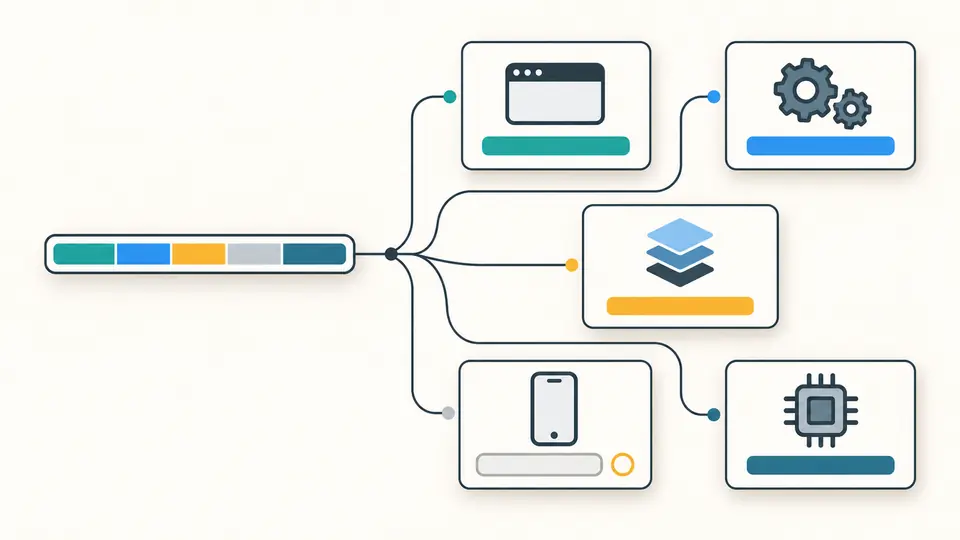
A segmented input line branches into browser, engine, operating system, device and processor cards, with an empty device slot.

Keep the trail back to the source

A batch report retains original lines, normalized UA values and line numbers. Empty lines are counted separately; duplicate records stay in order. A custom client with no matching fields remains visible between recognized records instead of disappearing from the report.

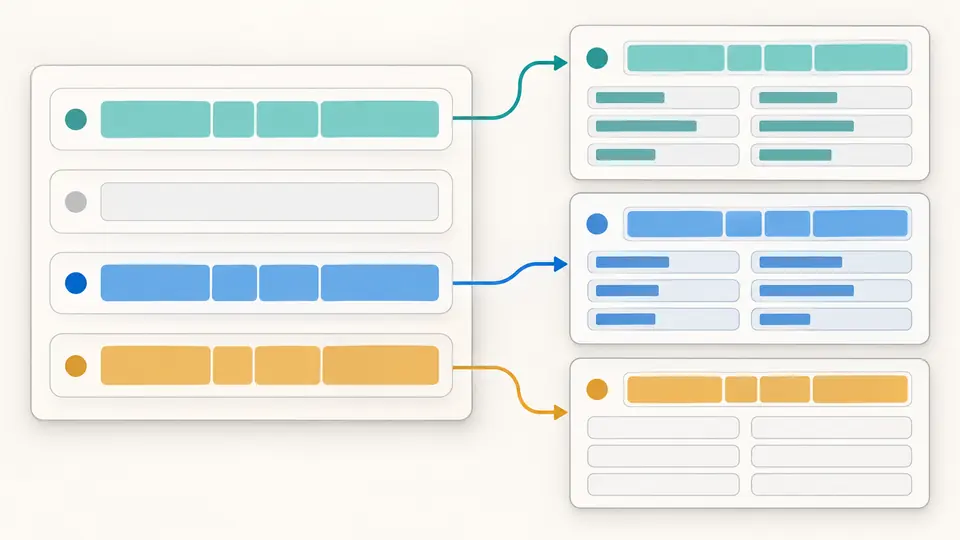
Several input rows connect to matching result cards; an empty row is skipped and an unrecognized row keeps empty fields.

Read a sample without losing context

01

Paste values, not an entire access log

A line may contain the UA alone or start with User-Agent: in any letter case. Only that prefix and surrounding whitespace are removed for parsing. Quotes, JSON escapes, IP addresses and timestamps are not extracted or repaired.

02

Decide when to refresh

Automatic parsing waits 350 ms after edits. Turn it off to inspect a draft, then use Parse or Ctrl/Cmd+Enter. Editing immediately disables export of the previous report. Changing the result view does not start a new parse.

03

Review replacement and export scope

Current browser, examples and Clear open a preview before replacing input. Undo restores the previous input and report. Show 50 more expands the visible records or JSON lines; copying and downloading always includes the complete current report.

What each record carries

Browser, rendering engine and operating system

Inspect the browser name, full reported version and major version separately from the rendering engine and OS. Edge can include Chrome and Safari tokens while resolving to Edge. Reported version numbers are preserved even when a browser has frozen them.

Device and CPU clues

Device type, vendor, model and CPU architecture are separate fields. A mobile type does not imply a known model; a recognized operating system does not prove a desktop device. Missing values are null in JSON and listed in unknownFields.

Traceable normalization

Each entry includes raw, ua and its one-based source line. The parser never rewrites the editor input. A User-Agent header prefix may disappear from ua while remaining intact in raw, so the transformation can be checked after export.

A reproducible rules snapshot

The report identifies ua-parser-js 1.0.41 and its bundled rules version. Pasted strings and the current browser button use the same string-only path. Touch support, Brave detection and Client Hints are not mixed into results from historical logs.

What these fields cannot establish

Declared software is not verified identity
Anyone can choose a UA string. This tool does not identify human visitors, verify crawlers or provide a bot verdict. Even a familiar browser result can come from a script. Feature support must be tested in the actual environment.
Frozen and missing values stay uncertain
Windows NT 10.0 does not distinguish Windows 10 from 11. Desktop-mode iPads can advertise Macintosh. Reduced browser versions and generic models cannot be expanded into real values from this text; an absent device type is never filled with desktop.
Explicit limits, no silent truncation
A batch accepts at most 500 nonblank lines and 512 KiB of UTF-8 input. Each normalized UA is limited to 500 UTF-16 code units. Exceeding a limit or finding a control character stops the whole report with a location, rather than exporting partial results.
A focused text input
There is no file import, URL fetch, request replay, Client Hints enrichment or full-log extraction. Quotes and escapes remain literal. Blank lines are skipped, repeated records are kept, and JSON is the export format; sorting, deduplication and traffic statistics are outside this page.

User Agent Parser questions

Why can Edge or Opera look like Chrome?

Chromium-based browsers retain compatibility tokens. The pinned rules check recognizable Edge and Opera signatures before generic Chrome. Keep the complete string: removing the final Edg/ or OPR/ token can remove the distinguishing evidence.

How is a device type determined?

The library looks for known device patterns. A missing match remains unknown, even if the OS is Windows or the browser name is recognizable. Mobile, tablet and other matched types describe the string; they are not a measurement of the physical device.

Can it verify Googlebot?

No. This version does not provide a bot classification. A UA saying Googlebot is still unverified text; the parser may leave its browser fields unknown. Verifying crawler origin requires evidence outside the pasted string.

Can I inspect my own browser string?

Use Current browser, review the replacement preview and apply it. The button reads navigator.userAgent only. It does not add screen size, touch support, hardware details or high-entropy Client Hints to the pasted-string report.

Where is the pasted input processed?

Parsing runs in the browser after the parser bundle loads. The workbench sends no UA data, stores no input history and does not put input into the URL. A JSON export deliberately includes the original lines, so review it before sharing.

Found a UA that is parsed incorrectly?

Inspect the next client string

Use the User Agent Parser on a small sample, check unknown fields against the original lines, and export the report with its rules version.