Web Security

Cookie parserfor both header directions

Paste a Cookie request or one Set-Cookie response per line, or switch to the builder to compose a single header.

Cookie parser

Header input

Header text stays in this browser; no request is sent and no browser cookie is changed.

Analysis or generated header

Enter header text or a cookie name.

Options

Enter header text or a cookie name.

When a session vanishes between a response and the next request, a Cookie parser can show which fields were actually sent in each direction. A request Cookie header carries pairs; a Set-Cookie response carries one pair plus attributes.

Use this Cookie header parser on captured text before changing server code. The cookie analyzer keeps missing attributes distinct from explicit settings, so an absent SameSite is never quietly reported as Lax.

Why use this Cookie parser

See the direction and attribute evidence before changing a session setting.

Do not invent missing attributes

The Cookie parser separates request pairs from response attributes. A request line has no Domain, Path or HttpOnly, while a Set-Cookie line can expose them. Explicit mode selection resolves an ambiguous bare name=value instead of guessing silently.

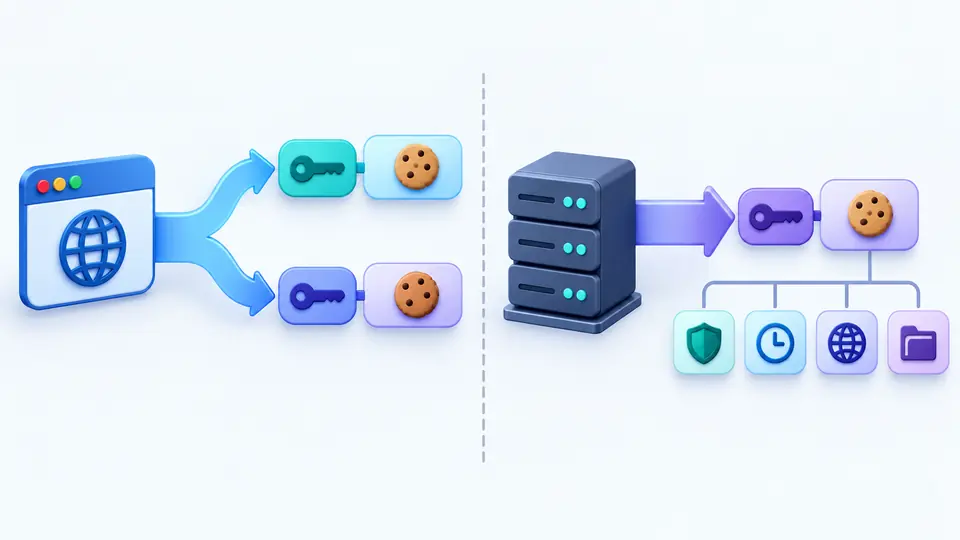
A request Cookie line splits into two name-value pairs, while a Set-Cookie response splits into one pair and an attribute grid.

See which lifetime setting wins

When both Max-Age and Expires appear, the estimate follows Max-Age and a warning explains the precedence. This Cookie parser shows the estimated UTC time without claiming that every browser will accept or retain the cookie.

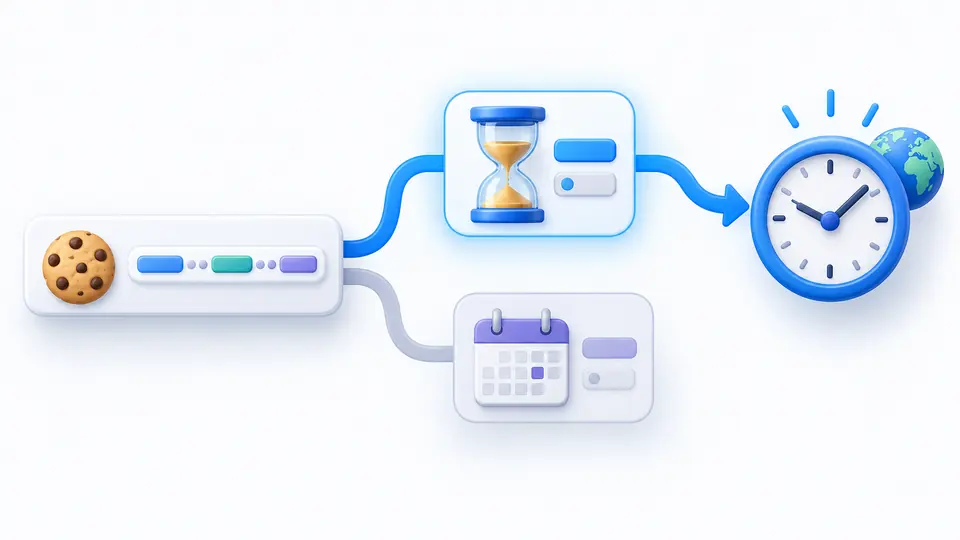
Two expiry inputs lead to one estimated clock, with Max-Age highlighted and the older Expires date marked as secondary.

Read a header without assuming browser defaults

01

Confirm the direction

The auto detector recognizes Cookie: and Set-Cookie: prefixes. A bare name=value is ambiguous; choose request or response explicitly when its origin matters. Put separate Set-Cookie response fields on separate lines, never comma-join them.

02

Choose the refresh behavior

Automatic mode waits 350 ms after an edit. Switch it off to inspect an unfinished header, then use Parse cookies or Ctrl/Cmd+Enter. Any input or option change makes the old result uncopyable until parsing succeeds.

03

Interpret the lifetime estimate

The report shows an estimated UTC expiry when Max-Age or Expires is valid. Max-Age wins if both are present. In Build, session is the default; selecting seconds or a local date produces just one expiry attribute.

Inspect and compose the actual header fields

Two grammars in one workspace

A Cookie request may carry many name=value pairs on one line. Each Set-Cookie response line starts one cookie and can add Domain, Path, SameSite, Secure, HttpOnly, Expires and Max-Age. Unknown attributes stay visible instead of being discarded.

Static conflict notes

The checker marks SameSite=None without Secure, Partitioned without Secure, and invalid __Host- or __Secure- prefixes. It also reports duplicate attributes and malformed dates or seconds at their source line; it cannot test whether a remote browser accepts the result.

Single response header builder

Build one Set-Cookie header with an explicit host-only Domain omission, Path=/, SameSite=Lax, Secure and HttpOnly by default. Select session, Max-Age or Expires; the builder never writes a cookie into this browser.

What the text can and cannot prove

Request attributes are unknowable
A Cookie request supplies names and values only. The Cookie parser cannot reconstruct Domain, Path, HttpOnly, Secure or SameSite from that line. If these matter, inspect the original Set-Cookie response instead of treating a missing field as false.
One Set-Cookie field per line
A response may send several Set-Cookie fields, but each field sets one cookie. Do not join them with commas: an Expires date already contains a comma. A malformed line is reported with its position; valid neighboring lines stay visible.
No live browser verdict or site access
The estimate uses this device's clock. Server Date skew, origin host, HTTPS context, public suffix rules and browser policy are unavailable, so warnings are static. The tool does not fetch a URL, read HttpOnly cookies, change document.cookie or create a share link containing session values.

Cookie parser questions

What do Secure, HttpOnly and SameSite control?

Secure limits transmission to secure contexts, HttpOnly blocks access through JavaScript APIs, and SameSite affects cross-site requests. The Cookie parser reports these only when a Set-Cookie response actually names them; a request Cookie header cannot reveal them.

Why does a Cookie header contain several semicolon-separated pairs?

A request Cookie header sends multiple stored cookies as name=value pairs. A Set-Cookie response field sets one cookie and uses following semicolon-separated parts for attributes. Select the header type if an unprefixed line is ambiguous.

Does parsing cookie data upload it?

No. Parsing and building run in this tab. The tool neither requests a remote site nor puts a captured session value in a share URL. Avoid pasting sensitive values into other tools or messages when copying the report.

What does the Partitioned attribute mean?

Partitioned requests a cookie partitioned by top-level site. This parser preserves it and flags a missing Secure attribute. The builder does not generate Partitioned yet, and the static report cannot determine whether a browser supports or stores it.

How many cookies can a domain store?

Limits differ by browser and may change. This page accepts up to 1000 pasted lines and 128 KiB of input for analysis, but those are tool limits, not a browser's per-domain storage limit. Check the target browser for an authoritative storage result.

Found a header this tool handles incorrectly?

Use the Cookie parser on your next header

Paste one captured exchange, check the direction and conflicts, then copy a current report or one generated Set-Cookie field.

Parsing and building stay in this browser.