Choose when the result refreshes
With automatic mode on, input and format options settle for 350ms before processing. Disable it for explicit runs with the button or Ctrl/Cmd+Enter. Exports remain disabled while a previous result is out of date.
XML tools
Automatic mode updates after 350ms. Turn it off to run manually with Ctrl/Cmd+Enter. Text-containing subtrees keep their original layout.
Your XML is processed in this browser tab without uploading it.
Subtrees containing text, including whitespace, CDATA or xml:space="preserve" stay unchanged. Existing indentation may remain unchanged too.
Input or options changed. The result needs updating.
A dense SOAP response can hide the element that explains a failed request. This XML formatter opens up containers that have no direct text and gives you a separate structure view for the rest. It works as an XML beautifier without treating every space between tags as disposable.
For XML pretty print, choose two or four spaces. The XML minifier uses a conservative compact mode: existing text, including indentation whitespace, remains protected. A document that already has indentation may therefore keep the same size.
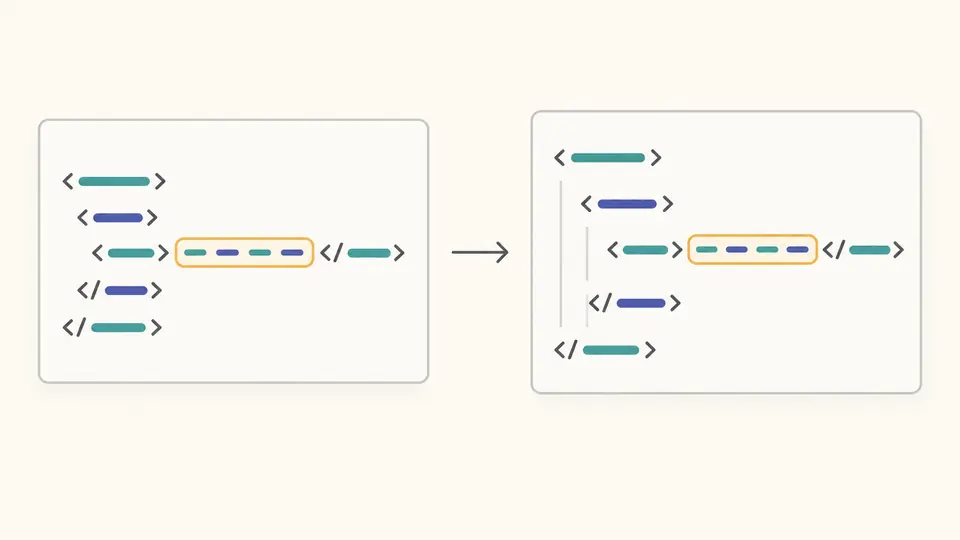
In a paragraph containing child tags, the space between two elements can separate words. Removing it changes the text that a reader receives. Any element with direct text, even pure whitespace, or CDATA keeps its entire source subtree. A layout change is limited to containers without direct text, so preserving content can mean preserving existing indentation.
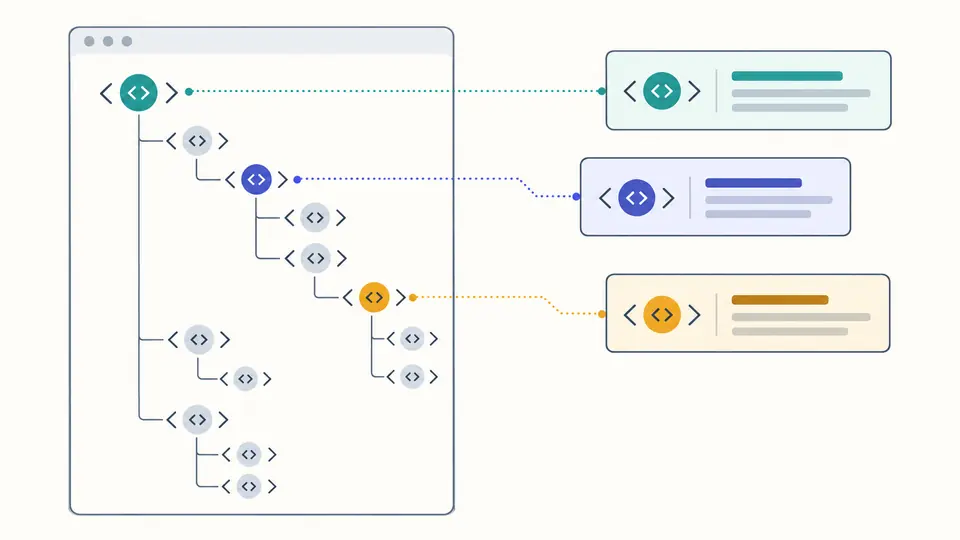
A SOAP envelope can declare a prefix on one element and redeclare it farther down. Inspect declaration entries beside the tree to see the prefix, URI, owning element and source line. The listing shows declarations, including repeated ones; it is not a list of remote resources to fetch.
With automatic mode on, input and format options settle for 350ms before processing. Disable it for explicit runs with the button or Ctrl/Cmd+Enter. Exports remain disabled while a previous result is out of date.
If switching from two to four spaces seems to do nothing, check the protected subtree count. Whitespace already inside the root is text too. The formatter preserves that root rather than guessing whether its indentation is meaningful.
Loading a different example or clearing existing input opens a replacement preview with character counts. Apply makes the change; cancel keeps the current work. Undo restores the preceding input and result together.
The XML formatter checks matching tags, legal characters, quoted attributes and namespace constraints before returning a result. An error includes its source line and column so you can correct the input instead of inspecting partially repaired output.
Expand and collapse branches to follow nesting in a long configuration or feed. Lists initially show 50 entries, with 50 more per action; export includes the full result. Click an element or namespace entry to reveal its source line. Switching views does not edit the XML.
Namespace entries connect each xmlns declaration to its element and line. A default namespace is labeled separately from named prefixes. Declarations remain in their original order and are never renamed to make the tree appear simpler.
Copy or download only after the current input and options have completed successfully. Downloads contain UTF-8 XML. A syntax error or an input edit makes the earlier result unavailable for export until it is refreshed.
Pretty mode adds layout to containers without direct text. Compact mode trims only unprotected tag layout and document-level whitespace. Both protect all text-bearing subtrees, so compact mode may leave a previously indented document unchanged.
The XML formatter preserves the raw subtree whenever an element directly contains text or CDATA. This includes whitespace-only text. Attributes, comments and namespace spellings are not rewritten to force a different layout.
Processing happens in the current browser tab. Copy and download are explicit export actions; namespace URIs do not trigger resource requests.
Use the reported line and column to inspect unmatched tags, missing attribute quotes, bare ampersands or undeclared prefixes. Correct the input and rerun. The tool does not guess missing markup or silently repair a document.
Yes. Select Structure and expand the branches you need. The namespace view adds declaration locations. Neither view edits the document or evaluates XPath expressions.
Found an unexpected result?
Use the XML formatter example to compare an expandable container with protected text, then inspect where its namespace prefixes are declared.