01
Interpret the same text deliberately
The default is decimal, 8-bit unsigned, A=12, B=10 and AND. Changing the input base reinterprets the existing text; it does not convert it. Prefixes must match the selected base.
Numbers, Bitwise & Units
Choose a width, edit the operand bits, and compare the resulting mask.
Bit 0 is the least significant bit. Checkboxes directly edit the operand.
Set bit positions (1): 3
Your input is processed in this browser and is not sent to a server.
One integer per operand, up to 256 characters. Select a matching base for 0b/0o/0x; no fractions or separators.
Signed mode accepts negative integers and interprets the highest bit as the sign. Arithmetic right shift extends it.
Calculation ready.
A bitwise calculator helps when a permission value or register contains several flags at once. Put the observed value in A and the mask in B to see exactly which positions survive an AND operation.
The bitmask calculator keeps bit positions beside the number. Unlike a quick JavaScript Number expression, its integer calculation preserves every bit through the full unsigned 64-bit range.
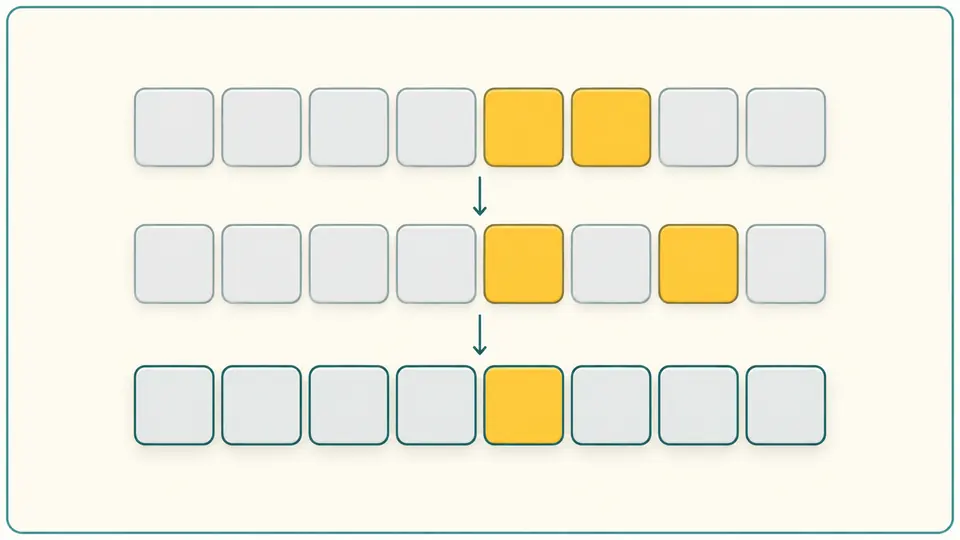
The bitwise calculator shows the common set bits, their zero-based positions and their count. For the initial 12 AND 10 example, only bit 3 remains, giving 8. Toggle that position in either input and watch the intersection change.
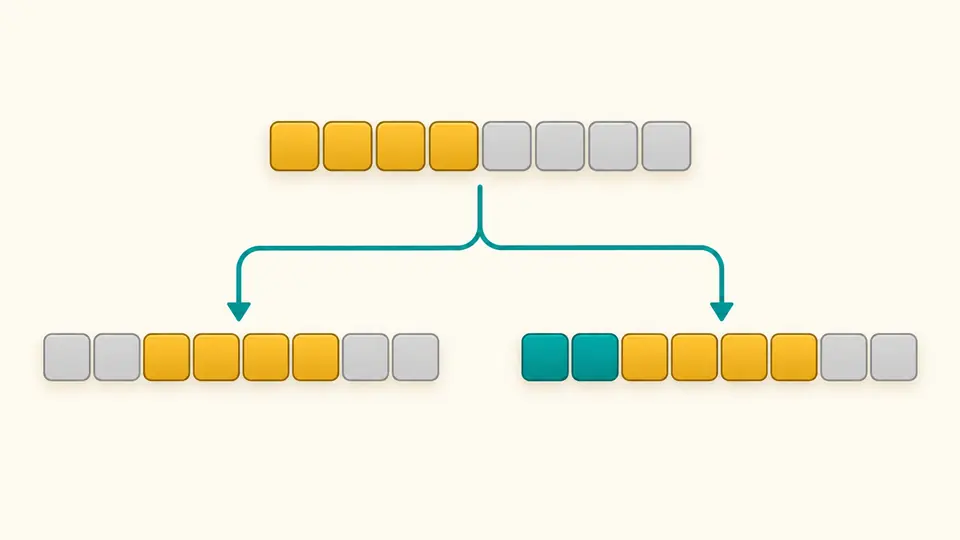
With signed 8-bit A=240 and a shift of 2, logical right shift gives 60 while arithmetic right shift gives −4. The bit pattern exposes the difference between adding zeros and extending the sign.
The default is decimal, 8-bit unsigned, A=12, B=10 and AND. Changing the input base reinterprets the existing text; it does not convert it. Prefixes must match the selected base.
Checkboxes edit A or B directly. Bit 0 is the least significant position; rows run from higher to lower indices. NOT and shifts hide B, and the shift count is a separate decimal field.
Automatic calculation waits 350 ms. Turn it off for Calculate or Ctrl/Cmd + Enter. Example, Clear and Swap show a replacement preview; Undo restores the previous inputs, settings and result.
Use bitwise AND to isolate a mask, OR to enable selected flags, and the XOR calculator to toggle them. With A=5 and B=3, the respective results are 1, 7 and 6. XOR is a flag operation here, not an encryption scheme.
Unsigned 64-bit 18446744073709551615 remains exact. Decimal includes both signed and unsigned readings; binary is padded to the selected width and hexadecimal to its matching digit count. Octal is also available in the result.
The bit shift calculator separates left shift, zero-fill right shift and sign-extending right shift. Its shift count never wraps modulo 32. Set-bit indices and the count are derived from the fixed-width output, including negative signed results.
No. NOT uses A alone and inverts each bit within the selected width. B is hidden and is not validated or included in the exported report for this operation. A bad value left in B cannot invalidate a NOT result.
Logical shift fills the high positions with zeros. Arithmetic shift repeats the sign bit and requires signed mode here. For the 8-bit pattern 11110000, shifting right by two gives 00111100 or 11111100 respectively.
Select binary, octal, decimal or hexadecimal for both operands. Matching prefixes are optional, so select hex before entering 0xFF. Negative mathematical values require signed mode; fractional values and expressions are not evaluated.
Width determines the size of the word, the sign bit and which bits NOT or left shift can affect. This bitwise calculator offers 8, 16, 32 and 64 bits. It rejects an input that cannot fit instead of choosing a width for you.
AND sets an output bit only when both input bits at that position are 1. Thus 12 (00001100) AND 10 (00001010) gives 8 (00001000). Set B to a mask to find which of its flags are present in A.
Something looks wrong?
Use the bitwise calculator to check one mask, then change the width or a single flag and compare the new result. Export only after the current calculation is ready.