Numbers, Bitwise & Units

two's complement calculatorOne word, two readings

Choose whether your input is a mathematical value or a stored bit pattern.

two's complement calculator

Input

One integer, up to 256 characters. Optional 0b/0o/0x must match the base. No internal spaces, separators, line breaks or fractions.

Your input is processed in this browser and is not sent to a server.

Results

Decimal result
-42
Parsed input in decimal
-42
Signed decimal
-42
Unsigned decimal
214
Binary
11010110
Hexadecimal
0xD6
Highest bit
1
Allowed input range
-128 … 127
Signed range
-128 … 127
Unsigned range
0 … 255
Big-endian bytes
D6
Little-endian bytes
D6

Encode the negative value

1. Absolute value in binary
00101010
2. Invert every bit
11010101
3. Add one
11010110

Options

Value encodes a mathematical integer. Bit pattern reads a nonnegative word, padded with zeros on the left; it rejects a minus sign.

Changing an option reinterprets the existing text. Both byte orders use the final word and preserve the bit order inside each byte.

Input fits the selected range.

A two's complement calculator is useful when a register dump says FF but your debugger displays −1. Before changing either value, establish the word width and whether you are encoding a number or reading existing bits.

A signed binary converter needs more than a base selector. Here, the input meaning is explicit: a mathematical 255 cannot fit a signed byte, while the raw pattern FF fits perfectly and decodes to −1. Both readings remain visible beside the same stored word.

Why use this two's complement calculator?

Keep the original when a value overflows

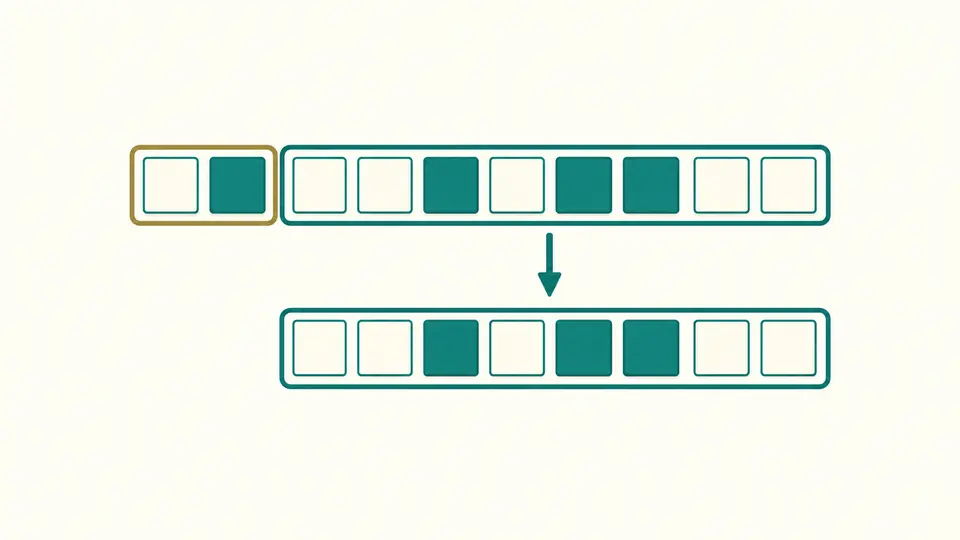
The two's complement calculator keeps 300 in your input while showing that only 44 remains in an 8-bit word. The warning separates integer overflow from invalid syntax. You can inspect the resulting bits and both decimal readings without accepting a replacement or losing the original number.

A longer bit row stays intact while its eight low positions are copied into a smaller word; the high positions are highlighted separately.

Compare byte order without reversing bits

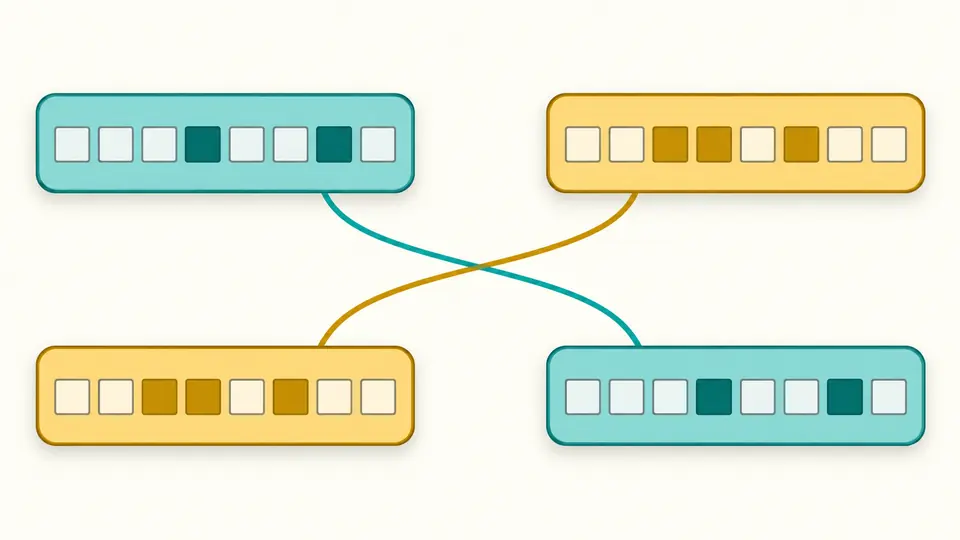
For 0x12345678 at 32 bits, the big-endian bytes are 12 34 56 78 and the little-endian bytes are 78 56 34 12. These are two layouts of one word. The value, sign and the internal order of each byte stay the same.

Two colored byte blocks exchange positions between rows while the marks inside each block retain their order.

Choose the meaning before the width

01

Separate a value from its encoding

Start in Value mode to encode −42. For an existing FF dump, select Bit pattern and hexadecimal. A base change reinterprets the text; it never rewrites it. The default is decimal, signed, 8 bits, with automatic calculation enabled.

02

Choose the width deliberately

The width sets the sign position and the range. FF at 16 bits is 00FF, which reads as 255; it is not sign extension of an 8-bit −1. To keep the mathematical value −1 while widening, enter −1 in Value mode.

03

Check the status before exporting

Automatic calculation waits 350 ms. Switch it off to use Calculate or Ctrl/Cmd + Enter. Every edit disables exports until recalculation. Example and Clear first show changed-field counts; applying can be undone together with the previous result.

Inspect the entire integer word

Read both decimal interpretations

For a word of width w, unsigned values run from 0 to 2^w−1 and signed values from −2^(w−1) to 2^(w−1)−1. The selected interpretation controls the main decimal reading, while both ranges remain available for comparison.

Follow the negative encoding

For −42 at 8 bits, the absolute value is 00101010. Invert all eight bits to get 11010101, then add one to obtain 11010110. This walkthrough appears for negative mathematical inputs inside the signed range, including its minimum value.

Keep all 64 bits exact

Integer parsing, range checks and formatting use exact integer arithmetic. The unsigned maximum 18446744073709551615 therefore remains intact. Binary and hex include leading zeros for the selected width; the report also records the original text and the parameters used to interpret it.

Where the mathematical rules apply

Overflow is an explicit modulo preview
Out-of-range mathematical values and oversized raw patterns retain their input. The output keeps the low w bits via a nonnegative remainder modulo 2^w. Thus signed 8-bit 128 becomes −128 in the preview, whereas 256 leaves zero. There is no apply-truncation operation.
Raw patterns use their numeric magnitude
Bit pattern mode accepts nonnegative integers, including short patterns and extra leading zeros. It rejects a minus sign even in −0. Overflow means the raw magnitude exceeds 2^w−1, not that the highest bit is 1 or the text has many leading zeros.
Only one integer at a time
Choose base 2, 8, 10 or 16. Matching prefixes are optional; outside ASCII spaces and tabs are trimmed. Internal separators, newlines, fractions, decimal scientific notation and arithmetic expressions are rejected. The limit is 256 input characters, not an unlimited-size file.
Two’s complement is the signed format
The supported widths are 8, 16, 32 and 64. There is no separate sign-magnitude or ones’ complement encoding, no negative zero, and no floating-point mode. The inversion line is an intermediate step for a negative value, not a second decoder.
No language or processor emulation
The displayed wrapping rule does not predict a compiler exception, a CPU flag or a language’s signed-overflow behavior. Bitwise operations and two-operand arithmetic belong to other tools. Byte order changes only the ordering of whole bytes; no file, URL or batch input is accepted.

two's complement calculator questions

How do I encode −5 as an 8-bit signed value?

Choose Value mode, decimal, 8 bits and signed interpretation. Enter −5: the output is 11111011, or FB in hexadecimal. Its unsigned reading is 251, which describes the same eight bits rather than a second encoding.

What is the signed range at each width?

The minimum is −2^(w−1) and the maximum is 2^(w−1)−1. For 8 bits this is −128 through 127; for 16 bits it is −32768 through 32767. The panel computes the exact limits for all four supported widths.

How do I convert two's complement to decimal?

Select Bit pattern, choose the source base and width, then read Signed decimal. If the highest selected bit is set, subtract 2^w from the unsigned magnitude. For 8-bit 11111011, that is 251−256=−5.

Why does 200 not fit a signed 8-bit integer?

A signed byte stops at 127. In Value mode, 200 receives a range warning and its retained pattern reads as −56. If 200 describes existing raw bits, use Bit pattern mode: the word fits and −56 is simply its signed interpretation.

Are conversions of 64-bit integers exact?

Yes, within the supported input syntax and length. The calculation never converts the integer through a floating-point Number. For example, 9223372036854775808 is preserved and reads as −9223372036854775808 when its 64 bits are interpreted as signed.

Something looks wrong?

Inspect another word

Use the two's complement calculator to inspect one boundary value, then change the input meaning or width and compare the result. Copy a fresh report with its original input, range status and both byte layouts.