01
Compare the two layouts
Tables mode moves scalar assignments before nested sections so that their scope stays correct. Inline mode puts each root member on one assignment line. Mixed arrays use inline objects in either mode.
JSON tools
Use the sample to compare tables with inline objects. Only strict JSON objects can become a TOML document.
Processed in this browser. Your input is not uploaded or stored.
Result is out of date; export is disabled.
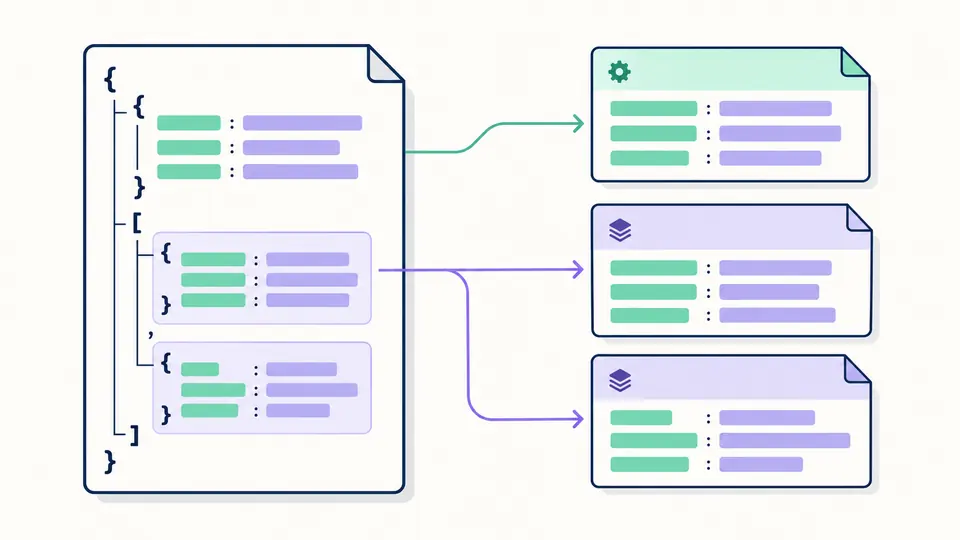
JSON to TOML helps when configuration data arrives as a JSON object but the receiving program reads TOML. Nesting becomes named sections, while lists of objects become repeated table sections.
A string containing a date stays text. A dotted key stays one key. The converter checks these distinctions instead of assuming that a readable result is also the same data.
JSON to TOML turns nested objects into named tables and object lists into arrays of tables. Each table path quotes its individual keys when needed, so "api.version" is not confused with an api object containing version.
A null inside a list stops conversion at its JSON Pointer. No list item is removed and no empty string is substituted. The same rule blocks integers outside the supported range; a previous result cannot be exported after failure.

Tables mode moves scalar assignments before nested sections so that their scope stays correct. Inline mode puts each root member on one assignment line. Mixed arrays use inline objects in either mode.
Auto-convert waits 350 milliseconds after a change. Turn it off to use Convert or Ctrl/Cmd+Enter. Editing input or changing layout immediately disables export until the new result is checked.
The preview shows 50 entries at a time, up to 500; counters include all nodes. JSON Pointer writes / as ~1 and ~ as ~0. An error adds its input line and column so you can change the intended value.
Nested arrays of objects attach to the current parent table entry. Empty objects remain tables or inline objects; an empty list remains []. Array order is retained even when sibling tables need a different layout order.
Signed 64-bit integers are emitted without a JavaScript Number conversion, including identifiers above 2⁵³. Decimal and exponent tokens retain their spelling. Integer-shaped -0 becomes -0.0 to retain its sign as a float.
Spaces, dots, empty names and Unicode keys are quoted as needed. Quotes, backslashes, newlines and control characters are escaped. Text such as "true", "007" or a date is never inferred as a boolean, number or timestamp.
The generated TOML is parsed and compared with the input tree, using BigInt for integers. Shapes, array lengths, string values and numeric types must agree before download. The emitter uses syntax compatible with TOML 1.0.
Paste an object into this JSON to TOML converter, choose tables or inline tables, and inspect the checked output. JSON to TOML online works for one text document; this page offers neither a command-line interface nor automatic file loading.
Yes. A nonempty list consisting entirely of objects becomes repeated [[table]] sections in the default layout. Child tables are emitted within the correct parent entry. Mixed arrays instead contain inline objects.
TOML documents describe a root table of named values. An anonymous array or scalar has no root key to write. Add a meaningful wrapper yourself; the converter will not invent a name such as items.
Null is absent from TOML’s value types. Removing a property, using an empty string and choosing an application default mean different things. This tool reports the first null and leaves that decision to you.
Not universally. Accepted integers retain their exact values, and strings and array structure are checked. Decimal tokens survive in the text, but consuming readers can round floats. Whitespace, escape spelling and table layout change; no reverse conversion is performed here.
Have a configuration that exposes an edge case?
Use JSON to TOML to inspect the example’s literal dotted key and repeated server tables, then try your own configuration.