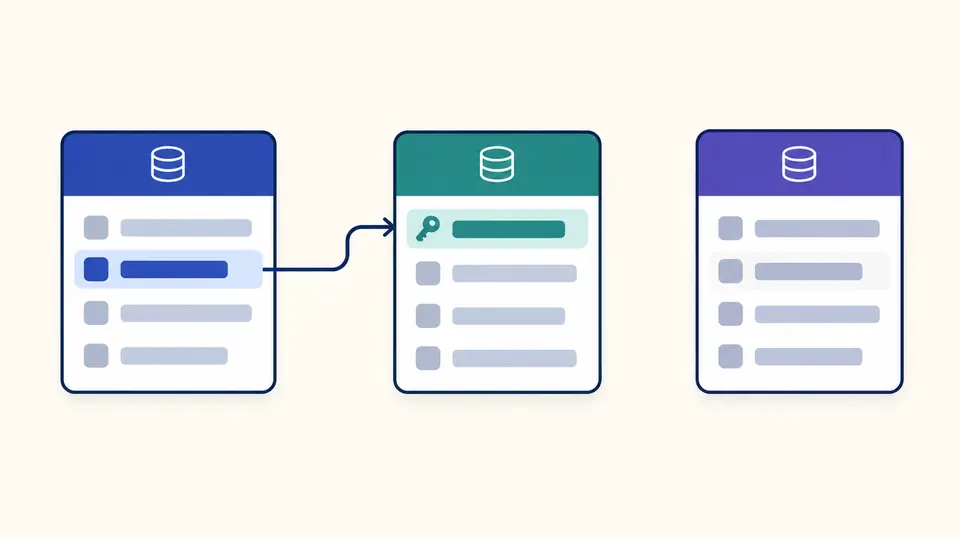
Read CREATE TABLE definitions as a graph, field inventory and exportable structure. Choose the dialect used by your DDL.
SQL schema visualizer
SQL DDL input
Structure overview
Enter SQL or choose an example.
Processed locally in your browser. No database connection or saved history.
Dialect and interpretation
CREATE TABLE and simple named-column CREATE INDEX only. Relationships require explicit foreign keys; SQL is never executed.
Up to 50,000 UTF-16 units, 50 tables, 1,000 columns and 200 keys/indexes/checks/foreign keys combined. Fields appear 50 at a time.
TypeScript describes read rows: exact large numbers and decimals use string; unknown and SQLite types stay unknown. Review your driver mapping.
Result is out of date. Process the current input before exporting.
A SQL schema visualizer is useful when a migration review starts with a file rather than a running database. Seeing table names is easy; checking which columns form a composite key or which references leave the supplied schema takes more care.
Use the sample to compare the diagram with its field inventory. A column called customer_id is not evidence of a relationship on its own. Only an explicit foreign-key definition creates an arrow.
What this SQL schema visualizer makes visible
Keep declared structure separate from assumptions about the application.
Trace only the relationships in the input
The SQL schema visualizer draws the foreign key that actually exists and leaves an unrelated table separate. A missing referenced table becomes a dashed external node, so a partial schema does not look complete.
Review one structure in several forms
A diagram helps with orientation, JSON keeps the structural inventory, and TypeScript gives a starting row shape. These outputs share one parsed result, so switching views cannot quietly reinterpret the SQL.
Check the interpretation before exporting
01
Choose the dialect deliberately
The selector changes parsing and identifier rules; it does not translate SQL. MySQL uses table-level FOREIGN KEY constraints, while PostgreSQL and SQLite also accept column references.
A dialect change immediately disables exports until a new analysis succeeds.
02
Read the unresolved count
An arrow can name a table that is not included in the input. Inspect the dashed node and compare its target columns before treating the diagram as a complete database schema diagram.
Unqualified references resolve only to unqualified tables; server search paths are not simulated.
03
Inspect the row type contract
Exact decimals and large integers export as string; nullable known types get a null union. Defaults do not make properties optional, because the output describes a read row.
Disable automatic analysis to use the button or Ctrl/Cmd + Enter.
Tables, constraints and reusable outputs
Three explicit grammars
The DDL viewer reads a supported subset of MySQL, PostgreSQL and SQLite. Quoted identifiers and qualified table names survive normalization, with PostgreSQL unquoted names folded to lowercase.
Composite keys remain composite
Primary and unique keys retain their ordered column lists. Foreign key relationships retain both sides of each mapping; bridge tables remain real tables instead of becoming an invented many-to-many shortcut.
Field-level inspection
Select a table to review type spelling, nullability and primary-key membership. Original column definitions preserve DEFAULT, CHECK and generated clauses as text. Explicit indexes retain their column order and direction.
A structural JSON snapshot
The JSON output contains table identities, columns, keys, indexes, checks and references, including unresolved targets. It is a schema inventory for documentation or scripts, not a JSON Schema validator.
Conservative TypeScript
Generated interfaces use safe numbered names and quoted property keys. PostgreSQL booleans become boolean, binary data becomes Uint8Array, and JSON or unrecognized types stay unknown. The mapping is a starting convention, not a driver guarantee.
A portable SVG diagram
SQL to ER diagram output is available as an SVG with table cards, field previews and directed links. The complete field inventory stays in JSON even when a diagram card abbreviates long names or shows only five fields.
Where text analysis stops
Accepted statements are deliberately limited
Use CREATE TABLE and CREATE INDEX over named columns. ALTER, INSERT, views, triggers, stored procedures and CREATE TABLE AS/LIKE are rejected for the whole batch. Expression, prefix and partial indexes are also rejected instead of silently simplified.
No inferred business model
Names such as owner_id never create an edge by themselves. The diagram does not claim business cardinality, verify referenced uniqueness or prove that a storage engine enforces a declared constraint. Add real constraints to the source when they are missing.
Dialect settings are not server settings
PostgreSQL unquoted names fold to lowercase; quotes preserve case. MySQL table matching is exact; column matching is case insensitive. SQLite matching is case insensitive for ASCII letters. Schema-less references match schema-less tables only; no search_path is assumed.
MySQL inline references are rejected
MySQL parses but ignores REFERENCES written on an individual column. This tool asks for a separate FOREIGN KEY clause rather than displaying that ignored syntax as an enforced relationship. Table-level declarations still do not prove runtime enforcement.
SQLite needs a different type reading
An ordinary non-INTEGER SQLite primary key may allow NULL. INTEGER primary keys and supported WITHOUT ROWID definitions use the relevant non-null rule. SQLite row properties export as unknown because declared affinity does not establish the stored value type.
Budgets bound the work
One input may contain 50,000 UTF-16 units, 50 tables and 1,000 columns. Keys, explicit indexes, saved checks and foreign keys share a 200-object budget. Also limited to 15,000 tokens, 32 parenthesis levels and 250 statements; any excess blocks the entire result.
Read-only outputs, no SQL execution
DEFAULT and CHECK expressions are preserved, never evaluated. TypeScript is neither an insert DTO nor runtime validation. There is no database connection, AI design, file import, cloud save, visual schema editing, migration generation or PNG/DBML export.
SQL schema visualizer questions
Which database dialects can the parser read?
Select MySQL, PostgreSQL or SQLite before analysis. Support is limited to the accepted CREATE TABLE and simple CREATE INDEX grammar; a database vendor supporting a construct does not mean this parser supports it. The error position helps identify a statement to simplify.
Will an SQL dump containing INSERT statements work?
Remove data and migration commands first. INSERT, ALTER and other unsupported statements stop the entire batch. This avoids showing a plausible diagram that quietly omits columns or foreign keys introduced later in a dump.
How are undeclared foreign-key links handled?
They are not inferred. A field name ending in _id remains just a field until the DDL contains an explicit constraint. If a declared target is missing from the supplied text, the reference is kept and marked external or unresolved.
Are multi-column primary keys supported?
Yes. A PRIMARY KEY(a,b) remains one key with two ordered columns, and a matching composite foreign key preserves the same positional mapping. Two separate primary-key declarations on one table are rejected; individual composite members are not presented as independently unique.
Which diagram export formats can I use?
Download SVG for the diagram, JSON for the complete structural inventory or a .ts file for row interfaces. JSON and TypeScript also support copying. SVG cards preview five fields; use the field view or JSON for the rest. No PNG, DBML or live database export is offered.
Found a formatting problem?
Continue reviewing the SQL
Format the source or inspect related database inputs with the same workbench.