Database tools

SQL to JSON

Extract literal rows, inspect each table, and export the selected table.

SQL to JSON

SQL INSERT input

Export text

Parsed locally in your browser. SQL is never executed or sent to a database.

Options

Only safe integers become JSON numbers. Other numeric literals remain strings; CSV preserves number spelling.

Explicit columns and literal VALUES only. Names match exactly. MySQL uses backslash escapes; PostgreSQL/SQLite preserve backslashes.

Max 200000 UTF-16 units · 500 statements · 100 tables · 100 columns/table · 5000 rows · 100000 cells. Export text is limited to 2000000 UTF-16 units to bound repeated keys.

Enter INSERT statements or load the example.

SQL to JSON helps when a seed script needs to become an API fixture. Keep the explicit column list: it supplies the object keys and lets repeated INSERT statements line up even when their column order changes.

Why use SQL to JSON?

Keep unrelated tables apart

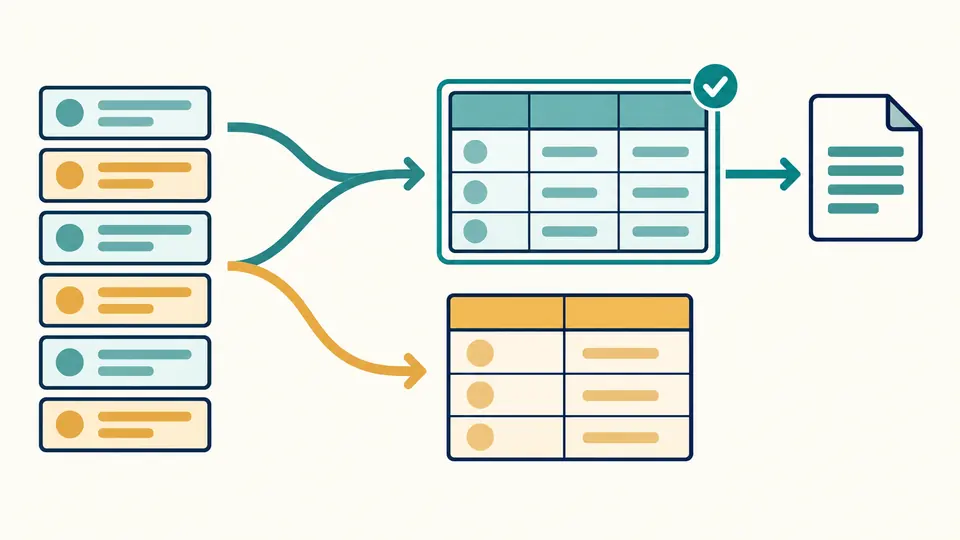
SQL to JSON groups rows by their table identifier. An orders INSERT cannot silently inherit the people columns. Select a table to inspect its own headers and export just those rows; schema-qualified names and a quoted name containing a dot stay distinct.

Two colored groups of source rows flow into separate tables, with one table selected for export.

Keep values you can account for

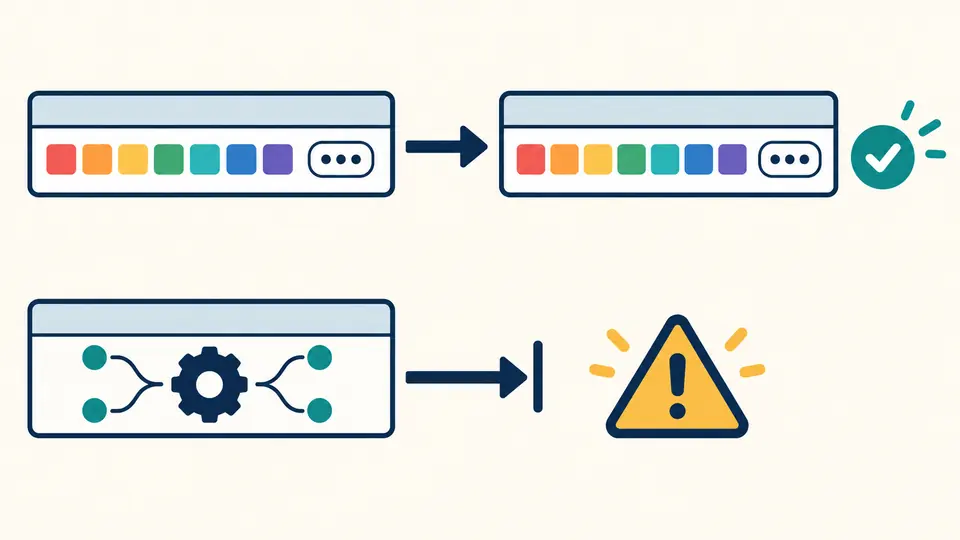
A large identifier should not change its last digit on the way to a test fixture. Safe integers become numbers; larger integers, decimal literals and exponent notation become strings. A function call stops conversion with a position instead of turning into an invented value.

Literal values pass intact into a table while an expression stops at a warning marker.

Check these details before export

01

Choose the string rules

PostgreSQL and SQLite preserve backslashes in ordinary strings. MySQL interprets its supported escape sequences. The selector does not detect server SQL modes: use the documented subset and review strings containing backslashes.

02

Read the selected table

The status reports all statements and tables, then the selected table’s rows and columns. The grid reveals 50 rows at a time. Copy and download include every row of that table, even when the grid shows only the first page.

03

Refresh after changing an option

Automatic conversion waits 350 ms after an edit. Turn it off to use the parse button or Ctrl/Cmd + Enter. Any change disables exports immediately; a failed conversion leaves an error and keeps the older result unavailable.

From literal SQL rows to usable data

Names drive the mapping

SQL INSERT to JSON uses explicitly listed column names as keys. Later statements may list those same names in another order: values are mapped back to the first statement’s column order. Duplicate columns and changed column sets fail rather than overwrite or fill invented values.

Punctuation stays inside strings

A scanner tracks quotes instead of splitting text on every comma. Doubled apostrophes, commas, parentheses, semicolons and line breaks inside a single-quoted value stay in that value. Ordinary comments between tokens are ignored; unterminated comments are errors.

Two exports with clear differences

SQL to CSV produces a comma-separated header and CRLF rows, quoting fields and doubling embedded double quotes. SQL NULL becomes an empty CSV field; JSON keeps null distinct from an empty string. Use JSON when downstream code needs those types.

Inspect the actual exported text

This SQL INSERT converter shows the exact text copied or downloaded. CSV formula protection prefixes risky text and headers with an apostrophe by default; numeric negative values remain unchanged. A count identifies affected cells, and turning the option off restores original text.

Accepted syntax and deliberate limits

Literal VALUES only
Require INSERT INTO table (columns) VALUES (...), with semicolons between statements. Functions, arithmetic, casts, DEFAULT, parameters, INSERT SELECT, upserts, RETURNING, DDL and transactions are rejected. No database connection or execution is provided, and no failing statement is skipped.
An extraction subset, not a server emulator
Choose PostgreSQL, MySQL or SQLite quoting rules. Names are matched exactly as extracted; database collation, identifier case folding and schema type coercion are not inferred. Missing columns, binary literals, dollar quoting, E/N/U& strings, nested comments and executable comments are unsupported.
Numbers and date text
Integers outside ±9007199254740991, all decimals, exponent notation and negative zero stay textual in JSON. CSV preserves the numeric token spelling. Quoted dates and JSON-looking values remain strings; there is no date normalization or nested JSON parsing.
Bounded input, complete output
Limits: 200000 UTF-16 code units, 500 INSERT statements, 100 tables, 100 columns per table, 5000 total rows and 100000 cells. Exceeding a limit rejects the batch. File uploads, URL fetching, cell editing and cross-table export bundles are outside this tool. Export text is limited to 2000000 UTF-16 units to bound repeated keys.
CSV has no type schema
CSV cannot reliably distinguish NULL from an empty string. Formula protection changes text only in CSV output and is not a guarantee for every spreadsheet application or later re-save. Import as text and check the target application when exact cell interpretation matters.

SQL to JSON questions

Can I convert a multi-row INSERT?

Yes. Every parenthesized VALUES tuple becomes a row. A tuple must contain exactly as many values as the explicit column list. If any row is malformed, the entire conversion fails, so a shorter partial export cannot be mistaken for the whole input.

What happens when INSERT statements target different tables?

They form separate table groups in first-seen order. Select a group before exporting. Repeated statements for the same exact table identifier append rows; this does not deduplicate rows, merge relationships or flatten different tables into one dataset.

How are NULL, dates and booleans handled?

NULL becomes JSON null and TRUE/FALSE become booleans. Numbers 0 and 1 stay numbers, without schema-based boolean inference. A quoted date keeps its spelling. Decimal and large integer literals become strings to preserve their digits.

Does it execute the SQL?

No. The parser recognizes the supported INSERT grammar and extracts literals. NOW(), subqueries and other expressions have no value here and produce an error. Successful extraction does not prove the script is valid for a particular database schema.

Why are explicit column names required?

Without a column list, there is no reliable way to recover object keys from the text alone. Include the names in the original export. The tool neither reads CREATE TABLE nor assigns placeholder names that could hide an incorrect column mapping.

Found a supported literal that parses incorrectly?

Turn a seed script into row data

Use SQL to JSON with a small representative INSERT first. Check quoted values, the selected table and the preservation count before exporting a larger batch.