Mobile development

ADB command builderBuild a command before opening your terminal

Choose a template, enter literal parameters, and review the command and its effects.

ADB command builder

Task parameters

Command preview

adb devices -l

POSIX sh output for macOS, Linux or WSL. Paths are literal; variables and ~ are not expanded.

Parameters stay in this browser. No device is connected and no command is executed.

Options

The device list ignores target options. Other templates use -d, -e or -s; the default leaves selection to ADB.

Command preview is current.

The ADB command builder turns a small set of Android tasks into a command you can inspect. Select a device serial when several phones or emulators are attached, then supply the parameters required by that task.

This ADB command generator covers installing an APK, reading logs, taking a screenshot, moving files and selected app maintenance. The preview is shell text; it is not a report that the device completed anything.

Why use the ADB command builder?

Preserve literal arguments

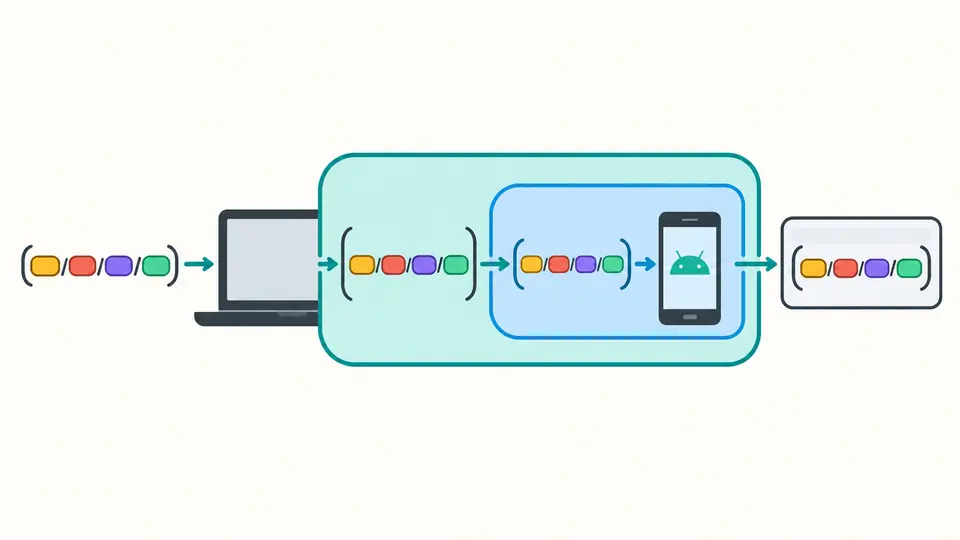
The ADB command builder quotes local paths and separately protects arguments interpreted by the device shell. A space or apostrophe in a filename stays part of that filename instead of becoming a new command argument.

Path fragments pass through two nested quotation boundaries into one command preview.

See the effect of the selected template

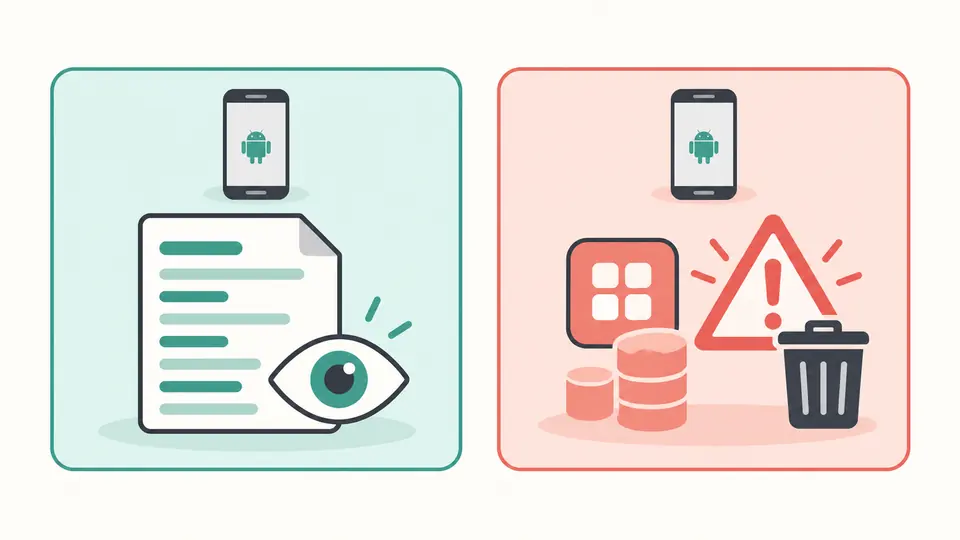
Switching from log reading to app-data deletion immediately changes the risk panel. Installation, file writes and restarts have their own explanations, so a valid command is never presented as proof that its effects are harmless.

A log-reading card and a deletion card show distinct read and warning symbols.

Decisions to make before copying

01

Choose the target deliberately

Listing devices is server-wide. For other templates, default selection works only when ADB can identify a single target; use the serial option to disambiguate multiple devices. A sample serial does not prove that an emulator exists.

02

Distinguish local and device paths

An APK path belongs to your computer. Screenshot output first belongs to the device and must end in .png; a second path names the local copy. Enter literal paths, including spaces, without adding your own shell quotes.

03

Check freshness before exporting

Automatic building waits 350 ms. Turn it off to review edits before building with Ctrl/Cmd+Enter. Example and Clear first show changed fields; applying can be undone once, restoring the form and its previous command.

Templates with explicit parameters

Install and remove a package

Use adb install APK parameters with optional replacement or test-package flags. Uninstall takes an application ID, not an APK filename. Keeping data changes the -k flag but does not preserve the installed app.

Filter a logcat stream

The adb logcat filter accepts one tag and a minimum priority. An empty tag targets all logs; a named tag adds *:S to silence other tags. Snapshot mode uses -d; turn it off for continuous output. Format is independently selectable.

Capture and transfer files

The adb screenshot template uses screencap followed by pull, connected with &&. Pull runs only if capture succeeds. Separate pull and push templates preserve the source/destination order and quote both paths.

Preview maintenance commands

Clear data includes an explicit Android user; normal reboot has no bootloader or recovery option. Copy and text download contain the current command only, without hidden form drafts or a fabricated execution result.

Shell and device boundaries

Only command text
No WebUSB, Wi-Fi pairing, network request or command execution occurs. Device connectivity, authorization and actual success must be checked in your terminal.
One host-shell dialect
Output is for POSIX sh, including appropriate macOS, Linux or WSL shells. It is not Windows CMD or PowerShell syntax. Shell templates quote both the host argument and the remote command arguments.
Bounded literal inputs
Paths are limited to 4096 UTF-16 units and cannot contain control or bidi characters. Device paths must be absolute. Leading hyphens are rejected; use a literal ./ prefix for a local filename beginning with a hyphen. Variables and tilde do not expand.
App data is not just cache
pm clear removes all data and cache for one package and user. There is no cache-only action, bulk app deletion, root, factory reset, flashing, permission bypass or device-side undo.
Files are never inspected
No APK upload, split-APK installation, signature inspection, path-existence check or overwrite detection is provided. Screenshot PNGs remain on the device. Real file permissions and Android versions may prevent the command from succeeding.
Fixed templates and log scope
No arbitrary shell, free-form flags, pipelines, port forwarding, recording or automatic package/PID lookup is included. Log tags use a bounded ASCII identifier; logcat buffer clearing is excluded.

ADB command builder questions

How to install an apk in one of the connected devices through adb?

Select the serial target and enter the identifier from adb devices -l. The generated -s argument applies to the selected command. -d selects one USB device and -e one emulator; either can still be ambiguous when several matching targets exist.

Using ADB to capture the screen

Choose Screenshot and pull, then supply an absolute device .png path and a local destination. The first command saves a PNG with screencap; && lets pull follow only after a successful capture. Existing files may be overwritten.

adb shell: are these two shells chained?

Yes. Your host shell parses the command first; adb shell sends a command string to the device shell. A quoted path may lose its first layer before reaching Android. This builder applies separate literal quoting at both boundaries.

Filter output in logcat by tagname

Enter one exact tag and a minimum priority. The command includes Tag:I, for example, plus *:S to suppress other tags. Leave the tag empty to use *:I across tags. Actual visibility also depends on device permissions and log buffers.

Clear Caches from ADB?

pm clear is not cache-only: it clears the application’s data as well. The Clear app data template is marked as destructive and includes the selected Android user. Do not use it if you need to preserve the app’s settings or session.

Script to pull from directory containing spaces

Enter the path itself, including spaces, without surrounding shell quotes. Pull treats paths as host argv values; screenshot paths also need remote quoting. This tool supplies those layers, but cannot check whether the source is accessible.

Does a preview differ from your device’s documented syntax?

Review your next command

Use the ADB command builder to check the target, literal paths and command effects together. Copy only the current preview, then review it in the shell environment it was built for.