Android development

Android App Links validator · Check the declaration before release

Paste the JSON, optionally enter the expected package and signing certificate SHA-256, then run a local check.

Android App Links validator

assetlinks.json input

Local check result

Paste assetlinks.json or load the example.

Deployment checklist

These steps have not been tested by this local checker.

  • Serve /.well-known/assetlinks.json over HTTPS on each claimed host, with application/json and no redirects.
  • Compare the release app signing certificate SHA-256 in Play Console with the file; include other signing certificates only when needed.
  • Confirm the manifest has an autoVerify web intent filter within the claimed host and path scope.
  • On an installed device, inspect adb shell pm get-app-links and re-verify after changing the server file.

JSON, package and certificate fingerprint are checked in this tab; no domain is contacted.

Options

Paste assetlinks.json or load the example.

A link that opens in the browser may have a perfectly readable JSON file but no single statement authorizing the installed app. The Android App Links validator checks the statement shape and keeps package, relation and certificate fingerprint together.

Use this before publishing assetlinks.json or when comparing a Play App Signing certificate with a release build. An assetlinks.json validator can catch a missing relation or a SHA-256 fingerprint mismatch; live HTTPS delivery and device behavior still need separate checks.

Why use this Android App Links validator

See what the pasted file actually proves, then what remains to test.

Match one statement, not three unrelated fields

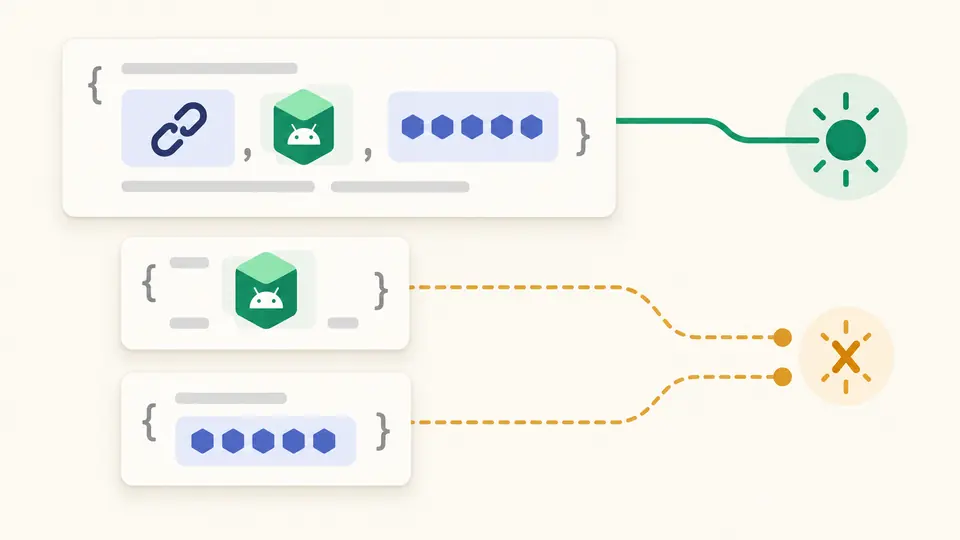
The Android App Links validator accepts a match only when one android_app statement contains handle_all_urls, the expected package and the expected certificate fingerprint. Two half-matching statements do not become one authorization.

One Android app statement connects a package, App Links relation and certificate fingerprint; two separate statements remain unconnected.

Keep deployment checks visibly separate

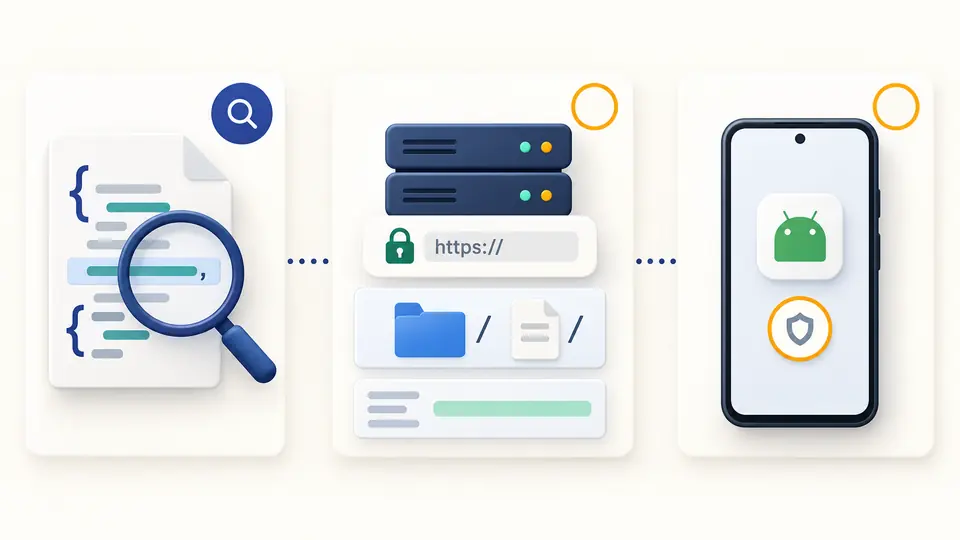
This Android App Links validator never fetches your domain. It reports local findings alongside a checklist for HTTPS, the well-known path, JSON content type, redirects, manifest autoVerify and device verification, leaving those items unconfirmed.

A local JSON report sits beside a separate website and Android device verification checklist.

Check the inputs that are easy to confuse

01

Choose the signing certificate

Paste the SHA-256 certificate fingerprint used for the installed app. With Play App Signing, use the App signing key certificate from Play Console; a local upload or debug key can differ. The field also accepts a 64-character hex string without colons.

02

Run after the final edit

Checking is manual. Any change to JSON, package or fingerprint immediately marks the previous report stale and disables export. Ctrl/Cmd+Enter reruns it; malformed JSON points to a line and column.

03

Read three separate conclusions

A valid DAL array, a matching statement and a deployed App Link are different claims. The report lists all declarations and issues, including unresolved include files. Copy and download contain the complete report even when the visible list is paged.

Structure, relationship and signature checks

DAL statements with precise paths

The Digital Asset Links checker parses the top-level array, relation lists, android_app and web targets, and points to an indexed field when a value is malformed. An include pointer is recorded without being fetched.

Certificate fingerprint comparison

Expected SHA-256 input tolerates letter case and optional colons for pasting. File entries are also checked against the canonical uppercase colon form; SHA-1 and file hashes cannot stand in for a signing certificate.

App Links relation and joint match

The report counts handle_all_urls declarations and tests package and fingerprint inside the same one. Other DAL relations remain visible but do not authorize Android App Links.

Complete local JSON export

Copy or download the full structured report after a current check. Long declaration and issue lists show 50 items at a time in the panel, while the export keeps every item.

What a pasted file cannot verify

No live website inspection
The page does not fetch a domain, follow redirects or test the response header. Put assetlinks.json at the HTTPS well-known path, serve application/json, and inspect the live response separately.
No inferred certificate
A SHA-256 fingerprint is from the app signing certificate, not from the JSON file or APK bytes. The optional expected value can be omitted, but then the report cannot confirm that specific certificate.
Includes remain unresolved
A legal include statement may point to another file. Without a network request this tool cannot expand it; an absent local match with include present is inconclusive rather than a definite denial.
No path or device simulation
relation_extensions can contain Android 15 dynamic rules, but the checker does not evaluate those paths or the manifest. Test the actual installation with Android device verification commands.

Android App Links validator questions

Why aren't my Android App Links working even though assetlinks.json looks correct?

A syntactically correct file can still lack the matching handle_all_urls statement, use the wrong Play App Signing certificate, or be served with a redirect. The Android App Links validator narrows the local declaration problem; then inspect the live URL, manifest and device state.

Where must assetlinks.json be hosted?

Host it at https://your-domain/.well-known/assetlinks.json on every hostname your app claims. Serve JSON directly without redirects and check its content type. This page gives the checklist but makes no HTTP request.

Do I need both debug and release SHA-256 fingerprints in assetlinks.json?

Add the SHA-256 fingerprints for certificates that sign builds which need to verify the domain. Debug and release builds often use different keys; a Play-distributed release usually needs the Play App Signing certificate, not merely the upload key.

Can one assetlinks.json grant access to multiple apps?

Yes. Put separate android_app statements in the array, each with its own package and certificate fingerprints. This checker evaluates each statement independently, so a package from one app cannot borrow another app’s fingerprint.

How can I test if my assetlinks.json is working correctly?

First run the local check here, then inspect the public HTTPS file and use adb shell pm get-app-links with the installed package. The Digital Asset Links checker cannot see server response headers, the installed signing key or device verification status.

A declaration still looks wrong?

Run the Android App Links validator now

Paste your pre-release statement list into the Android App Links validator, compare the app signing certificate, then take the deployment checklist to your server and device.

JSON and comparison values stay in this browser tab.