Files, Binary & Compression

Executable file inspectorRead ELF, PE and Mach-O structures

Select a local executable or load a tiny example, then inspect its headers explicitly.

Executable file inspector

Binary input

Drop one ELF, PE or Mach-O file here, or choose a file.

No file selected

Read locally in this browser; the file is never uploaded or executed.

Header results

Select a file or try an example.

Select a file or try an example.

When a build will not load, an executable file inspector can reveal whether its architecture, entry point or section offsets match what you expected. The bytes behind each field matter more than the filename extension.

If you came looking for an ELF header viewer, PE header viewer or Mach-O viewer, this executable file inspector keeps each format’s own terms. It reads one file in your browser and never starts the program.

Why use this executable file inspector

Follow structure back to exact bytes without running a binary.

Three formats, their own structures

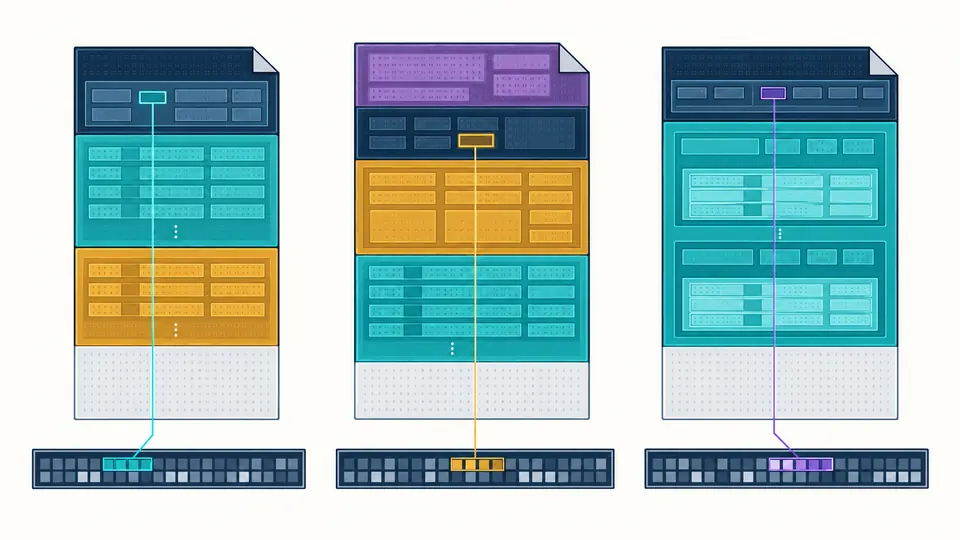
The executable file inspector labels ELF program headers separately from sections, follows PE from DOS to its optional header, and walks Mach-O load commands. A generic magic-byte verdict cannot explain those structures.

Three color-coded binary header layouts with distinct nested tables and the selected field connected to its byte interval.

Universal binaries keep their slices

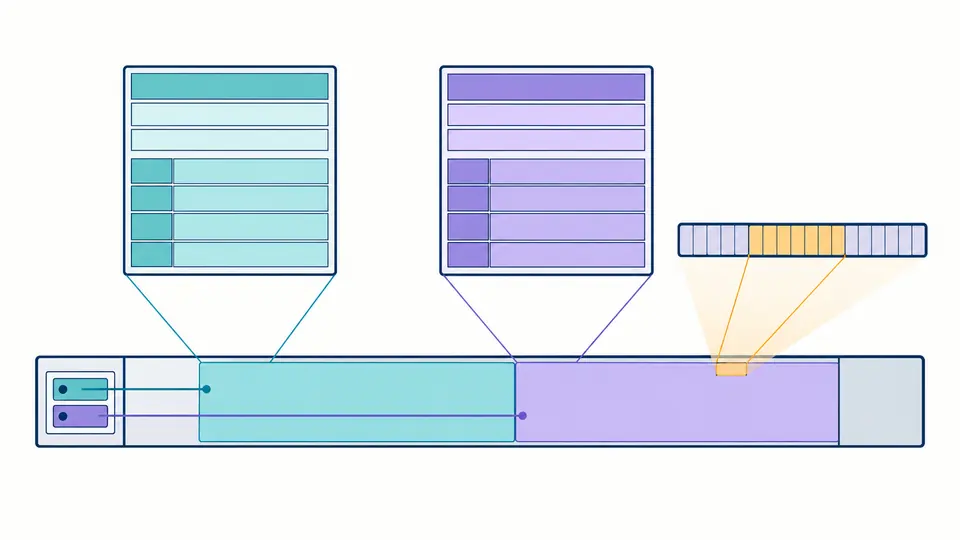
In a universal Mach-O file, each architecture has its own bounded slice. Choose arm64 or x86-64 and see the slice offset, size and header rather than treating the fat wrapper as the executable itself.

One universal binary container split into two bounded architecture slices, each pointing to its own header and byte range.

From a file to verifiable offsets

01

Check the source before parsing

The filename and byte count appear before analysis. Files above 32 MiB are refused before they are read into memory; the three built-in examples are tiny headers, not runnable programs.

  • The extension is only a name; the magic bytes decide the format.
02

Run inspection deliberately

Select a file, then choose Inspect headers or press Ctrl/Cmd+Enter. A changed file makes the previous report stale, so copy and download stay disabled until a successful run.

  • A missing ELF section table is valid; a section table pointing past EOF is not.
03

Trace and export the structure

Expand a header, section, segment or load command and select a field to see its absolute file offset and first bytes. For universal Mach-O, choose a slice and inspect again before exporting JSON.

  • The JSON contains interpreted fields and ranges, never the binary payload.

What the parser actually reads

ELF32 and ELF64 with both byte orders

File, program and section headers are decoded with full-width offsets. Extended section counts and string-table indexes are resolved from section zero; a deliberately absent section table remains a valid empty result.

PE32 and PE32+ header chain

The DOS header points to the PE signature, then the COFF and optional headers lead to the section table. Machine type, entry RVA, image base, flags and raw section ranges are kept distinct.

Thin and universal Mach-O

Both 32- and 64-bit Mach-O headers, load commands, segments and sections are listed. Fat containers retain every slice's architecture, offset and size, even when one slice is malformed.

Fields tied to stored bytes

Click a field or table row to inspect its hexadecimal file range. Zero-filled ELF and Mach-O sections are identified as memory-only, so the viewer does not invent bytes that are absent from disk.

Scope and limits of this inspection

Read-only, local, never executed
The selected executable is read through the browser File API. The tool makes no upload or URL fetch and never executes code from the file; a matching signature does not establish safety or trust.
Headers rather than reverse engineering
This is a binary header viewer, not a disassembler or decompiler. It does not decode ELF symbols or DWARF, PE imports and resources, or Mach-O dylib paths and code-signature trust.
32 MiB and strict bounds
One file of at most 33,554,432 bytes is accepted. Counts, entry widths, offsets and lengths are checked against the whole file or Mach-O slice before traversal; damaged tables stop with an offset-bearing error.
JSON is a structural report
Copy and download export the current slice's named fields, flags, section and segment ranges. The report does not contain the original executable bytes and is never turned into a public result URL.

Executable file inspector questions

Which executable formats are supported?

This executable file inspector accepts ELF32/64 in either byte order, PE32/PE32+, and thin or universal Mach-O 32/64. It rejects other magic values, including raw firmware, WASM and Unix ar archives.

Does a signature being present mean the file is trusted?

No. A PE or Mach-O header or code-signature command is only structural evidence. This executable file inspector does not verify certificates, hashes, revocation or whether code is malicious.

How large a binary can it open?

The limit is 32 MiB. The browser refuses larger files before loading their bytes, then bounds every declared table and slice. Use platform tools such as readelf, dumpbin or otool for a larger binary.

Is my binary uploaded anywhere?

No. The File API reads it in your tab; this page has no upload or remote fetch path. The JSON report is created only when you choose Copy or Download.

Is this a disassembler or a decompiler?

No. It exposes headers, section and segment metadata, flags and byte ranges. It never translates machine instructions or reconstructs source code.

Why are section headers missing from a stripped ELF?

A stripped ELF may still have section headers, but some executable files legitimately omit the section table. If e_shoff and e_shnum are both zero, the viewer reports no sections; if a declared table is out of bounds, it reports damage instead.

Still have a question?

Inspect your next executable file

Try the ELF, PE and Mach-O examples, then use the executable file inspector on a build you need to understand. Check a field's actual offset before sharing the JSON report.

The selected file stays in this browser tab.