Files, Binary & Compression

File Type CheckerWhat the bytes say, not the file name

Choose or drop one or more files; each is identified from its first bytes the moment it is added.

File Type Checker

Files

Drop files here, or use Choose files. Up to 20 files per batch; any size.

Only the start of each file (and the end of a ZIP) is read, locally in your browser. Nothing is uploaded.

Result

Choose or drop files to identify them.

Only changes how much of the header is displayed; nothing is read again. Signatures found further in (tar, ISO, PE header) are shown separately.

Choose or drop files to identify them.

The report is plain text: one block per file with its size, verdict, MIME, extension check and header bytes.

You need a file type checker when a name stops being trustworthy: an attachment with no extension, a download that will not open, an upload form that must reject a script renamed to photo.jpg. The extension is only a label someone typed; the first few bytes of a file — its magic number or signature — are written by the program that created it.

This file type checker reads those bytes locally, names the format and its MIME candidates, and compares the result with the extension. It also says what the verdict rests on — an exact signature, a checked structure such as the file names inside a ZIP, or a text guess — and highlights the bytes that matched, so you can verify the answer instead of taking it on faith.

Why use this file type checker

A verdict you can verify byte by byte, with the extension checked against it.

You see the bytes behind the verdict

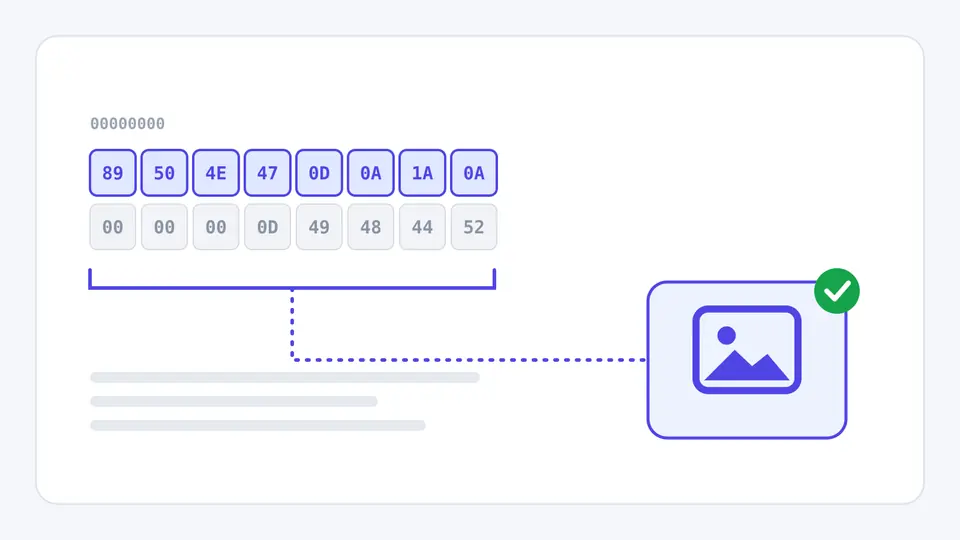
The header is shown in hex and ASCII with the matched signature highlighted — 89 50 4E 47 for PNG, 50 4B 03 04 for ZIP — and signatures deeper in the file, like tar's ustar at offset 257, are shown with their offset.

Two rows of header bytes in hex; the first eight bytes are highlighted and bracketed, and a dotted line leads to an image-format badge with a green check.

The extension is checked, not trusted

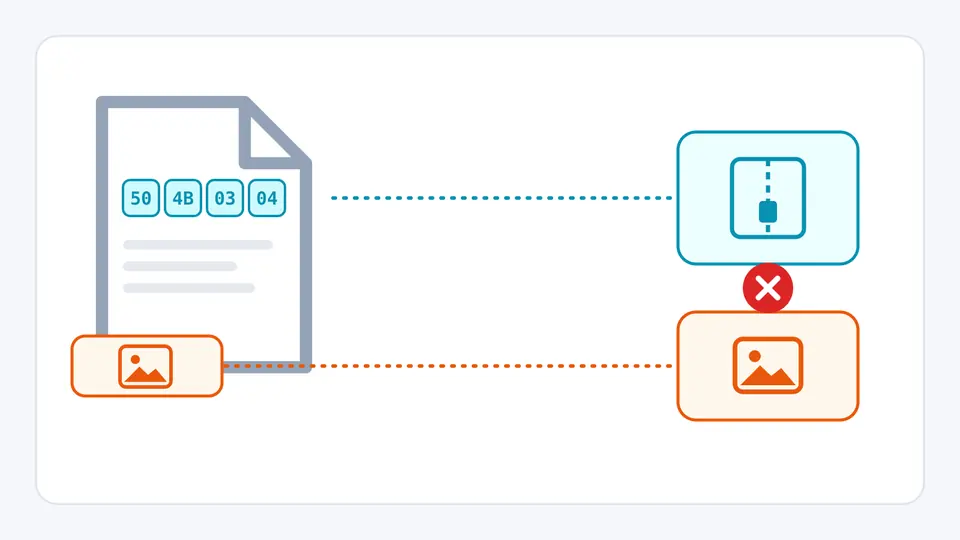
A PNG renamed to .jpg is flagged as a mismatch with the expected format for .jpg spelled out, while a .docx that is correctly a ZIP container is marked compatible instead of wrong.

A file whose first bytes 50 4B 03 04 lead to an archive icon, while its name tag shows a picture icon; a red cross marks that the two disagree.

Three things the verdict depends on

01

Add files — no button to press

Choosing or dropping files identifies them immediately, and new files are added to the list rather than replacing it. Only the first 64 KiB of each file is read, plus the last 64 KiB when it starts like a ZIP, so a 20 GB disk image is as quick as a 20 KB icon.

  • Load examples adds four samples: a normal PNG, a PNG named .jpg, a minimal .docx and an unrecognised .bin.
02

Read what the verdict is based on

Exact signature means fixed bytes at a fixed offset matched. Signature plus checked structure means an inner field was also read — the file names inside a ZIP, the brand in an MP4 ftyp box, the RIFF subtype. Text or pattern guess means no fixed magic exists, as with JSON, XML or plain UTF-8.

  • Old Office files (doc, xls, ppt, msi) share one signature, so they are shown as a list of MIME candidates rather than one guess.
03

Compare with the extension and export

Compatible is not an error: .docx, .jar and .apk are all ZIP files and .m4a is an MP4 container. Mismatch is the one to look at. The browser MIME row shows what File.type reports — it comes from the extension, which is exactly why it cannot be trusted for validation.

  • Header bytes shown only changes the display; the report uses the same length.

What it recognises and how it decides

More than 70 formats and subtypes

Images, PDF and office documents, archives and compression formats, executables (ELF, PE, Mach-O, WebAssembly), audio and video containers, fonts, databases and capture files, plus text formats with a clear opening marker such as XML, SVG, HTML and PEM.

ZIP containers told apart

Reading only the file names in the ZIP central directory, it separates DOCX, XLSX, PPTX, ODT, EPUB, JAR, APK and IPA from a plain ZIP — without decompressing a single entry.

Five-state extension check

Match, mismatch, compatible, no extension and cannot compare — so a correct .docx is not reported as a wrong .zip, and a missing extension gets a suggested one.

Exact size, any size

Each file shows its exact byte count next to KiB, MiB or GiB. There is no size limit, because the cost of identification does not grow with the file.

Where signature detection stops

Not a malware scanner
A correct PNG signature does not make a file safe, and a PE verdict does not make it malicious. A polyglot file can be a valid image and carry other data after it. Use antivirus software for safety decisions.
One signature can mean several formats
Legacy Office documents and MSI installers share the OLE2 signature, and a ZIP with no telling file names stays a generic ZIP. In those cases every MIME candidate is listed rather than one being picked.
Text formats without a marker are just text
CSV, YAML, INI, Markdown and source code have no signature; they are reported as plain text (UTF-8, or UTF-16 when a byte order mark is present). Other encodings such as GBK or Shift_JIS are not guessed.
Identifies, does not dissect
No archive is unpacked, no EXIF is parsed, and executables are not broken down into architecture or sections; a full hex dump belongs in a hex viewer. At most 20 files are checked per batch, and folders are not scanned recursively.

File type checker questions

How can I check a file's type when it has no extension?

Drop it into the file type checker above: identification never uses the name, only the first bytes, so a missing extension changes nothing except that the extension check reads "no extension" and a suggested extension is shown.

Why is my .docx file detected as a ZIP?

Because a .docx really is a ZIP archive. Here the file names in its central directory are read, so a normal .docx is reported as a Word document; if those names cannot be found, it stays ZIP and the .docx extension is marked compatible, not wrong.

How do I check a file's MIME type in JavaScript before upload?

Do not rely on File.type: browsers fill it in from the extension, which the browser MIME row here shows side by side with the detected type. Read the first bytes with file.slice(0, n).arrayBuffer() and compare them with a signature, which is what this page does.

Is checking magic bytes enough to validate a file upload?

It is a good first filter against renamed files, not a guarantee. Magic bytes only cover the start of a file, so a crafted polyglot can pass. Servers should still re-encode or fully parse images and documents, limit size, and scan when it matters.

What is the Linux command to check a file type?

file somefile, which uses the libmagic signature database, and file --mime-type for just the MIME type. This page is a file type detector built on the same idea, with a smaller, documented table, and adds the extension comparison and highlighted bytes.

Does an online file type checker upload my file?

Many do. This one does not: files are read with the browser's File API in this tab, only the header (and the end of a ZIP) is read, and the report you copy contains only names, sizes, verdicts and header bytes.

Still have a question?

Run the file type checker on your own files

Load the examples to see a match, a mismatch, a ZIP subtype and an unrecognised file side by side, then point the file type checker at the files you actually doubt.

Everything runs locally in your browser.