JSON tools

JSON to Markdown tablecolumns ready for your README

Paste an array of objects. Select fields, reorder columns and check the table before exporting.

JSON to Markdown table

JSON input

Processed in this browser. Your input is not uploaded or stored.

Table result · Markdown

Convert to preview rows.

Output options

Select and order columns

Convert to discover fields. Input or nested-strategy changes reset selection. Arrows change column order only.

Changes detected. Updating the result…

An API response is useful in documentation only when its important fields fit the page. JSON to Markdown table turns the selected records into a readable reference without asking you to maintain separator rows by hand.

A field that appears only in the last record still deserves a column. This JSON to Markdown converter scans the whole array, retains the original numeric spelling and lets you decide which fields your reader needs.

Why use JSON to Markdown table

Choose the reader’s column order

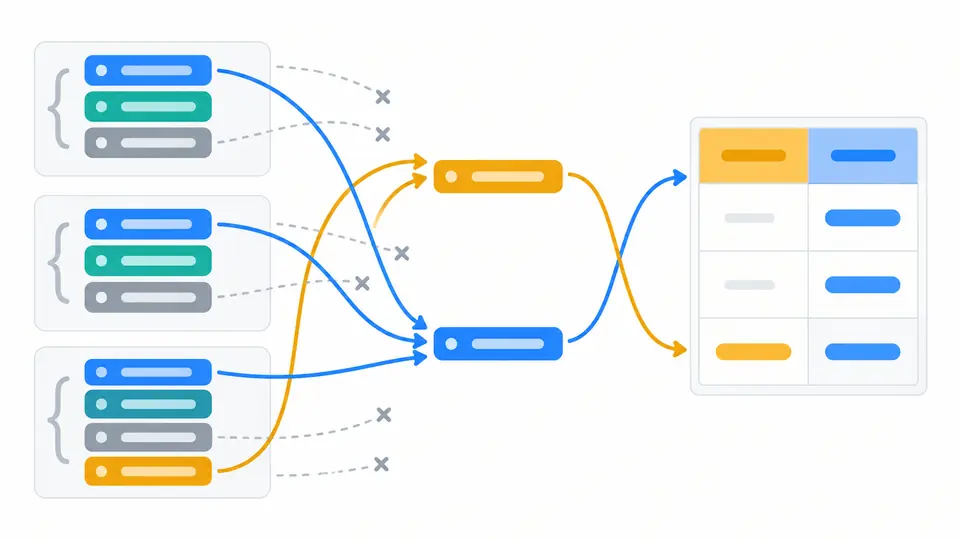
JSON to Markdown table discovers fields across all records before selecting them. Move an identifier beside its description, hide internal flags and keep later optional fields visible. The original array remains unchanged throughout this process.

Fields from several records selected and reordered into table columns

Keep context inside a cell or expose its paths

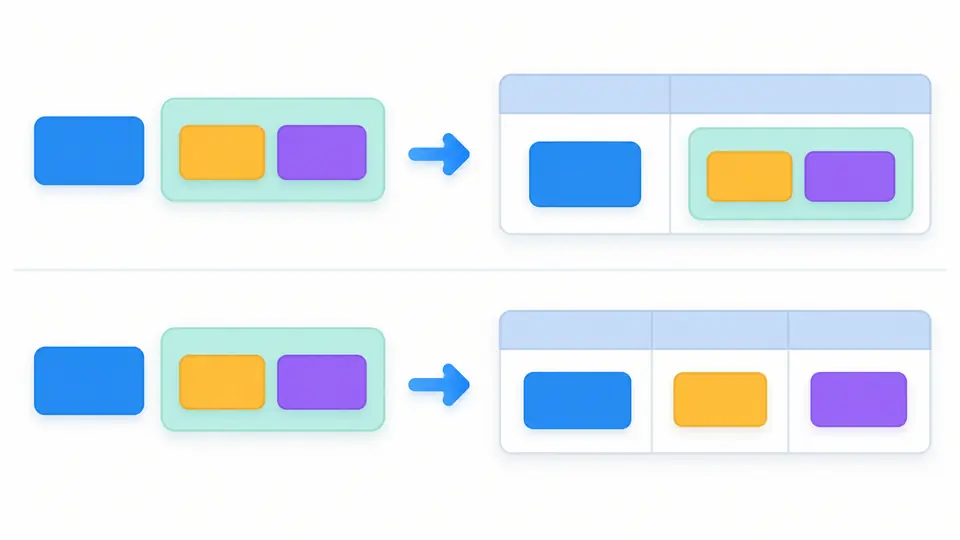
An address can remain compact JSON when readers need the whole object. Switch to flattened object paths when city and postcode deserve separate columns. Arrays stay in one cell, so an item with several tags still occupies one row.

A nested object kept in one cell or expanded into separate path columns

Prepare a table that survives pasting

01

Discover fields before narrowing the export

The first conversion collects every field. Selection and arrow controls then set your exported columns. Editing input or switching nested strategy resets the field list; changing alignment or format keeps the current selection.

02

Control when your result refreshes

Automatic conversion waits 400 ms after your last edit. Turn it off to use Convert or Ctrl/Cmd + Enter. Every input, option and column-order change disables export until the next successful conversion finishes.

03

Compare data and source views

The preview shows 50 records at a time; Show more adds another 50. Source view exposes pipes, separator colons and generated line breaks. Copy and download include all records, including those beyond the preview.

Fields, syntax and output choices

A union of keys, with meaningful empty cells

Column order follows first appearance, including fields from later objects. Missing fields become empty cells; explicit null prints null, while false, zero and empty strings keep their distinct source representation where a text table can express it.

Escaped headers as well as values

Pipes and backslashes are escaped in every cell, including header names. Markdown emphasis and link syntax are treated as text. Literal HTML is entity encoded before source line breaks become generated <br> elements.

Markdown and HTML use the same records

Choose left, center or right alignment for every column. Markdown includes the required header and delimiter rows. HTML exports a table fragment with header scopes and aligned cells. Downloads use table.md or table.html accordingly.

Numbers avoid floating-point conversion

Long identifiers, exponent notation, trailing decimal zeros and negative zero survive the parser as original tokens. Nested JSON remains compact text; objects can be flattened without splitting arrays or multiplying parent rows.

Know what the table cannot preserve

Only strict arrays of objects
Extract the intended array from a wrapped response before using this tool. Single objects, scalar arrays, JSONL, JSON5, comments and duplicate keys are rejected. There is no URL fetch, upload or automatic repair operation.
Flattening uses explicit JSON Pointer paths
The default header is the original top-level key. Flattened headers use /user/name, with slash and tilde escaped as ~1 and ~0. Empty containers remain {} and []; arrays never become extra records or joined lists.
A preview is not every Markdown renderer
Output targets GitHub Flavored Markdown. Other renderers may lack tables or reject the generated HTML line breaks. Leading and trailing cell spaces may be trimmed and repeated whitespace collapsed by the destination. Keep JSON for exact types and whitespace. Some destinations also turn plain URLs into links; this preview shows them as text.
Bounded conversion without partial exports
The limits are 500,000 input characters, 50,000 parser nodes, depth 100, 10,000 records, 200 discovered columns, 100,000 cells and 2,000,000 output characters. Empty arrays, all-empty objects and selecting no columns produce a no-columns error.

JSON to Markdown table questions

What JSON format produces a Markdown table?

Use an array containing only objects, such as [{"name":"Ada"}]. Each object contributes one row. Fields discovered across the entire array provide the headers. A top-level object is not automatically reinterpreted as key/value rows.

Does the output work on GitHub?

Yes, the table uses GitHub Flavored Markdown syntax, including a header separator and alignment markers. Check the actual destination when using another wiki. A renderer that disables inline HTML may handle <br> differently.

Can I align columns?

Choose left, center or right in the alignment selector. This applies to all selected columns and updates both the table preview and exported format. It does not sort values, change numeric types or add spaces to pad columns.

How are nested values displayed?

Keep the default to display objects and arrays as compact JSON in one cell. Flatten exposes object leaves through JSON Pointer headers. Arrays always remain compact JSON, and empty objects stay visible as {}.

How do I format JSON as a Markdown table?

If a pasted table breaks into extra columns, inspect its pipes and newlines. This tool escapes pipes in headers and values and replaces source line breaks with <br>. It generates the required separator row and exports the full selected table.

Found an edge case this converter gets wrong?

Build your documentation table

Use JSON to Markdown table when a README needs a focused view of real records. Check optional fields, choose the appropriate nested representation and paste the current result into your document.