CSV / TSV

CSV joininspect the relationship before exporting

Join two tables by one or more keys, or append their records by column name.

CSV join

Left CSV

Right CSV

Your tables stay in this browser; no data is uploaded.

Result table

No generated rows yet.

Join settings

Use 1-based positions, separated by commas: 1,3. Both sides need the same number of keys. Header names must be nonempty and unique within each input.

Inputs or settings changed. Estimate again before generating or exporting.

A customer table and an order export describe different parts of the same relationship. CSV join connects their identifiers while keeping each source available for checking. Repeated identifiers may create several output rows for one customer.

To merge CSV files from consecutive reporting periods, select append instead. That operation adds records beneath existing records, even when the two files list their columns in a different order.

Why use this CSV join

See the size of a relationship

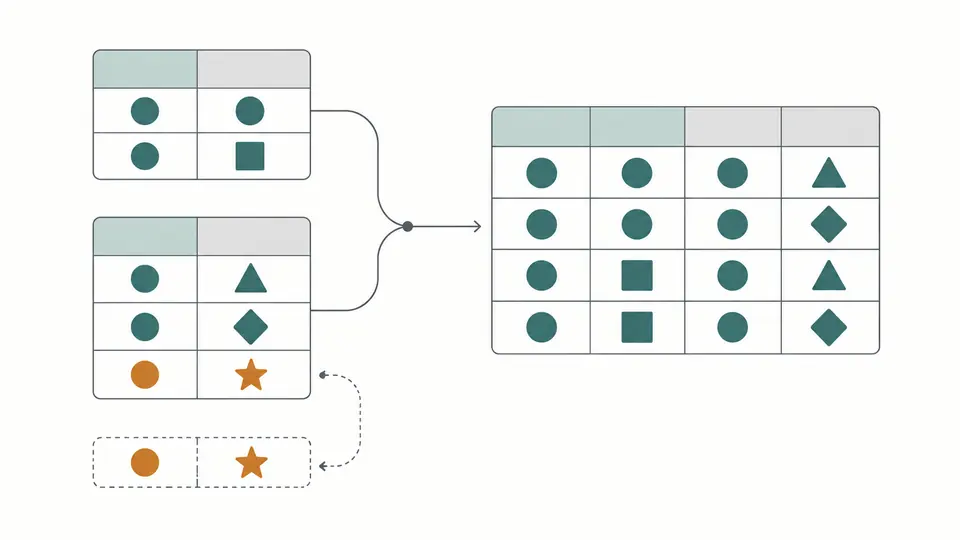
CSV join counts matches before constructing the output. Two rows sharing a key on the left and two on the right produce four combinations. Review that expansion and the unmatched counts before generating the file.

Two colored key groups connected into multiple matching rows, with unmatched records shown separately

Align records by their column names

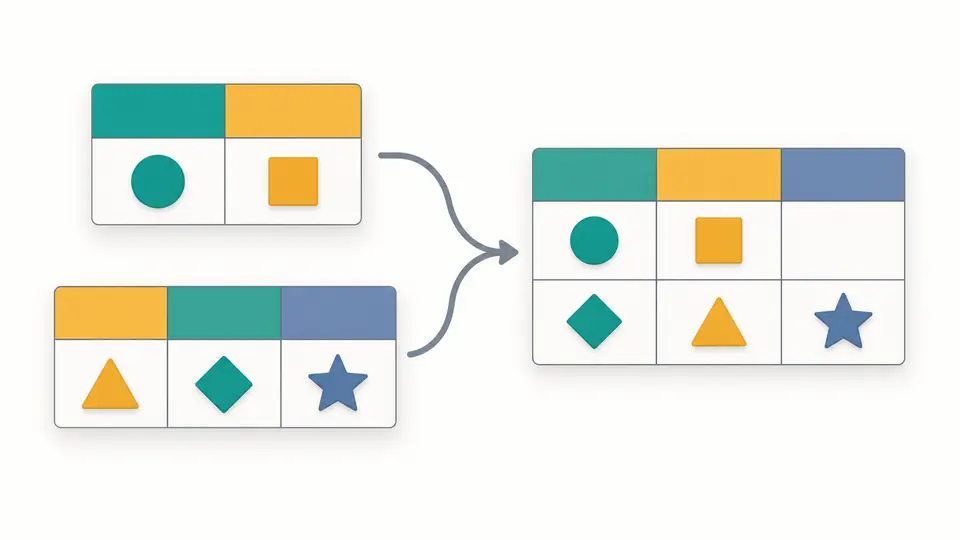
A regional export may put the amount before the account identifier. Append CSV records by matching header names, preserving the left table’s column order and adding names found only on the right. Missing fields become empty cells.

Two tables with different column orders stacked into aligned colored columns with empty cells for missing fields

Choose the relationship and check its size

01

Set a delimiter for each source

The left and right tables can use different delimiters. Both need one header record with unique, nonblank names. If automatic detection is uncertain, choose the separator explicitly before interpreting the column positions.

02

Build a complete key

To join CSV by key on account and date together, enter the corresponding column positions on each side, such as 1,3. Positions start at 1, and both lists need the same number of columns. Every paired component must match.

03

Review, then generate

Inspect the duplicate groups and unmatched source records in the estimate. Generate only after that review. Changing either table or any parameter expires both the estimate and result, so exports stay disabled until you run the stages again. The table shows 50 records at a time; copying and downloading include the complete result.

Match, preserve or stack records

Choose which records remain

Inner keeps matching combinations; left also keeps every unmatched left record. Full outer join adds unmatched records from the right too. A missing counterpart contributes empty cells, while each source’s own values remain available.

Keep every duplicate combination

Repeated keys are reported on both sides. Matching groups expand to all pairs rather than silently taking the first lookup row. Counts describe the relationship before rows are materialized, making accidental many-to-many joins easier to spot. Separate left and right unmatched CSV reports include original fields and a source-line column.

Control comparison without rewriting values

Whitespace trimming, case-insensitive comparison and empty-key matching are optional. They affect key comparison only. Output cells retain their original strings, including leading zeros and the spelling present in each source.

Preserve overlapping fields

For a join, shared column names receive left and right suffixes. Generated names avoid existing headers and use numeric additions when needed. Append instead treats equal header names as the same column and adds right-only columns at the end.

Input requirements and output boundaries

Headers must identify columns unambiguously
Both tables require one header record; blank, whitespace-only or repeated names are rejected. Invalid quoting and unequal record widths stop processing. There is no automatic CSV repair or multirow-header interpretation.
Identifiers remain text
The values 007 and 7 are different keys. Numbers, dates and booleans are never inferred. Empty key components do not match by default; enabling their comparison is an explicit choice. There is no fuzzy matching or aggregation.
Budgets cover the complete output
Each input allows 2 MiB of UTF-8, 2,000 records including its header and 100 columns. Output permits 100,000 data rows, 1,000,000 cells including the header and 8 MiB of serialized UTF-8. Exceeding any budget blocks generation without truncating records.
Both sources retain their identity
All left and right columns remain in a joined result, including both key columns. For a right-only record in full mode, left fields are empty and its right key remains in the right column. The tool does not fill a synthetic shared key.
One pair of pasted tables per operation
Paste two CSV or TSV texts. There is no XLSX, remote URL, batch chain or automatic deduplication. Joining leaves both sources intact; Example and Clear require a replacement preview and support one undo. Output uses comma-separated UTF-8 with CRLF record endings and may rewrite quoting. Formula-like fields are flagged but kept as text without neutralization. An exported result can be used as another input only if it fits the input limits.

CSV join questions

How do shared column names affect the joined file?

In join modes, both versions receive suffixes such as _left and _right. Numeric additions resolve further collisions with existing names. Neither value overwrites its counterpart. In append mode, identical header names identify one output column.

When should I append rows instead of joining on a key?

Use append for records of the same kind, such as monthly exports. Use a join to attach fields from another table by a shared identifier. Append needs no key selection and keeps repeated records rather than removing duplicates.

Can I combine a third CSV after joining two?

Each operation accepts two inputs. You can download a result and paste it alongside another table, provided that result fits the smaller input limits: 2 MiB, 2,000 records including the header and 100 columns.

Why do repeated keys produce additional rows?

Every left record is paired with every right record carrying the same key. A group of two and a group of three therefore produce six rows. The estimate exposes this multiplication; clean unexpected duplicates before joining again.

Can I combine files whose columns differ?

Yes. A join preserves columns from both tables with unique names. Append aligns equal header names and introduces columns found only on the right, filling missing values with empty cells. Both inputs still require unique, nonblank headers.

Did the matching counts differ from your expectation?

Check your next relationship

Try the CSV join example and compare the projected count with the relationship you expect before generating your own combined table.