CSV / TSV

CSV transposecheck the shape before exporting

Swap the entire grid, including the first row and first column. Choose how to display headings without removing values.

CSV transpose

CSV or TSV input

Each side: 1 MiB UTF-8, 1,000 rows, 1,000 columns; padded area ≤100,000 cells.

Transposed result

Cells are shown as literal strings. Heading view preserves the first row in exports.

No result yet.

Your table is processed in this browser; no input data is uploaded.

Options

Heading view changes only the preview. All cells remain in CSV/TSV; no header metadata is exported.

Paste a table to begin.

A monthly report may place dates across the top while the next chart expects them down the side. CSV transpose changes the orientation of the existing grid: the value at row 2, column 3 moves to row 3, column 2.

CSV rows to columns and CSV columns to rows are the same operation. This page keeps strings intact, so an identifier such as 007 stays 007 even when its position changes. It does not group repeated names or calculate a pivot table.

Why use CSV transpose

Keep labels attached to the right axis

CSV transpose includes the whole first row. Its cells become the first column, while the original first column becomes the top row. Mark that output row as headings in the table preview when it contains labels; the exported values remain identical in both heading modes.

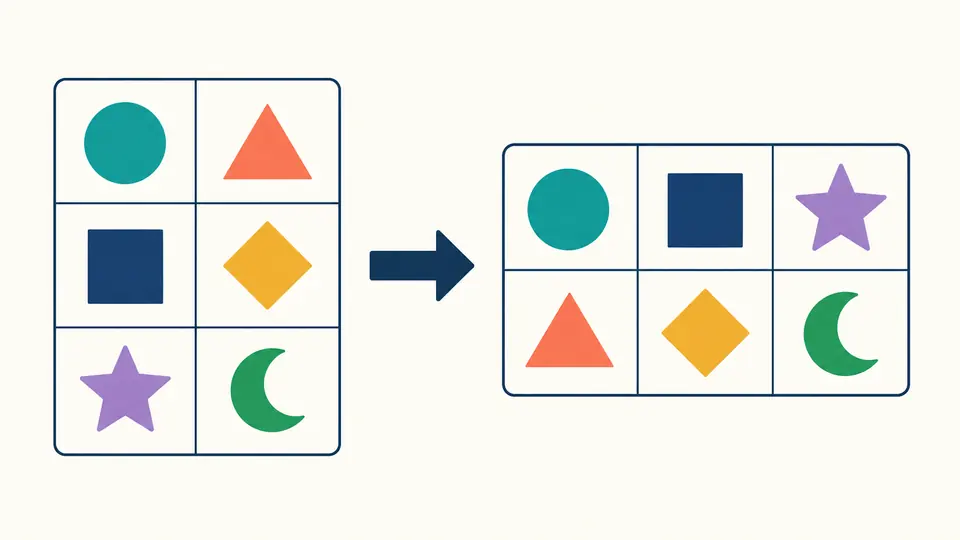
A three-row two-column grid becomes a two-row three-column grid, with matching colored cells preserving their positions across the diagonal

Expose missing positions before they spread

A short record must not pull later values into the wrong column. CSV transpose pads missing trailing positions with empty strings up to the widest record and reports how many were added. Use strict mode instead when unequal row lengths indicate a broken export that needs correction.

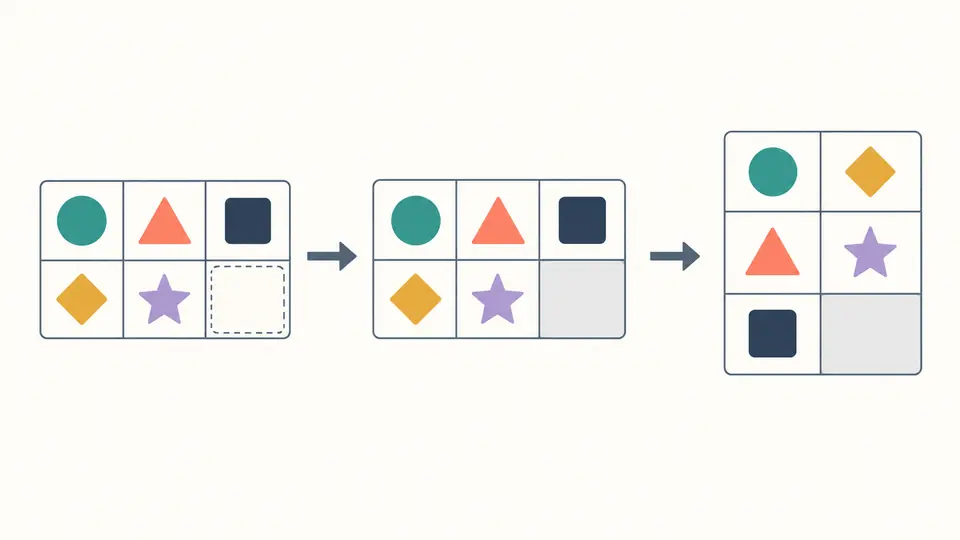
A short second row gains one outlined empty cell before the completed grid is transposed, keeping that empty position visible

Read the dimensions and choose the boundary

01

Choose both separators deliberately

Input and output delimiters are independent. Select tab for pasted spreadsheet cells, or semicolon for a regional export. The parser does not guess: a wrong separator can make the input look like a single column. Inspect the reported input dimensions before using the result.

02

Decide what an absent cell means

Padding adds only missing trailing cells; an existing empty string is left as it is. Strict mode rejects any record whose width differs from the widest record. A blank physical line is a one-cell record, while a newline inside quotes belongs to that cell.

03

Compare the complete shape

An input of 4 rows by 3 columns becomes 3 rows by 4 columns, including any headings. The preview grows by 50 rows or 20 columns, but exports always include the full result. Automatic processing waits 300 ms after edits; turn it off to run with the button or Ctrl/Cmd + Enter. Edits expire exports until processing succeeds again.

Preserve values while changing orientation

Two explicit heading views

Treat every output cell as data, or display the original first column as the new header row. Neither mode skips, renames or duplicates cells. Blank and repeated headings are allowed. CSV and TSV carry no header metadata, so the exported text is the same for both views.

Quoted fields remain single cells

Quoted delimiters, doubled double quotes and embedded CRLF or LF stay inside their original strings. Leading zeros, surrounding spaces and Unicode remain unchanged. Quote-all output is optional; fields that need quoting and empty fields are always quoted.

Produce CSV or TSV directly

Use comma, semicolon, pipe or tab independently on each side. To transpose TSV, choose tab as the input delimiter; tab output downloads as csv-transposed.tsv. Other separators download as csv-transposed.csv. UTF-8 output uses CRLF between records, without a BOM or final record terminator.

Reverse the orientation on a second pass

Copy the result back into the input and choose its delimiter to transpose again. With the same delimiter and quoting policy, the rectangular cell matrix returns to its original orientation. Padding remains as real empty cells; original quote choices and record terminators are not restored.

Capacity, parsing and excluded operations

The same limits on both axes
Input and output each allow at most 1 MiB of UTF-8 text, 1,000 records and 1,000 columns. The padded rectangle must contain at most 100,000 cells. These limits include headings and empty records. Output quoting can enlarge the text; any exceeded limit rejects the complete operation, never a truncated success.
Strict text syntax, no silent cleanup
Only double-quote CSV escaping is recognized. A quote inside an unquoted field, text after a closing quote, an unclosed quoted field or a NUL character is rejected. One leading unquoted BOM is treated as a document marker. A BOM inside a quoted first cell remains data. No trimming, comment filtering or blank-row deletion occurs.
A transpose is not an aggregation
There is no pivot, unpivot, grouping, arithmetic, formula evaluation, row sorting or cell editing. Prepare a selected subtable before pasting it. Excel workbooks and file uploads are not accepted; paste CSV or TSV text. Formula-like strings remain literal in the preview, but spreadsheet applications may evaluate them when imported.
Changes are reviewable
Transposition produces a separate result and never rewrites the input. Example and clear actions first show the replacement and character counts. Apply keeps one undo snapshot of input, options, automatic mode, result and errors. The example restores default options and enables automatic processing. Cancel leaves the current work intact.

CSV transpose questions

How can I turn rows into columns without Excel?

Paste delimited text and select its separator. The entire matrix is transposed locally. Check the input and output dimensions and the padding count, then copy or download the current result. No spreadsheet formulas or installed application are required.

What happens to the original header row?

It becomes the first output column, including its top-left cell. The original first column becomes the first output row. Choosing the heading view only marks that output row as table headings; it does not remove a record or add metadata to CSV.

Can records have different numbers of cells?

Yes, in the default padding mode. For a width of three, a one-cell record gains two empty trailing cells before the axes are swapped. Choose strict mode to receive an error instead. Existing empty cells and missing positions become indistinguishable once the padded file has been exported.

How large a table can I transpose?

Both directions allow up to 1,000 records and 1,000 columns, with a maximum rectangular area of 100,000 cells and 1 MiB each for input and output. A 1,000 by 100 table fits the shape limit; a 1,000 by 101 table does not. A large individual string or added quotes can still exceed the byte limit.

Does it work with tabs and semicolons?

Yes. Select comma, tab, semicolon or pipe for each side independently. Tab output produces TSV. Quoting follows the same rules for every delimiter, so a tab inside a quoted value remains part of that value instead of creating another column.

Found a case with the wrong cell positions?

Try CSV transpose on a small sample

Check one known value, the header positions and any added empty cells before exporting the complete result.