Hash & Crypto Helpers

Password hash generatorGenerate a record. Check a candidate.

Use a test password. Generate a salted record or switch to verification to check an existing one.

Password hash generator

Test password

Hash record

Test data only. Passwords stay in page/Worker memory; nothing is uploaded or saved to browser storage.

Options

Test default: cost 10; allowed 4–14. Work grows as 2^cost. This is not a production security preset.

Random: 16 new bytes per run. Fixed: bcrypt 16 bytes; others 8–64 bytes. Hex only, without spaces or 0x.

bcrypt and Argon2id use encoded strings. scrypt/PBKDF2 use HeyUtils JSON, not a universal framework format.

Enter a test password and run the selected operation.

A Password hash generator is useful when a test login fails after moving between libraries. Start with the stored record and a known test password: a different salt, work factor or byte sequence can explain a mismatch without changing the algorithm.

This page keeps generation and verification together. A generated record carries its salt and parameters; verifying it reads those values from the record. Changing the generation settings never overrides the cost embedded in an imported hash.

Why use this Password hash generator?

See what a fresh salt changes

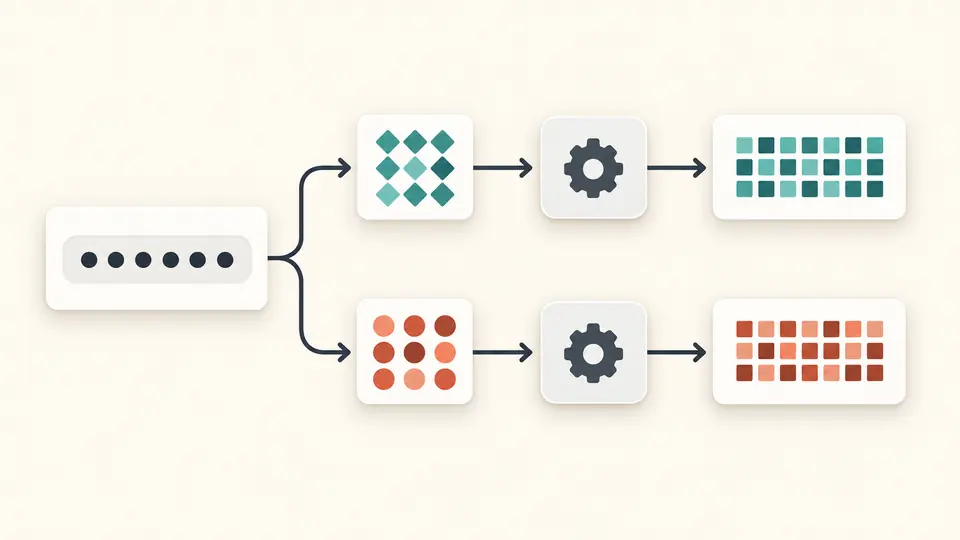
The Password hash generator draws a new 16-byte salt for each random-mode run. The same test password then produces different records. Switch to a fixed hexadecimal salt when you need a repeatable fixture to compare two implementations.

One masked test password branches through two different salt tokens into two different hash records.

Verify the whole record

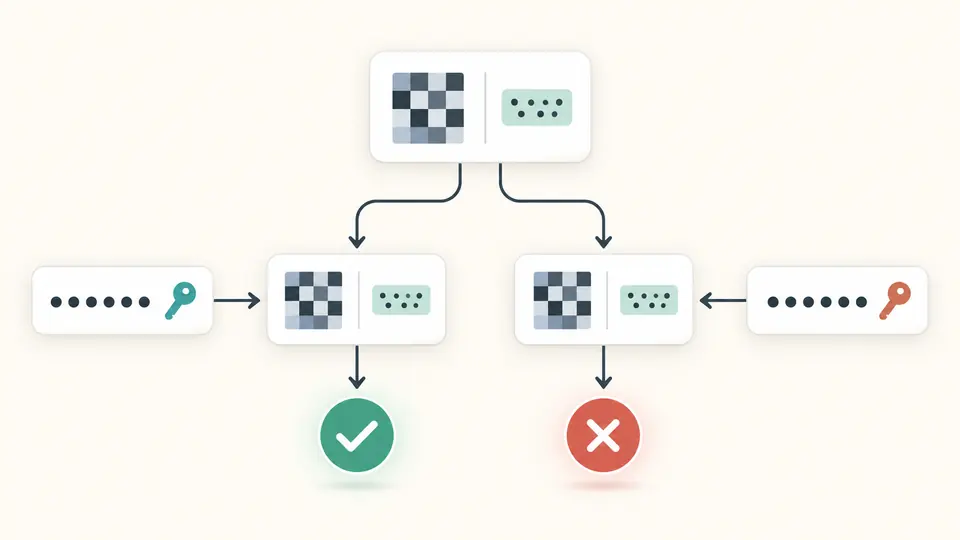
Matching checks the candidate against the salt and work parameters saved with the hash. A wrong password produces a completed mismatch result; a malformed or excessive-cost record produces an error before hashing starts. Those outcomes answer different debugging questions.

The same stored hash record is checked against two candidates, yielding a green check and a red cross.

Make a reproducible check

01

Start with the example record

Load the example and apply its replacement preview. It opens verification mode with a fictional password and a bcrypt record that should match. Change one character and verify again to observe the mismatch path.

  • The preview changes nothing until you apply it; undo restores the prior input and output together.
02

Choose when the salt should change

For a new fixture, switch to generation. Random mode creates a fresh salt on every run; fixed mode expects hexadecimal bytes, not a literal word. bcrypt requires exactly 16 bytes; other algorithms accept 8–64.

  • The result shows the actual salt in hexadecimal, so a random run can be reproduced later.
03

Read the result before exporting

Use Ctrl/Cmd + Enter to run the selected mode. Any input or option change cancels active work and makes the old result stale. Copy and download become available after a successful generation or matching verification.

  • Cancel stops the Worker; a task still running after 15 seconds is terminated.

Salt, work parameters and a verifiable record

Four real hashing engines

Use the bcrypt generator for a bcrypt fixture, scrypt for a memory-cost experiment, Argon2id for a version 19 PHC record, or PBKDF2-HMAC-SHA-256 for an iteration-based test. Each run computes one algorithm; this is not a simultaneous performance comparison.

Parameters travel with the result

bcrypt embeds its cost and salt; Argon2id includes memory, passes and parallelism. scrypt and PBKDF2 use a versioned HeyUtils JSON record with parameters, saltHex and hashHex. That keeps the inputs needed to verify a password hash beside the derived value.

Bounded work with measured duration

Cost validation runs before expensive computation. The result reports elapsed milliseconds for the current device, including engine loading when needed. Cancellation and the 15-second timeout keep a slow experiment from holding the page indefinitely; the measurement is not a server capacity estimate.

Accepted formats and deliberate limits

Password bytes remain significant
Use a nonempty single-line test password of at most 1,024 UTF-8 bytes. Spaces and Unicode normalization differences remain significant. bcrypt rejects more than 72 bytes instead of silently truncating; invalid Unicode and pasted line breaks are rejected.
Finite costs apply to imported hashes too
bcrypt cost is 4–14. scrypt uses ln 10–16 with r=8 and p=1. Argon2id permits 8–65,536 KiB, 1–6 passes and 1–4 lanes, with m≥8p and m×t≤131,072. PBKDF2 permits 1–1,000,000 iterations.
The record format is part of compatibility
Verification accepts bcrypt $2a$, $2b$ and $2y$, Argon2id v19 in m,t,p order, and this page’s scrypt/PBKDF2 JSON. It does not import arbitrary framework formats, Argon2i/d, v16, pepper or associated data. References are limited to 8,192 characters.
Salt and output sizes are explicit
Random salt is 16 bytes. Fixed salts are hex without prefixes or spaces: exactly 16 bytes for bcrypt, 8–64 otherwise. Generation uses a 32-byte derived value outside bcrypt; verification accepts 16–64-byte tags. PHC Base64 must be canonical and unpadded.
Use the numbers as test settings
No default is a production security recommendation. There is no cracking, password recovery, file import, bulk hashing or strength score. Clear and example replacement offer one undo snapshot, held in page memory until the next edit, run or departure.

Password hash generator: common questions

Which hashing function should I use?

Choose the scheme your test integration actually uses. This page supports four algorithms so you can reproduce that integration, but it does not select a production policy for you. The default bcrypt cost 10 is a convenient browser test setting. Production choices need the target library, deployment constraints and measurements under expected load.

Why won't my framework verify the hash?

Check the exact storage format as well as the algorithm. A framework may require its own prefixes, Base64 variant, prehashing or extra secret. This page supports only the listed bcrypt and Argon2id dialects. Its scrypt and PBKDF2 JSON records document a test calculation and are not ready-made Django or other framework password fields.

What salt length should I use?

Random mode uses 16 bytes for all four algorithms. Fixed mode requires 32 hex digits for bcrypt and 16–128 hex digits for the others. Keep the actual salt with the record; the salt is not the password. Reuse a fixed salt to reproduce a test, rather than treating that fixture as a production password-storage policy.

Can a bcrypt hash be decrypted back to the password?

No. Verification takes a candidate password and recomputes the hash under the stored parameters. It reports whether the result matches; it does not recover the original password. There is no decryption, dictionary search or batch-guessing operation in this tool.

Why does the same password produce a different hash every time?

Random mode creates a new salt for each run, and the salt changes the hash. Both records can still verify the same password because each stores its own salt. If a deterministic comparison is needed, use identical password bytes, a fixed salt and identical work parameters.

Still have a question?

Try the Password hash generator

Load the matching example in the Password hash generator, change one character, and compare the two verification outcomes.

A match checks a candidate; it does not rate password strength.