01
Copy the public line without its wrapper
Use the type, Base64 body and optional comment from a .pub file. Remove hostnames or authorization options yourself; a known_hosts line and a PEM block have different structures.
Hash & Crypto Helpers
Paste one OpenSSH public key, or add a second to compare. Never paste a private key.
Public keys only. Inputs stay in this page’s memory; nothing is uploaded or saved to browser storage.
Enter a public key to inspect.
A blank second field inspects one key. Fingerprint copy buttons use the first key; the JSON report contains both.
One OpenSSH line per field, up to 16,384 UTF-16 units. Structural inspection only; MD5 and DSA are for legacy records.
Enter a public key to inspect.
SSH key inspector helps when two public-key files have different names or comments and you need to know whether they contain the same key. The label at the end of a line is not part of its fingerprint.
Use this SSH public key parser to inspect a copied .pub line before checking a deployment inventory. A matching key identifies the same public bytes; it does not establish who controls the corresponding private key.
SSH key inspector decodes both inputs before comparing their complete wire blobs. An email address, a machine label or surrounding whitespace can change without changing the key. The example deliberately uses one public key with two comments.
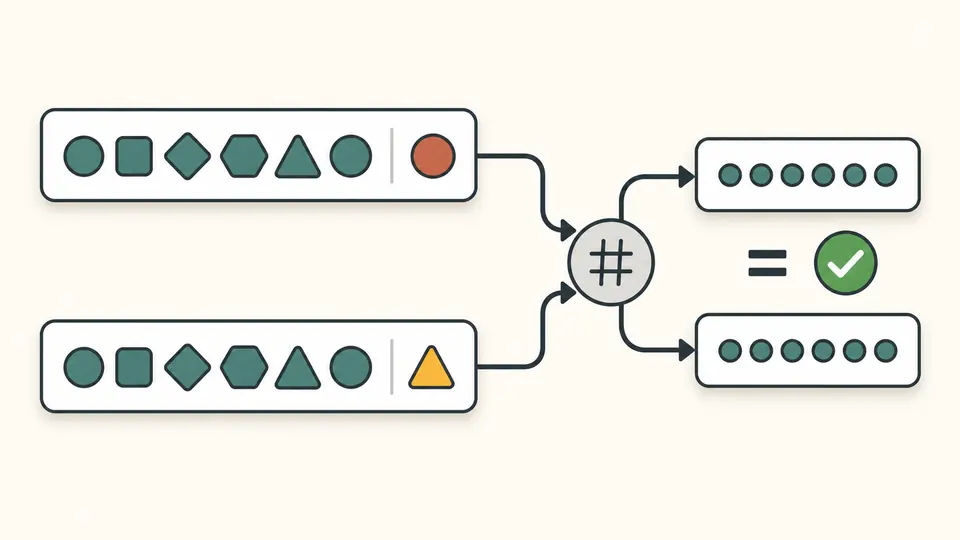
Base64 decoding alone cannot tell you whether a public key is complete. Length prefixes, internal type names and algorithm-specific fields are checked before any fingerprint is returned. A truncated blob produces an error rather than a plausible identifier.
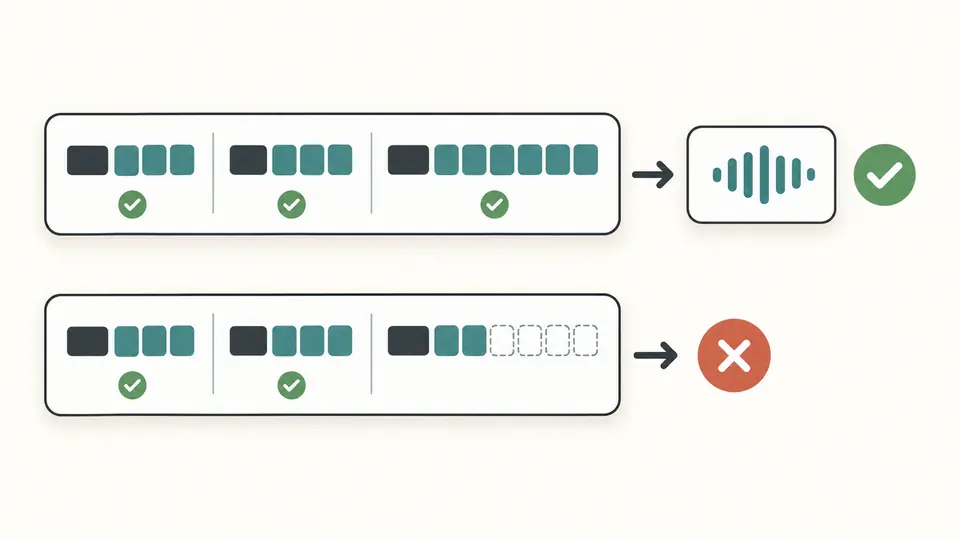
Use the type, Base64 body and optional comment from a .pub file. Remove hostnames or authorization options yourself; a known_hosts line and a PEM block have different structures.
Changing only the comment should still report a match. The SHA256 and MD5 copy buttons target the first key; the JSON report includes both keys and the comparison.
Automatic parsing waits 350 ms after an edit. Turn it off to use the button or Ctrl/Cmd+Enter. Old exports are disabled immediately; Example and Clear can be previewed, applied and undone once.
Inspect RSA exponent and modulus, Ed25519 public bytes, DSA p/q/g/y, or ECDSA curve and point. RSA length comes from the modulus; Ed25519 shows 256 encoded bits. Equal bit counts across algorithms do not imply equal security.
The SHA256 fingerprint uses standard Base64 without trailing padding. The MD5 fingerprint uses lowercase hex pairs separated by colons. Both hash the same SSH wire blob, not the visible line or its comment.
The JSON report includes type, bit length, comment, decoded byte count, parameters and fingerprints for each supplied key. The sameKey field is null for one key and a boolean for two, so absence is distinct from a mismatch.
Paste its single OpenSSH public line. The report displays both hashes. On your computer, ssh-keygen -lf key.pub produces the SHA256 fingerprint, while ssh-keygen -l -E md5 -f key.pub selects the legacy representation.
They are different hashes of the key, not two encodings of one digest. Obtain the public key and recompute the required hash. Compare SHA256 with SHA256 or MD5 with MD5; you cannot convert one fingerprint back into the other.
The public .pub line contains everything needed for inspection. This page refuses recognizable private-key containers before accepting pasted text. If you only have a private key, derive its public part on your own computer first.
It appears as a separate field. A missing comment is valid and shown explicitly. Comments are neither hashed nor compared, so changing the email address at the end cannot turn a matching public key into a different one.
Yes, for the supported ordinary OpenSSH public-key blobs. Hashing the file as text gives a different result. Cloud key-pair identifiers may use other serialized data or rules, so this report does not promise to match every cloud console.
Need another key format?
Start with SSH key inspector and its public example. Change a comment, then try a different public key to see which part actually controls the match.