
Hash & Crypto Helpers

AES-GCM encryption toolCheck bytes, nonce and tag

Use a raw 128-, 192- or 256-bit key. Encryption creates a new nonce; decryption requires the matching tag and any AAD.

AES-GCM encryption tool

Plaintext

Decrypted plaintext

Message and key stay in this page’s memory; nothing is uploaded or saved to browser storage.

Options

Mode: AES-GCM

Max 1 MiB input, 64 KiB AAD. Key 16/24/32 bytes; nonce 12 bytes; tag 16 bytes.

Enter a raw key; empty plaintext is allowed.

Use the AES-GCM encryption tool when two implementations produce different ciphertext or a received message fails authentication. Start with the actual key bytes, not a password that one service may derive differently.

This AES-GCM encryption tool keeps ciphertext, nonce and tag separate so you can compare each field with a protocol trace. It is an AES encrypt decrypt online check for one test message, not a key store or production protocol.

Why use this AES-GCM encryption tool?

See the fields that decide whether a message can be decrypted.

A fresh nonce changes the result

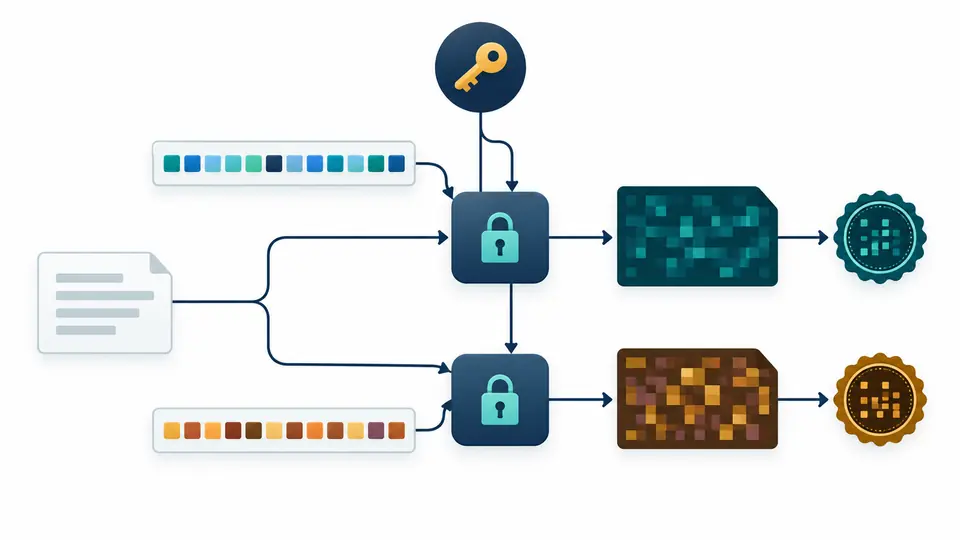
The AES-GCM encryption tool generates a new 12-byte nonce for every normal encryption. The same plaintext and key therefore lead to different ciphertext and authentication tags; both fields are shown separately.

One message and key feed two encryptions with different nonce patterns, ciphertext blocks and authentication seals.

A changed tag releases no plaintext

Alter a tag or use different AAD and authenticated decryption fails as a whole. The AES-GCM encryption tool never displays speculative partial plaintext after a failed check.

A tampered authentication seal stops ciphertext at a closed verification gate, with no plaintext card beyond it.

Match the bytes before comparing results

01

Decode the key deliberately

A 32-character Hex key is 16 bytes; the same characters as text would be 32 bytes. Choose Hex or standard Base64 and check for exactly 16, 24 or 32 decoded bytes.

  • The key field is raw bytes, not a passphrase or a PBKDF2 input.
02

Set the nonce and AAD

Normal encryption draws a new 12-byte nonce on every run. Switch to manual nonce only to reproduce an existing vector; decryption always needs the original nonce and exactly the same AAD.

  • Changing any input or encoding makes the visible result stale and disables copying.
03

Compare the independent fields

Load the NIST vector to test known ciphertext and a 128-bit tag. For an external message, paste ciphertext and tag separately; failed authentication identifies a mismatch without claiming which field caused it.

  • Ctrl/Cmd + Enter runs the current direction without changing the nonce policy.

Raw-key interoperability checks

Raw AES-128/192/256 keys

Key length is checked after Hex or Base64 decoding, never guessed from character count or silently padded.

Explicit byte encodings

Plaintext can be UTF-8 or Hex; ciphertext, nonce and tag can be Hex or Base64. An AES GCM authentication tag stays distinct from the ciphertext.

Known-answer vector

A NIST AES-128-GCM example loads exact test bytes and compares both ciphertext and tag, making an AES 256 encrypt decrypt online mismatch easier to isolate from presentation format.

Authentication and input boundaries

AES-GCM only
This page does not run CBC, CTR or ECB and does not invent a password-derived envelope. Match another system’s mode and packaging elsewhere before comparing bytes.
Nonce and tag have fixed sizes
The nonce is exactly 12 bytes and the tag exactly 16 bytes. An AES GCM IV length or missing tag error stops before decryption; manual nonce reuse with one key is unsafe.
No guesswork on encoding
Hex rejects prefixes, spaces and odd digits; Base64 rejects malformed characters. A valid but non-UTF-8 plaintext is preserved as Hex rather than changed into replacement characters.
One test message at a time
Decoded input is limited to 1 MiB and AAD to 64 KiB. This local test cannot establish that a production key lifecycle or nonce allocation is safe.

AES-GCM encryption tool questions

How long should an AES-GCM IV be?

This tool accepts a 12-byte nonce, the usual 96-bit GCM size. Keep it with the ciphertext and tag so the recipient can decrypt.

Can I reuse an AES-GCM IV with the same key?

No. Normal encryption generates a fresh random nonce on every run. Manual nonce input exists only to reproduce known vectors or existing test data.

What does an AES-GCM tag mismatch mean?

The key, nonce, AAD, ciphertext or tag may differ from the sender’s values. GCM cannot identify which one changed, and this page releases no plaintext after failure.

Can AES-GCM be decrypted without an authentication tag?

No. Supply the complete 16-byte tag alongside the ciphertext. This tool does not offer unauthenticated recovery or shorter tags.

Can I use this to encrypt and decrypt AES-256 online?

Yes, if you already have a 32-byte raw key and use AES-GCM with matching nonce, tag and AAD. Password-based containers from other sites are not interchangeable.

Still have a question?

Try the AES-GCM encryption tool

Load the public NIST vector, then replace it with your own test bytes. The AES-GCM encryption tool shows exactly which encoded fields must travel with the ciphertext.