Certificate diagnostics

Certificate chain checker

Paste a PEM bundle in any order. Check once, then choose a target certificate or a CA trust anchor if needed.

Certificate chain checker

PEM certificates

Processed locally. No certificate upload or AIA, OCSP or CRL requests.

Chain and report

Paste PEM certificates to begin.

Target and anchor

Run once to populate these lists. Select an input CA only if you intend to use it as this run’s anchor; then check again.

Up to 20 PEM certificates, 256 KiB input and 64 path results.

Paste PEM certificates to begin.

A certificate chain checker helps when a bundle looks complete but a client still reports an issuer error. A matching issuer name is only a candidate: the certificate must also verify against that issuer’s public key. Inspect the actual links before changing a deployment file, and keep trust decisions separate from sorting.

Why use this certificate chain checker

Names are candidates, signatures are evidence

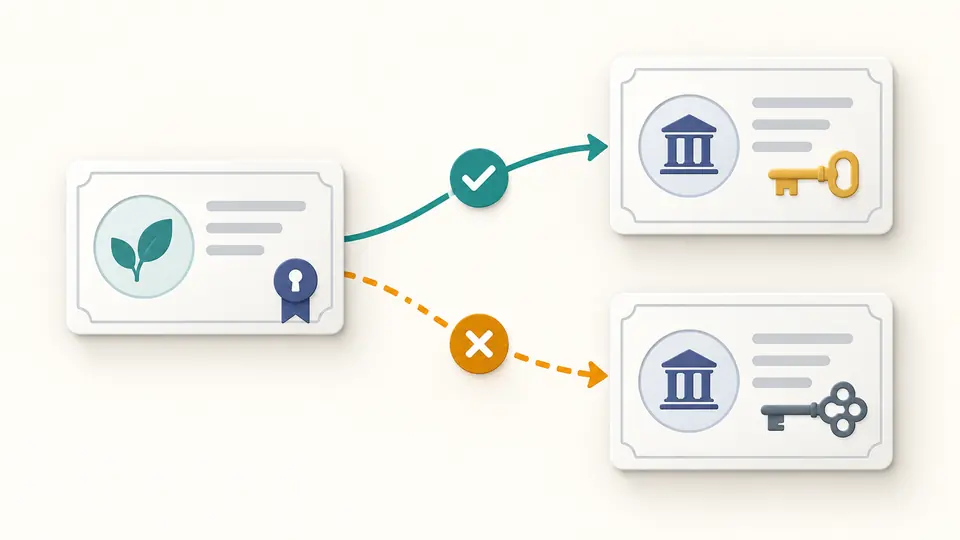
The certificate chain checker tests each matching issuer candidate cryptographically. Two certificates can have the same subject and different keys; the report preserves both a failed candidate and a verified link instead of joining boxes merely because their names match.

Two issuer cards share a shape, but only one connects to the leaf through a verified solid link.

Order and trust remain separate

A path runs from the selected target toward an issuer. A self-signed endpoint can complete that structure without being trusted. Choose a supplied CA explicitly when you want to see whether a path reaches your anchor; the initial setting makes no such assumption.

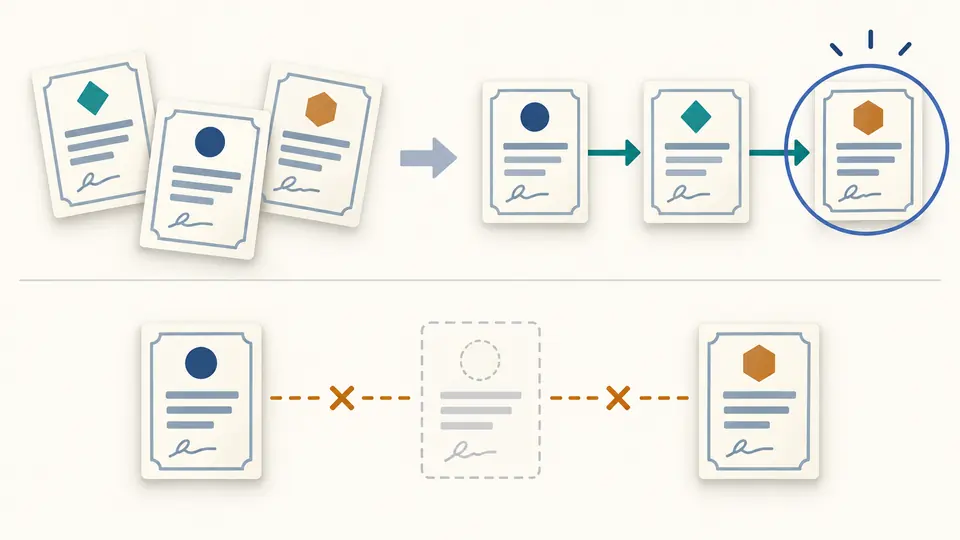
Shuffled certificate cards become a leaf-to-root path, with a gap and a separately highlighted anchor.

Read the gaps before replacing a bundle

01

Keep every certificate block

Paste complete BEGIN CERTIFICATE and END CERTIFICATE blocks, including intermediate certificates. The parser rejects private keys, other containers and leftover text. Original input numbers remain in the report even when the suggested order changes.

02

Inspect first, select second

The first run discovers the supplied certificates. If several end certificates are present, select the intended target below the panels and check again. A trust anchor is optional and must be an explicitly selected CA from that same input.

03

Read the ending and export state

A missing issuer is a gap in the supplied set, which may be an intermediate or an omitted root. JSON retains the diagnostic report; PEM export requires one complete, unambiguous path using all input certificates without reported defects. Editing anything requires another check.

What the report checks

Cryptographic links

Each name-matched candidate is tested using its public key. The report distinguishes verified, failed and unsupported verification, including self-signatures. Unsupported browser algorithms never receive a success mark.

Certificate identity

Inspect the subject, issuer, serial number, SHA-256 fingerprint and UTC validity interval for each original block. Duplicate detection uses the entire encoded certificate, so matching subject names alone do not make certificates duplicates.

Basic path diagnostics

The checker reports expiry, not-yet-valid dates, missing issuers, non-CA signers, certificate-signing key usage and path-length limits. Duplicate or unhandled critical extensions remain visible instead of becoming a silent assurance.

Explicit output decisions

Review PEM chain order without rewriting the editor. A JSON report includes every certificate, candidate link, path ending and diagnostic, plus explicit flags showing that revocation and system trust were not checked.

What this result does not establish

No issuer retrieval
A missing intermediate certificate must be obtained separately from the appropriate CA and pasted into the bundle. There are no AIA fetches, domain connections, OCSP requests or CRL downloads.
No automatic trust store
A root being self-signed does not make it trusted. Reaching the trust anchor means a signature path reaches the CA you chose for this run; it does not predict acceptance by browsers, operating systems or other clients.
A deliberately limited validation scope
Certificate signature verification and the listed field checks are not complete RFC 5280 validation. Name constraints, policy processing, application purpose, hostname matching and comprehensive algorithm-strength policy are outside this tool.
Ambiguity never silently discards input
Cross-signed alternatives, duplicates, unrelated certificates, reported defects or a missing endpoint block sorted PEM export. The original input is unchanged. A report can still be downloaded after a successful analysis to explain what prevented ordering.
Bounded PEM input
Accepts at most 20 CERTIFICATE blocks and 256 KiB of input. DER, PFX, PKCS#7, CSRs and private keys are rejected. Path exploration stops after 64 results and reports the limit; it does not choose a convenient branch.

Certificate chain checker FAQ

What does the error unable to get local issuer certificate mean?

It usually means the verifier cannot find a suitable issuer in the certificates or trust sources it has. This page can identify an absent issuer or a name-matched certificate whose signature fails, but it does not inspect your client’s trust store or fetch missing material.

Should fullchain.pem include the root certificate?

A server bundle normally contains the leaf followed by intermediates; the client normally already has a trusted root. This diagnostic tool may need a root to display a complete local path. Its ordered PEM includes every supplied certificate, including a root, and is not automatically a server-ready fullchain file.

Does this tool tell me whether a certificate is trusted?

No. With no selected anchor, even a complete self-signed path has no trust assumption. Selecting a CA lets you test reachability to that chosen endpoint. Browser trust, application policy and revocation remain separate checks.

Why does the certificate chain order matter?

Some consumers require the leaf first and its issuers after it. The checker can analyze a shuffled bundle, preserving source numbers so the proposed ordering is reviewable. Consumers differ, so verify the configuration requirements before deploying exported material.

Does chain validation check revocation?

Not here. OCSP and CRL status can change independently of the signed certificate. The JSON flags explicitly record that revocation was not checked; a completed local path is not evidence that a certificate has not been revoked.

Have a certificate-chain case to report?

Review the next bundle

Use the certificate chain checker again after adding missing issuer material or changing the selected anchor. Compare the new path with the report before replacing configuration.