01
Start with the right syntax
A lone tag goes in Language tag mode. For a copied HTTP value, switch to Accept-Language; it accepts an optional header name and keeps q parameters out of tag validation.
Unicode & i18n
Inspect one tag or switch to an Accept-Language header; the two inputs use different rules.
Parsing stays in this browser; input is not sent or saved.
Parsing…
IANA registry snapshot: …
Parsing…
A localization bug often starts with a small tag such as zh-Hant-TW. This BCP 47 language tag parser keeps the original string beside its fields, so a script is not mistaken for a region.
A BCP 47 validator checks syntax and the dated registry here. The language subtag lookup and locale code normalizer are visible in the result, while Accept-Language parser mode has its own q rules.
The BCP 47 language tag parser shows language, script, region, variants and extensions, then checks public subtags against the IANA snapshot. A browser may accept an unregistered region; the two verdicts remain distinct.

Accept-Language weights are displayed from highest q to lowest, with equal weights preserving input order. A zero weight remains visible as excluded; this is analysis, not a promise about a server response.
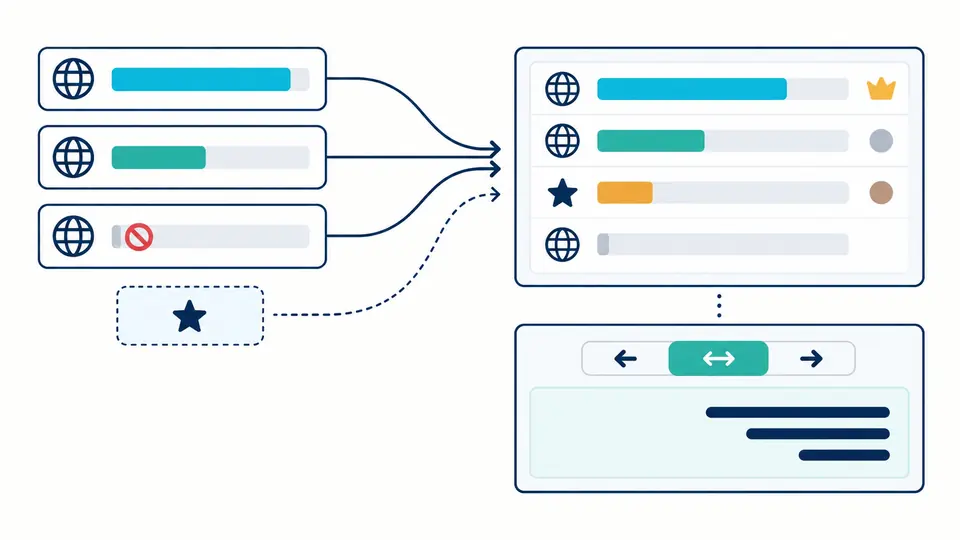
A lone tag goes in Language tag mode. For a copied HTTP value, switch to Accept-Language; it accepts an optional header name and keeps q parameters out of tag validation.
The suggested form changes casing and known deprecated codes, but never edits the input. Read both the structural parse and the dated IANA verdict; a private-use tag has no public subtag meaning.
Automatic parsing waits 350 ms after edits. Turn it off for Parse or Ctrl/Cmd+Enter. The RTL preview has its own auto, left-to-right and right-to-left choices because language alone cannot set base direction.
Language, extended language, script, region and variant each retain their code and registry description. Duplicate variants and extension singletons are flagged instead of disappearing during normalization.
The IANA File-Date is shown beside the result. Deprecated values suggest their preferred form, while the browser canonical form is identified separately so CLDR or ICU differences stay visible.
The Accept-Language parser gives omitted q a value of 1, accepts at most three decimals and keeps the wildcard distinct from a tag. q=0 is shown as not acceptable, not silently removed.
Use the shortest tag that identifies the content: language first, then script or region only when the distinction matters. This tool exposes the fields and registered subtags but cannot decide your product’s audience.
A header contains comma-separated language ranges such as en-GB and optional ;q=0.8 weights. Paste the value or the full Accept-Language line into Header mode; a single tag field does not accept q.
It gives that range a preference weight of 0.5 relative to ranges with higher q. It is not a probability; q=0 means not acceptable. Equal weights remain in their input order here.
No. A tag identifies language attributes, not the base direction of arbitrary mixed text. Use the independent preview direction switch; auto follows the first strong character in the preview.
BCP 47 is the language-tag format used by web lang values and many localization APIs. Use this parser when inspecting a tag’s parts, registry status or canonical suggestion, not to test whether an app has translations.
Found a tag we misread?
Keep the original value visible, compare its suggested form and IANA status, then inspect header weights or a separate RTL text preview when needed.